Open WebUI v0.13.1 Release: Coding Agents and Tether
Open WebUI released v0.13.1 on GitHub on November 8, 2026, and the headline change is a shift in what the model picker means. Where Open Terminal provides them, coding agents such as Claude Code, Codex and Pi now appear as models. A new desktop companion app, Tether, connects your own computer to the deployment, and a third tool permission mode called Auto lets a reviewer model clear low risk tool calls. The release also contains a security fix, and the release notes recommend updating every deployment as soon as possible.
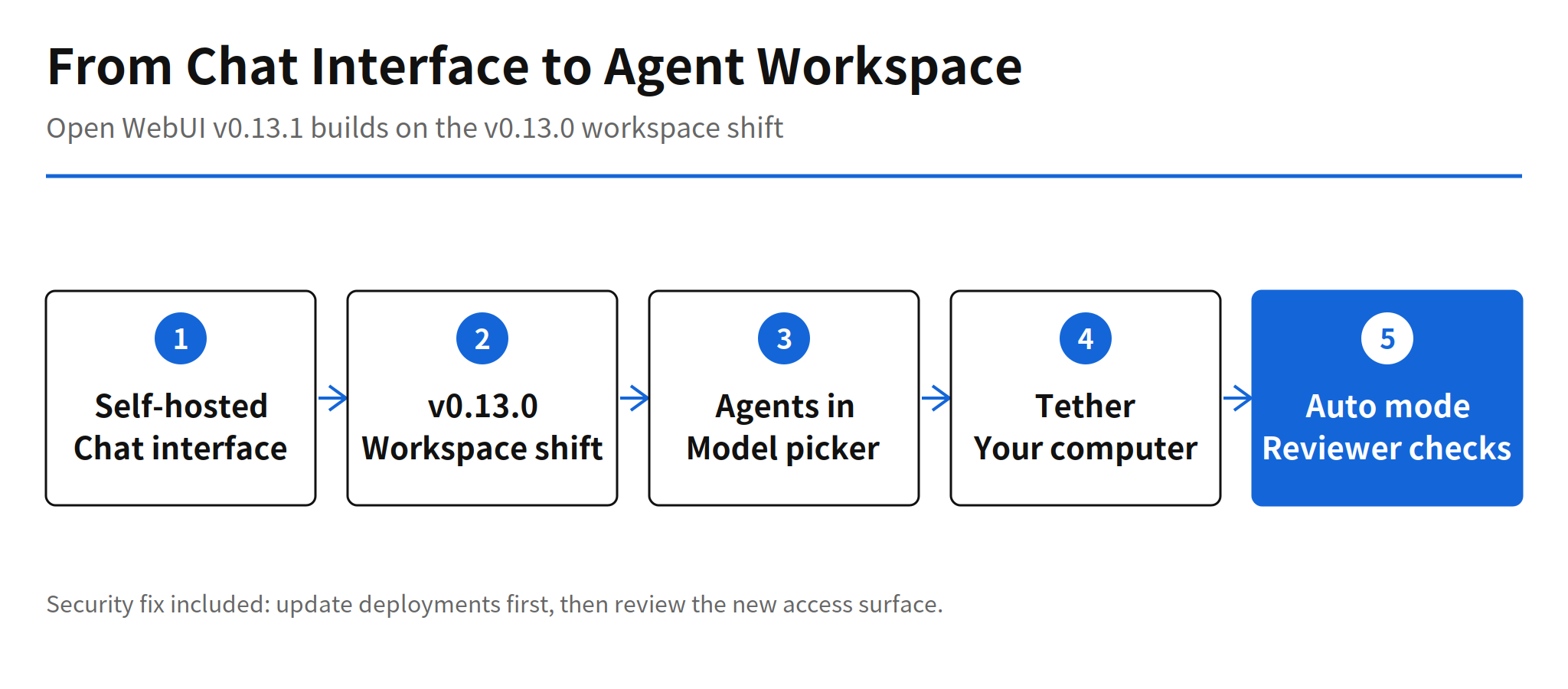
The context matters. Open WebUI started as a self-hosted chat interface for Ollama and OpenAI compatible APIs. Version 0.13.0, released on November 3, 2026, attached the desktop, the browser and Git to models and turned the product toward a workspace. Version 0.13.1 goes one step further: the coding agent itself becomes the conversation partner, and Tether extends the working surface to the machine on your desk. A follow-up release, v0.13.2, appeared the same day at 11:53:42 UTC, less than an hour after v0.13.1 at 11:07:53 UTC. The scope of the v0.13.2 changes has not been verified beyond the version and its timing.
Coding Agents in the Model Picker
The agent integration is deliberately narrow in one respect and broad in another. It is broad because an agent in the picker can be called by chat or by voice, with a selectable reasoning effort and service tier, and its tool requests are approved inside the chat. It is narrow because one conversation is bound to one agent. Agent chats cannot be regenerated, continued, or edited and resent. If the agent terminal disappears, the chat falls back to the default model, and earlier answers keep the agent name attached.
That trade reads as an honesty choice. A coding agent session has state that a plain model reply does not, and the interface refuses to pretend a regenerated answer came from the same run. For teams evaluating this release, the practical question is workflow fit: agent chats behave more like terminal sessions with a transcript than like ordinary chat threads, and habits built around regenerate and edit will not carry over.
Tether and Access to a Real Computer
Tether is a desktop companion app for macOS, Windows and Linux. You sign in once, and your computer appears under Your devices in the terminal menu. From there, models, coding agents and automations can work on your real files, repositories and tools, reachable from any browser, including a phone. The connection is outbound, so there are no ports to open. Terminal output continues when a connection drops, desktop notifications arrive even when the Open WebUI page is not open, and sessions expire after 90 days without use by default, under the setting name SESSION_EXPIRES_IN.
The convenience is also the risk. The access range Tether opens is, by design, your actual files and tools as a whole. Who can send work from which device depends on each deployment permission setup, and the release notes do not state those defaults separately. My read is that Tether should be reviewed the way a remote access tool is reviewed, not the way a chat feature is reviewed: device enrolment, session lifetime and per user permissions decide whether this is a productivity link or an open door.
Auto Tool Permissions and Prompt Caching
Auto is a third permission mode beside Full access and Ask for approval, and it is off by default. A reviewer model sends the tool, its arguments and a few recent messages to a scoring API, and only calls that need no check run right away. Calls the reviewer cannot assess, because of an error, a timeout or too much context, fall back to an approval request. The fallback direction is the right one: uncertainty routes back to a human. What the release notes do not provide is the reviewer accuracy, so an operator should test misjudged cases in their own environment before turning Auto on.
A quieter change sits underneath, in the cost structure of tool chats. Citation instructions, memory recall, skill lists and attached knowledge are no longer rewritten into the system prompt or the user message on every tool loop iteration. The early part of a conversation now stays stable across requests, so providers can serve it from a prompt cache. Small files get simpler treatment too: when extracted text is shorter than the default 50,000 character threshold, RAG_FULL_TEXT_CHAR_THRESHOLD, the full text goes into the conversation instead of a search step. Both changes point the same way, at token spend that bought nothing.
Performance Numbers and the Paste Test
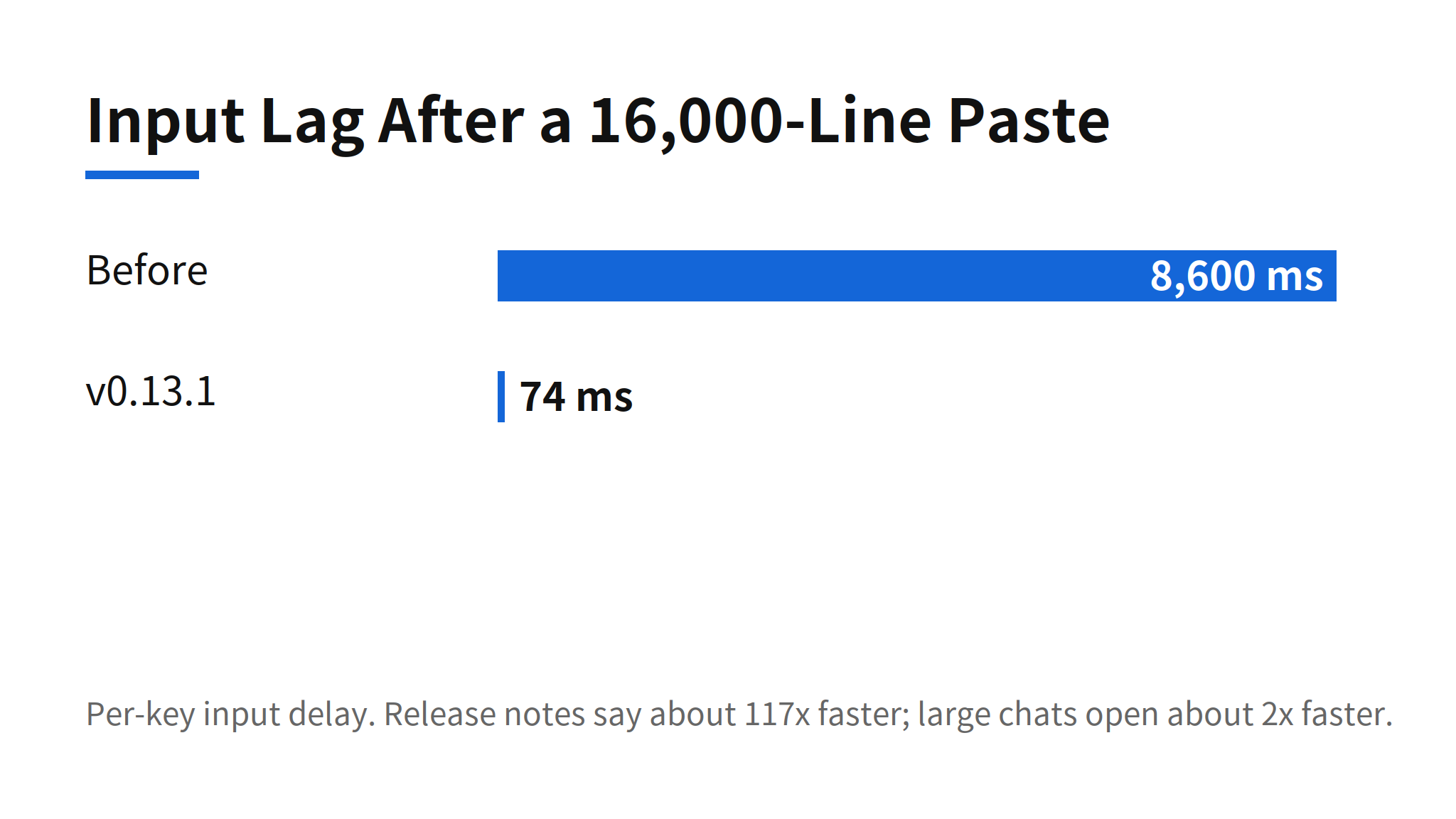
The release ships with measured numbers instead of adjectives. Large chats open about 2x faster. After pasting 16,000 lines, input lag fell from 8.6 seconds per key to 74 milliseconds, which the release notes describe as about 117x faster. Numbers like these are easy to check and hard to argue with, and they matter for the agent story: an interface that hosts long agent transcripts and large pasted code has to stay responsive at exactly the sizes agents produce.
Security Fix and Update Priority
The release contains a security fix, and the notes recommend that every deployment update as soon as possible. The fix details are not listed publicly. Open WebUI says the security advisory will be published right after a CVE is assigned. Until that advisory lands, operators cannot judge the exposure from the notes alone, which is precisely why the update comes before the feature review: the agents, Tether and Auto mode can be evaluated after the patched version is running.
For a self-hosted deployment, the order of work in this release is fixed by the vendor's own wording: update first, then decide how much of the new agent surface to open.
Open Questions and Deployment Risks
- Security fix details are undisclosed. Only the promise of an advisory after CVE assignment is public, so severity and affected configurations are unconfirmed.
- Auto reviewer accuracy is unpublished. Calls the reviewer passes run immediately, so the error rate of that judgement is an operator test item, not a release note fact.
- Tether access defaults are unstated. The reachable surface is the user's real files and tools, and the permission defaults per deployment are not spelled out in the notes.
- Version 0.13.2 scope is unverified. Its existence and release time on November 8, 2026 are confirmed; its change list has not been checked at the same depth.
None of that cancels the direction. The leading self-hosted interface has moved from chat screen to agent work surface: pick an agent the way you pick a model, point it at your own machine through Tether, and delegate part of the approval burden to a reviewer model. Teams running local models now hold that whole option set inside one screen, with the security update as the immediate action and the access review as the decision that follows it.
Related Reading
For another open-source take on running agents as a managed service, see the report on AMD PrimusClaw and its managed agent runtime. For cloud coding sessions with a similar workspace ambition, see Antigravity remote agents.
FAQ
What changed in Open WebUI v0.13.1?
Coding agents such as Claude Code, Codex and Pi now appear in the model picker where Open Terminal provides them. The release also adds Tether, a desktop companion app that connects your own computer, an Auto tool permission mode that is off by default, and a security fix.
What is Tether in Open WebUI?
Tether is a desktop companion app for macOS, Windows and Linux. After one sign-in, your computer appears under Your devices in the terminal menu, and models, coding agents and automations can work on your real files, repositories and tools from any browser. Sessions expire after 90 days without use by default.
How does the Auto tool permission mode work?
Auto is a third mode beside Full access and Ask for approval, and it is off by default. A reviewer model sends the tool, its arguments and a few recent messages to a scoring API, and calls that need no check run right away. Calls the reviewer cannot check, because of an error, a timeout or too much context, fall back to an approval request.
Should existing Open WebUI deployments update right away?
The release notes say yes. Version 0.13.1 contains a security fix and recommends updating every deployment as soon as possible. The fix details are not public yet, and Open WebUI says the advisory will follow once a CVE is assigned.