Antigravity Dynamic Workflows: How /run-workflow Works
Google has added Dynamic Workflows to Antigravity, its agent coding environment. The idea is simple to state and different in kind from most multi-agent features. Instead of letting a lead agent improvise coordination inside a long conversation, you type /run-workflow followed by a task, and the agent writes a short Python script that does the coordinating. The script runs other agents concurrently with parallel() or one after another with pipeline(), groups the work into named phases you can follow live, and collects a structured result from each agent.
That shift, from conversation to code as the control layer, is the whole story. A script can be read before it runs, rejected with instructions to adjust it, saved to a file in the project, and run again next week. A conversation transcript offers none of those properties. Google positions the feature for work that splits cleanly: the same review applied to every changed file, an audit per package, or staged steps such as writing a failing test first and then fixing the code until it passes. Dynamic Workflows are available in the Antigravity App and the Antigravity CLI on Google AI Pro and Google AI Ultra plans, with no separate price. They consume the plan's existing model credits.
How a workflow runs, step by step
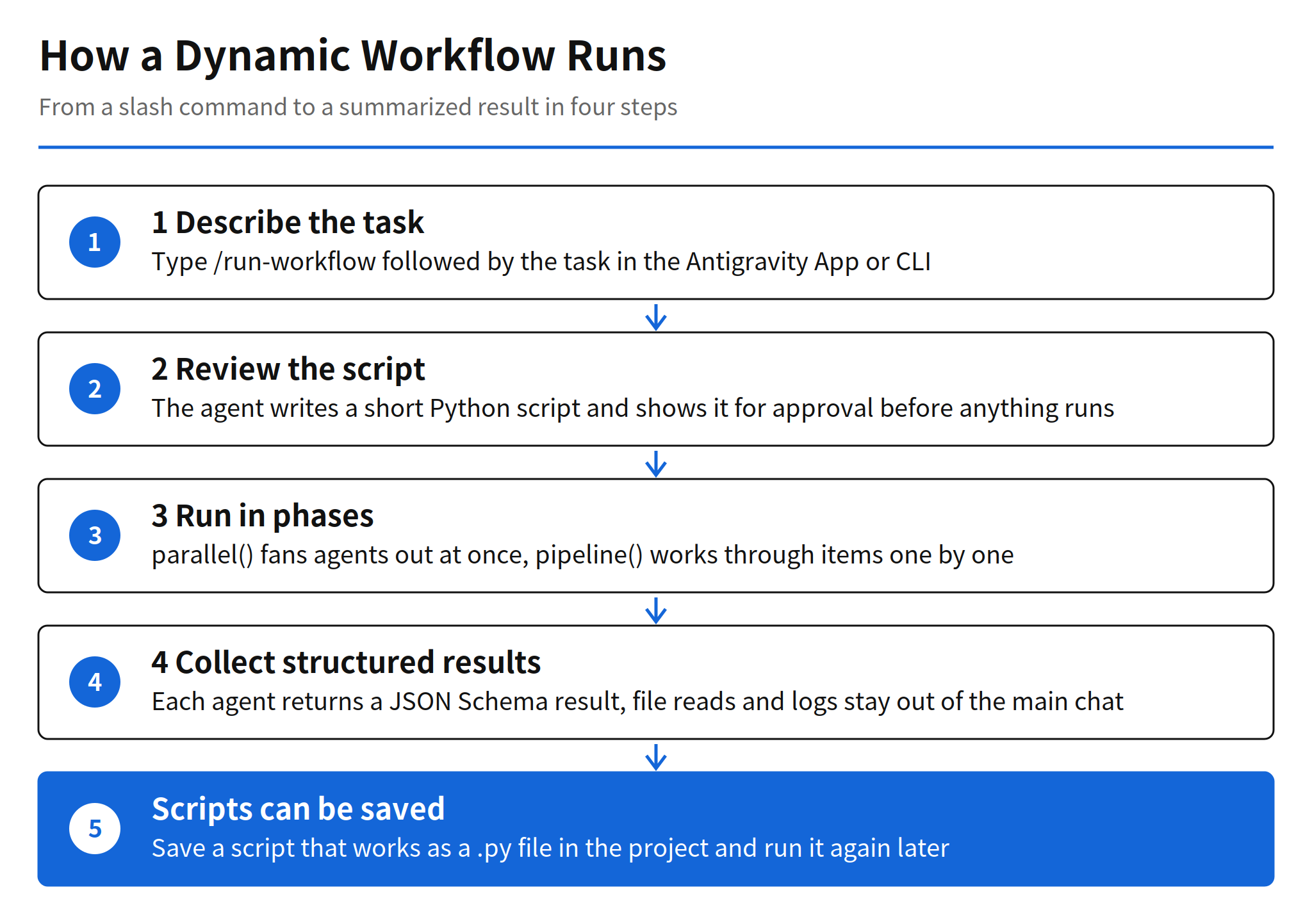
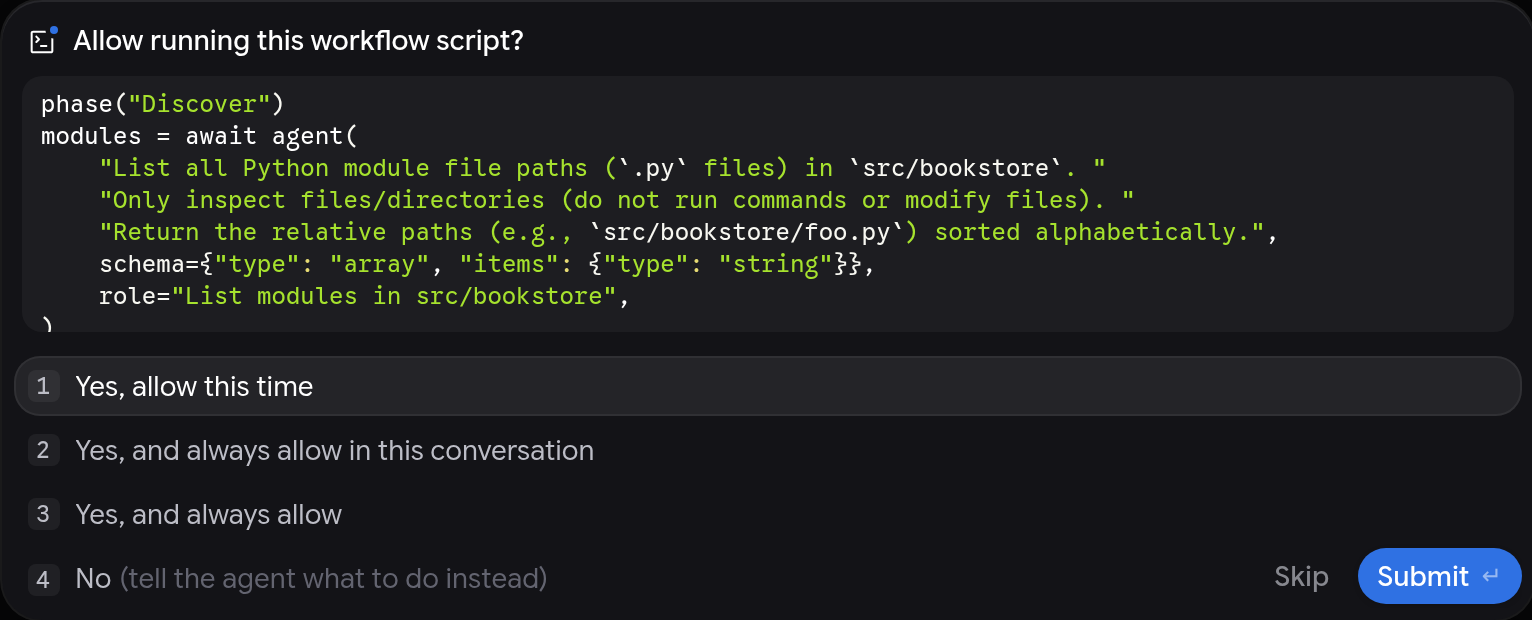
The sequence has four steps. First, the agent reads the built-in run-workflow skill and writes a Python script for your task. Second, Antigravity shows you the script in an Allow running this workflow script? prompt and waits for approval, unless your permission preset already allows it, with Turbo given as the example. Denying the prompt is the steering mechanism: you say no, tell the agent what to change, and it revises the script. Third, the approved workflow runs in the background in a separate process, so you can keep working in the same conversation. Fourth, when the script finishes, the main agent receives the workflow logs and output and summarizes the results for you.
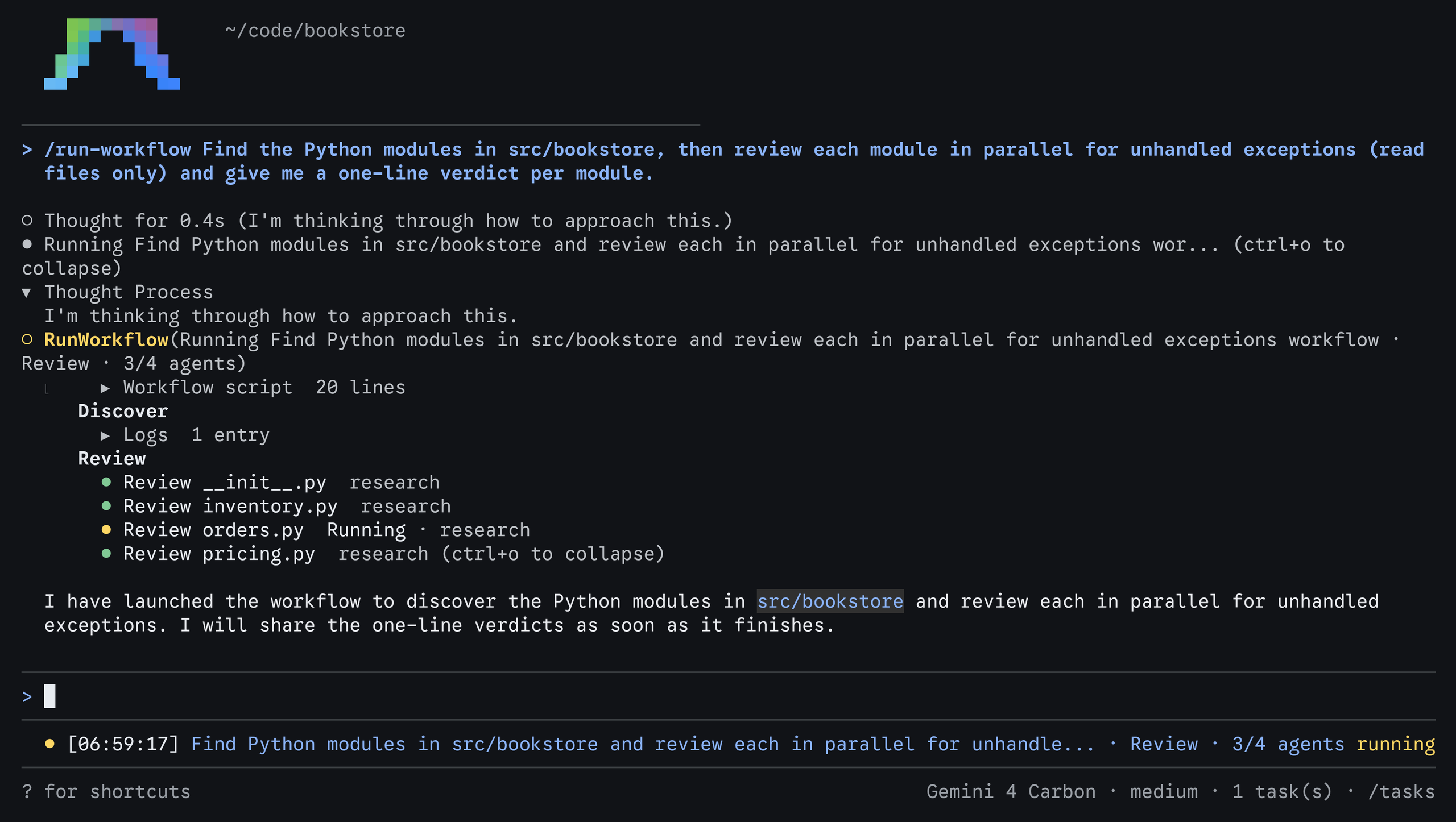
While it runs, the workflow appears as a single step in your conversation, titled with its description, the current phase, and how many of its agents have finished, for example workflow, Review, 3/4 agents. Expanding the step shows the script itself, one section per named phase, the log lines for each phase, a card for every agent with its role and state, and anything the script printed. Clicking an agent card opens that agent's own conversation in the side panel, where you can read its prompt, watch its tool calls, answer its pending approval requests, or send it a message. Workflow agents do not appear in your main conversation list. Stopping the parent conversation stops every running workflow agent with it.
The script building blocks
You do not need to write Python to use the feature, because the agent writes the script. Knowing the building blocks still helps, since the script is what you approve, and since you can ask for specific options in your prompt. The vocabulary is small: six functions and values cover the whole model.
| Building block | What it does |
|---|---|
| phase(name) | Starts a named phase. Later logs, tool calls and agent cards are grouped under it. |
| log(*args) | Adds a line to the current phase and to the result the main agent receives. |
| agent(prompt, schema, role, type_name, workspace, model) | Defines an agent. Awaiting it runs one turn and returns the result. Keeping the handle and calling it again continues the same conversation across turns. |
| parallel(items, fn) | Runs fn(item) for every item at the same time and returns results in item order. If one item fails, the others are canceled. |
| pipeline(items, fn) | Runs fn(item) for one item at a time and returns results in item order. |
| await trajectory(...) | Returns earlier steps of the current conversation, optionally filtered, so a script can build on work already done. |
Two details in this design do real work. The first is the schema. Each agent returns its result through a finish tool that validates the value against the JSON Schema the script declared, and the script receives the parsed value. That is what makes the output of a dozen agents composable instead of a pile of prose the main agent has to reinterpret. The second is isolation. Agents started by a workflow are full agents with their own conversations, and they see neither the script nor each other. The script therefore has to give each agent everything it needs inside its prompt and ask for a short, well-defined result. File reads, searches and test logs stay inside those side conversations, which keeps the main conversation context clean during high-volume jobs. That context hygiene is arguably the most practical benefit for everyday use, because a review of forty files no longer costs forty files of context in the chat you are actually talking to.
phase("Discover")
files = await agent(
    "List the Python files changed since main. Paths only.",
    schema={"type": "array", "items": {"type": "string"}},
)

phase("Review")
# parallel() runs one agent per file at the same time.
reviews = await parallel(
    files,
    lambda f: agent(
        f"Review {f} for unhandled exceptions. Reply with a one-line verdict.",
        schema={"type": "string"},
        role=f"Review {f}",
        model="flash",
    ),
)
for r in reviews:
    log(r)
The example above is the pattern Google documents for a parallel review. A single discovery agent produces the file list as a typed array, then the Review phase fans out one agent per file, each pinned to the lighter flash model tier and each returning a one-line string verdict. The shape generalizes: discovery, fan-out, then a reduction step that logs or summarizes. Anything that fits that shape is a good workflow candidate, and anything that needs agents to negotiate with each other mid-task is not, a boundary Google draws explicitly in its own comparison table.
Work patterns the feature is built for
Google documents four example prompts, and together they map the intended territory better than the feature description does. The first is the parallel review above. The second is a review, fix and verify loop: a persistent Reviewer agent lists the bugs in a directory, one Fixer agent per bug works in parallel, and then the same Reviewer, which kept its notes across phases, confirms that every bug it found is fixed. That loop is only possible because an agent handle can survive across phases, so single-use agents and multi-turn agents can be mixed in one script.
The third pattern is parallel editing in isolated workspaces. For each package in a repository, one agent replaces a deprecated helper, runs the package tests, and logs a diff summary and the test result, with each agent working in its own branch workspace. The fourth pattern is deliberately sequential: process a bug list one item at a time, where for each bug one agent writes a failing pytest test and a second agent fixes the code until the new test passes. The docs recommend the sequential form when items touch shared files or shared test suites, which is an honest admission that parallelism is a tool for independent work, not a default to apply everywhere.
Model, agent type and workspace controls
Each agent call in a script can be tuned, and these options are where cost and safety are actually managed. The model option defaults to inheriting the conversation model. The docs suggest asking for a lighter tier, flash_lite or flash, for fast, high-volume checks across many files, and pro for deeper reasoning. If a tier is not available on your plan, the agent fails with the list of valid choices. The type_name option defaults to self, meaning the current agent configuration and tools. It can instead select the built-in research agent, which is read-only and suited to codebase research, or the name of one of your own custom subagents.
The workspace option decides how much damage parallel agents can do to each other. The default, inherit, uses your current workspace. The branch option gives each agent its own isolated Git worktree, which is the right choice when agents edit code at the same time. The share option gives each agent a new working copy that shares the underlying repository storage. For read-only fan-out such as reviews and audits, the default is fine. For parallel editing, branch isolation is close to mandatory, because two agents editing the same files in one working tree will overwrite each other in ways no merge step can reliably untangle afterwards.
Permissions and the limits of unattended runs
Approval works at two levels, and the second level is the one that limits how hands-off a workflow can be. At the script level, Antigravity asks you to approve each workflow script before it runs, unless your permission preset already allows it. You can allow a script once, for the rest of the conversation, or always, and an approval covers that exact script. A command prefix rule cannot cover a Python script, so there is no broad pre-authorization shortcut for arbitrary generated code. That is a sensible line: the script is the unit of trust, and it is shown to you in full.
At the agent level, each agent a workflow starts follows your permission preset and asks for approval inside its own conversation, then waits until you answer. A wide fan-out can therefore produce a queue of pending requests across many agent cards, and the run is only as unattended as your preset allows. Combined with the cancellation rule for parallel(), the failure model is strict in both directions. Approvals can stall a workflow, and a single failing item cancels the rest of a parallel phase rather than letting the phase finish with partial results. Teams adopting this should design scripts accordingly: keep parallel phases to work where all-or-nothing is acceptable, and use pipeline() or smaller phases where partial progress has value.
Plans, credits and runtime details
Dynamic Workflows are included with Google AI Pro and Google AI Ultra and carry no separate price. They consume the plan's existing model credits, according to AlphaSignal's coverage of the launch, which means model selection is the main control over cost. A workflow that fans out to one agent per file across a large branch can trigger many model calls in minutes, and the difference between running those calls on a flash tier and on a pro tier is the difference between a cheap audit and a noticeable credit bill. The docs give no per-workflow credit estimates, so the first runs on a new repository should be treated as calibration.
On the runtime side, the workflow executes in a separate process using the Python runtime bundled with Antigravity, so no local Python installation is required. Developers who need a different interpreter can set the ANTIGRAVITY_PYTHON environment variable, per AlphaSignal. Reuse is a file operation: ask the agent to save a script that works to a .py file in your workspace, then run it later with a prompt such as /run-workflow Run scripts/review-changes.py. Antigravity asks you to approve the script each time it runs, unless you have chosen to always allow it, so a saved workflow stays reviewable even after it becomes routine.
How it differs from Orchestrator, subagents and agent teams
Antigravity already had several ways to split work across agents, and Google's own comparison is unusually clear about when each one applies. The Orchestrator is a single conversation where a frontier planner model plans and reviews while routing routine tool execution to a lighter model. Subagents delegate one self-contained task, such as a research question or a build, while you keep working. /swarm puts peer agents on a shared message board so they can split a feature or a bug bash and coordinate directly. /boost applies deep reasoning with independent verification to one hard problem. /teamwork assembles a collaborative team for a large, multi-milestone project, starting with a scoping interview.
Dynamic Workflows are the entry on that list where the agents do not talk to each other at all. Google states the rule directly: if your agents need to coordinate while they work, for example to agree on interfaces or review each other's diffs on a shared message board, use /swarm instead. The contrast with the coordinator style used elsewhere, including the Claude Code Projects approach covered in issue #3976, is sharp. A coordinator model decides the next step as results arrive, which adapts well and audits poorly. A workflow script decides everything up front, which audits well and adapts only where the script itself branches on structured results. Neither is strictly better. The script wins when the procedure is known in advance and worth freezing, which describes most recurring review, audit and migration work in a real codebase.
Limits and unanswered questions
Three limits are documented rather than hidden. A failing item cancels the rest of a parallel() phase. Workflow agents wait for permission approvals in their own conversations, so fully unattended execution is not the default behavior. And an approval covers one exact script, so small prompt changes that regenerate the script also regenerate the approval step. Beyond those, the open questions are about evidence. Google has published no failure rates, completion rates or cost measurements for workflows on large repositories, and no independent measurements were available at the time of writing. Those numbers are unconfirmed, and they are the numbers that decide whether fan-out reviews stay reliable at fifty files rather than five.
My read is that the durable idea here is not the fan-out itself, since every major coding agent now offers some form of parallel subagents. The durable idea is making the orchestration a reviewable, savable artifact. A team can put a workflow script in version control next to the code it reviews, argue about it in a pull request, and run the identical procedure next month. That turns agent coordination from a prompting habit into an engineering asset, and it is a standard other tools will likely be measured against.
Related articles
- Google Opens Antigravity /teamwork: Proofs and Rust Gains, the collaborative team mode in the same product
- Claude Code Projects Update: Proactive Coordinator Guide, the coordinator approach that Dynamic Workflows invert
- Self-Hosted Claude Managed Agents: Pricing and How It Works, on running managed agents on your own infrastructure
FAQ
What are Dynamic Workflows in Google Antigravity?
Dynamic Workflows are a way to coordinate many coding agents with code instead of conversation. When you run /run-workflow with a task, the agent writes a short Python script that runs other agents in parallel or in sequence, grouped into named phases, and collects structured results from each one.
How do you start a Dynamic Workflow?
In the Antigravity App or CLI, type /run-workflow followed by the task, or ask for a workflow in your own words. Antigravity shows the generated Python script and asks you to approve it before it runs, unless your permission preset already allows it. The workflow then runs in the background while you keep working.
What is the difference between parallel() and pipeline() in a workflow script?
parallel() runs one agent for every item at the same time and returns the results in item order. If one item fails, the others are canceled. pipeline() runs one item at a time, which suits work that touches shared files or shared test suites.
Which plans include Dynamic Workflows and what do they cost?
Dynamic Workflows are available in the Antigravity App and CLI on Google AI Pro and Google AI Ultra plans. They have no separate price and consume the plan's existing model credits, so a workflow that fans out to many agents can use credits quickly.