Claude Code Projects Update: Proactive Coordinator Guide
Anthropic announced a Claude Code Projects update on November 13, 2026 through the official @ClaudeDevs account. The headline change is behavioral, not cosmetic. The coordinator that runs a project is now, in Anthropic's wording, much more proactive: it answers questions directly in the project chat and it reports progress from running threads first, before the user goes looking for it.
That reverses the default flow of parallel agent work. Without a coordinator, the user assigns the tasks, then polls each session to find out which one finished, which one is stuck, and which one needs an answer. In a project, one long conversation holds the stream of work, Claude splits it into threads, and the coordinator brings the status back to that conversation. The work itself is unchanged. The checking cost is what this update attacks.
The November 13 coordinator update
The published demo shows the pattern in one request. A user asks the project to work through a checkout backlog: add rate limiting to the checkout API, fix a flaky cart total test, and upgrade a date library. The coordinator starts one thread for each task and says it will report back in the chat when something is ready or when it needs the user. Three independent jobs run at once, and the user reads one conversation instead of three session logs.
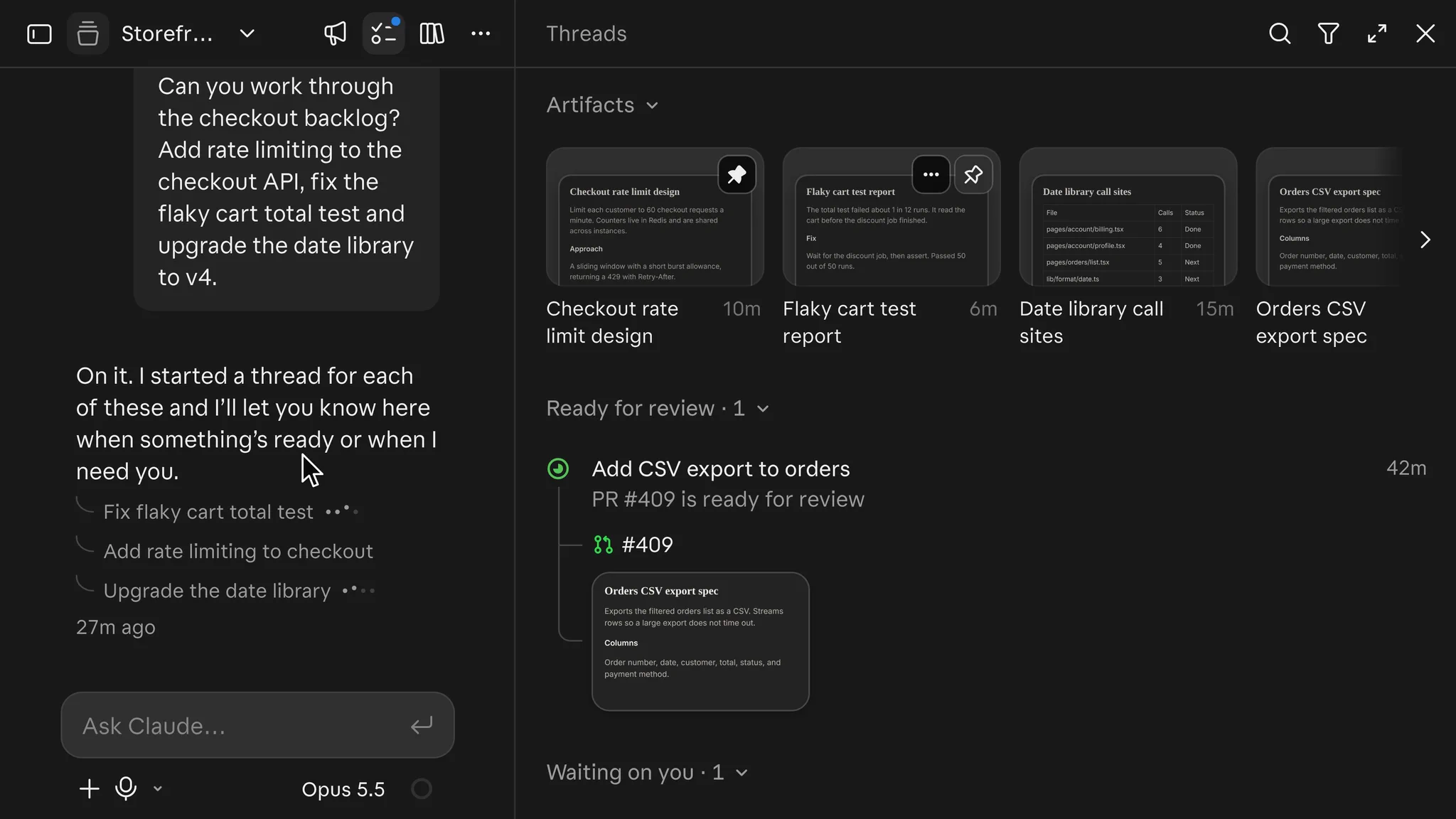
Secondary coverage of the update adds smaller tools around that core. AlphaSignal reported a /btw command that moves a side question into its own thread so it does not derail the current one, and a /fork command that branches a new thread from the current thread to try a different approach. The same coverage described reminders on threads and a row at the top of the thread panel that collects recently opened, updated, or pinned artifacts. Those details came from launch coverage rather than the official documentation page, and the limits section below keeps that distinction visible.
A separate desktop app announcement on the same day added custom themes. The Daily Fledgling reported that the two announcements together passed 9,000 likes overnight. That figure is a social signal from one newsletter, not an adoption metric, and it should be read as interest rather than usage.
How a project is organized
The official documentation defines a project as one coordinating conversation plus the threads it starts. The conversation is a long running session where Claude acts as coordinator: it takes what the user sends, decides what becomes a thread, and tracks every thread it started. It sees what threads report back, not every step they take, which is why the proactive reporting matters. If the coordinator only knows thread reports, a coordinator that waits silently leaves the user with no signal at all.
Each thread is a separate session with its own context window. A cloud thread works on its own branch and opens a pull request when the work calls for one. Every cloud thread starts with the same base: the project repositories and files, the project instructions and memory, the CLAUDE.md file in each repository, the connectors on the user account, and a cloud environment that sets network access, variables, and installed tools. Cloud threads do not pick up skills, settings, or MCP configuration from the user local Claude Code setup, and the documentation explains how to supply those separately.
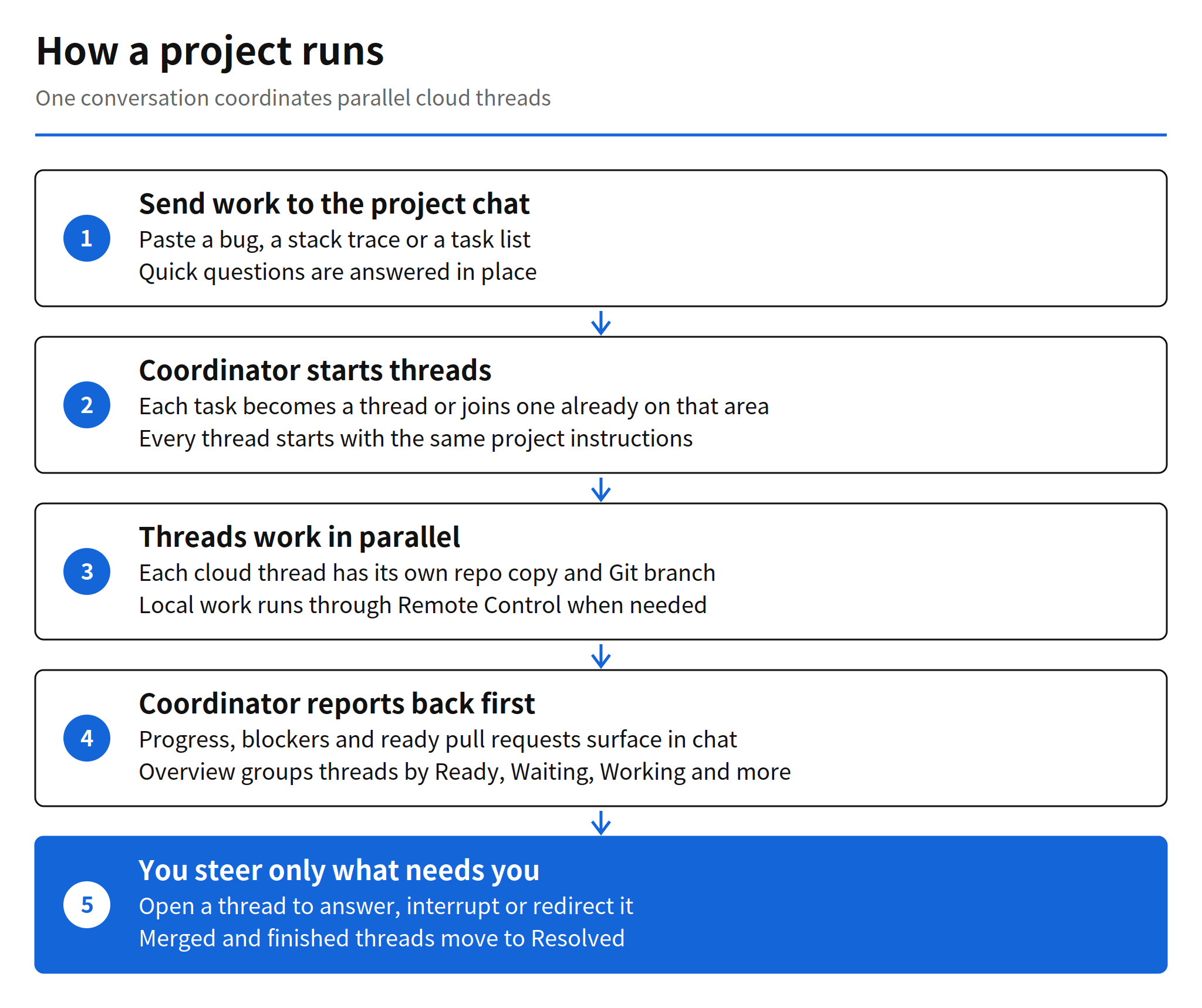
The Overview pane is the tracking surface beside the conversation. It groups threads into Ready for review, Waiting on you, Working, Landing, Idle, and Resolved. Files that threads produce collect in the project Library. In the desktop app, a notification appears by default when Claude posts in the conversation, a thread hits an error, or a thread needs input. In a browser, a dot on the Threads button carries the same signal.
Starting a project in practice
Projects live at claude.ai/code, in the Code tab of the desktop app, and in the latest Claude mobile app. The documentation lists three prerequisites worth checking before the first batch of work. The account needs a plan where Projects appears in the sidebar, directly or under More. Code work needs repositories on github.com with push access and the Claude GitHub App installed, because a token from the terminal web setup flow is not enough for project cloud threads. Work that needs extra domains, secrets, tools, or an MCP server needs those set up in the project cloud environment or the account connectors first.
A new project can start from scratch in the New project dialog, where only the name is required, or from an existing cloud session through Continue in project. The documentation advises a specific first batch sequence: write project instructions first, send one small piece of real work and inspect how the thread reports back, then check the thread model and effort settings. A new project runs every thread on Opus at high effort by default, which draws on plan limits fastest, so that settings check is a cost control rather than a formality. The user can also tell the coordinator to propose threads and wait for a go ahead, or to run only a few threads at a time, and lift those limits after a few threads come back correctly.
Threads that need something only the user computer has, such as a local database or a device emulator, can run on that computer through Remote Control instead of in the cloud. Cloud threads keep going after the laptop closes. A thread on the user computer runs only while that computer is awake, which is the trade to keep in mind when a long job is assigned locally.
Usage, plans, and the thread limit
Projects draw on the same plan limits as other Claude Code sessions, and they draw faster, because each running thread is a full session and several can run at once. A thread watching a pull request also wakes up and uses the plan again when CI fails or a review comment arrives. A project with no running threads, no watched pull requests, and no new messages uses nothing while it sits idle. Usage credits, if the account has them turned on, are the only way work goes past plan limits, and a thread cannot turn them on by itself.
On plan availability, the sources do not fully agree, and the gap is worth stating plainly. Coverage of the November 13 update reported a public beta on Pro and Max, with everyone else on a waitlist. The current official documentation lists the public beta on Pro, Max, and Ultra, rolling out gradually, starting with accounts that have used cloud sessions. Both sources agree that Team and Enterprise plans do not have Projects yet.
The thread limit shows the same pattern. Launch coverage reported 200 new threads per day per account across all projects. The current documentation states an enforced limit of 500 new threads per day across projects. The documentation was still being updated after the announcement, so the 500 figure is the safer planning number, and the 200 figure belongs in the record as what was reported on launch day.
What changes for parallel coding work
The practical shift is where coordination labor sits. Multi session coding already existed through cloud sessions, worktrees, subagents, and agent teams, and the documentation is explicit that running sessions in parallel is not by itself what a project is for. A project differs in who does the coordinating. Claude starts and tracks the sessions, each session starts from the same instructions, and the coordinator now reports first. For a codebase split into modules, such as an Android app with separate feature areas, that maps well to file level parallel work: one thread per module, one conversation to read.
The limits of that model are structural. Two threads that touch the same code still surface as an ordinary Git merge conflict, because the coordinator does not remove dependency conflicts between threads. A project also belongs to one user, and its threads belong to the one project that started them. Threads cannot be moved between projects, and two projects cannot be merged. Parallel capacity is real, but it is not shared capacity, and it is not free of integration cost at the end.
Limits and unverified points
Four points should stay attached to this story. First, the /btw, /fork, reminder, and thread sharing details come from secondary coverage, mainly AlphaSignal, and the official documentation page checked for this article does not describe them. The sharing claim needs particular care: coverage reported that individual threads can be shared as read only links to signed in Claude users, while the documentation limitations section says a project and its threads cannot be shared with another user. Those two statements conflict, so thread sharing is unverified here.
Second, Projects are not available in the terminal CLI, the VS Code extension, or the JetBrains plugin, and not through Amazon Bedrock, Google Cloud Agent Platform, or Microsoft Foundry. Third, a cloud thread sandbox pauses between turns, and if it cannot be resumed the thread continues from a fresh clone, so uncommitted changes can be lost; the documentation advises asking Claude to commit and push work in progress on long tasks. Fourth, there are no organization level controls for projects during the beta, which matters for any team considering this as shared infrastructure rather than a personal tool.
The narrower verified core is still a meaningful change. A coordinator that answers in place and reports progress first removes the polling loop that made parallel agents expensive to supervise. Whether that holds up in daily use depends on report quality, which no announcement can prove. The first small batch test the documentation recommends is the right way to find out, because it measures the coordinator on real work before the thread count grows.
Related articles
- Self-Hosted Claude Managed Agents: Pricing and How It Works
- Claude Code v2.1.323 Release: Code Mode and 1M Context
FAQ
What changed in Claude Code Projects on November 13, 2026?
Anthropic said the project coordinator became much more proactive. It now answers questions directly in the project chat and reports progress from running threads first, instead of waiting for the user to check each thread.
What is a thread in a Claude Code project?
A thread is a separate Claude Code session that does one piece of work. A cloud thread works on its own copy of the repositories and its own Git branch, and it reports back to the project conversation when it finishes.
Which plans include Claude Code Projects?
Coverage of the November 13 update reported a public beta on Pro and Max, with a waitlist for everyone else. The current official documentation lists public beta on Pro, Max and Ultra, and says Projects are not offered on Team or Enterprise plans yet.
How many new threads can a project start per day?
Coverage at announcement time reported a limit of 200 new threads per day per account across all projects. The current official documentation states an enforced limit of 500 new threads per day across projects, so the documentation figure is the one to plan against.