Claude Cage Release: Isolated VM, 3,181 Stars in 11 Days
Claude Cage, published by Lee-xeo on GitHub, is a lightweight virtual machine built for one job: running Claude in an environment isolated from the host. The repository was created on October 31, 2026 and reached 3,181 stars and 352 forks in 11 days, about 289 stars a day. It is written in Go and released under the MIT license.
General agent sandboxes already exist, and so do plain virtual machines. Cage is narrower and more opinionated than either. It bundles the network routing, the fingerprint settings, the browser sign-in flow, and the Claude Code process itself into one desktop program tuned for Claude, then adds multi-account management, mobile handoff, and remote deployment on top. That packaging, rather than any single isolation trick, is what the star count is reacting to.
Isolation Built Around Claude
The network setup is isolated from the host, and Cage takes over and proxies all traffic generated inside the environment. The fingerprint setup is isolated as well, covering settings such as timezone and language, with an option to sync those settings automatically to the proxy IP. The adaptation covers the full Claude workflow, from browser login and authorization through to the Claude Code process.
The safety mechanism is a built-in network and isolation check. When a critical check fails, or the evidence is incomplete, the environment stays offline instead of falling back to a direct connection. The README is explicit on that point: if the proxy is unavailable, there is no direct-connection fallback. That design choice matters more than the isolation claims themselves, because it turns a leak from a silent failure into a visible stop.
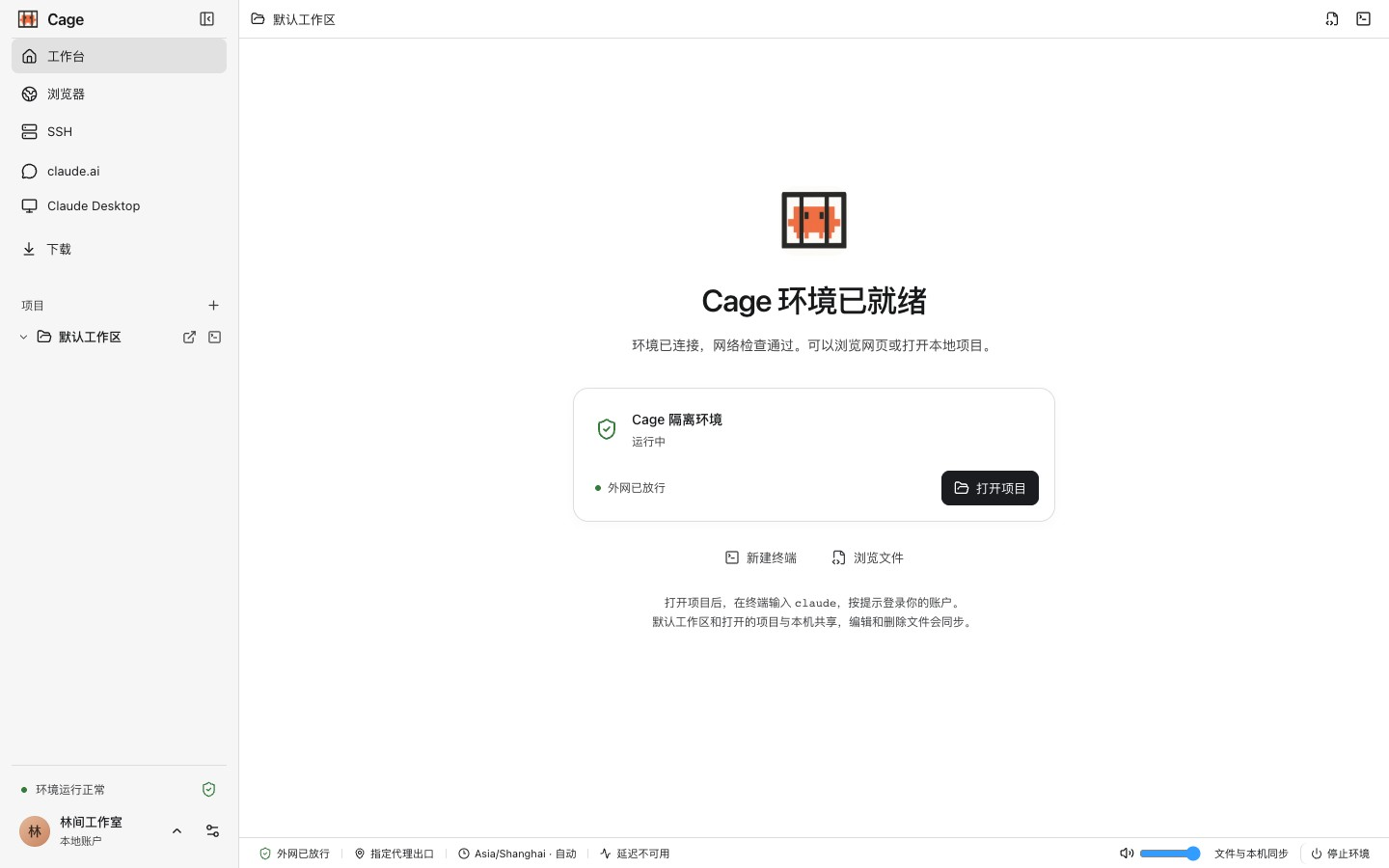
Sharing is scoped in the same spirit. Only the default workspace and project folders the user explicitly opens are shared with the guest. The host's Claude login, browser profile, and SSH keys are not imported automatically. Edits inside a shared project do hit the real files on the host, including deletions and Git operations, so the documentation tells users to rely on version control or backups and to check commit results.
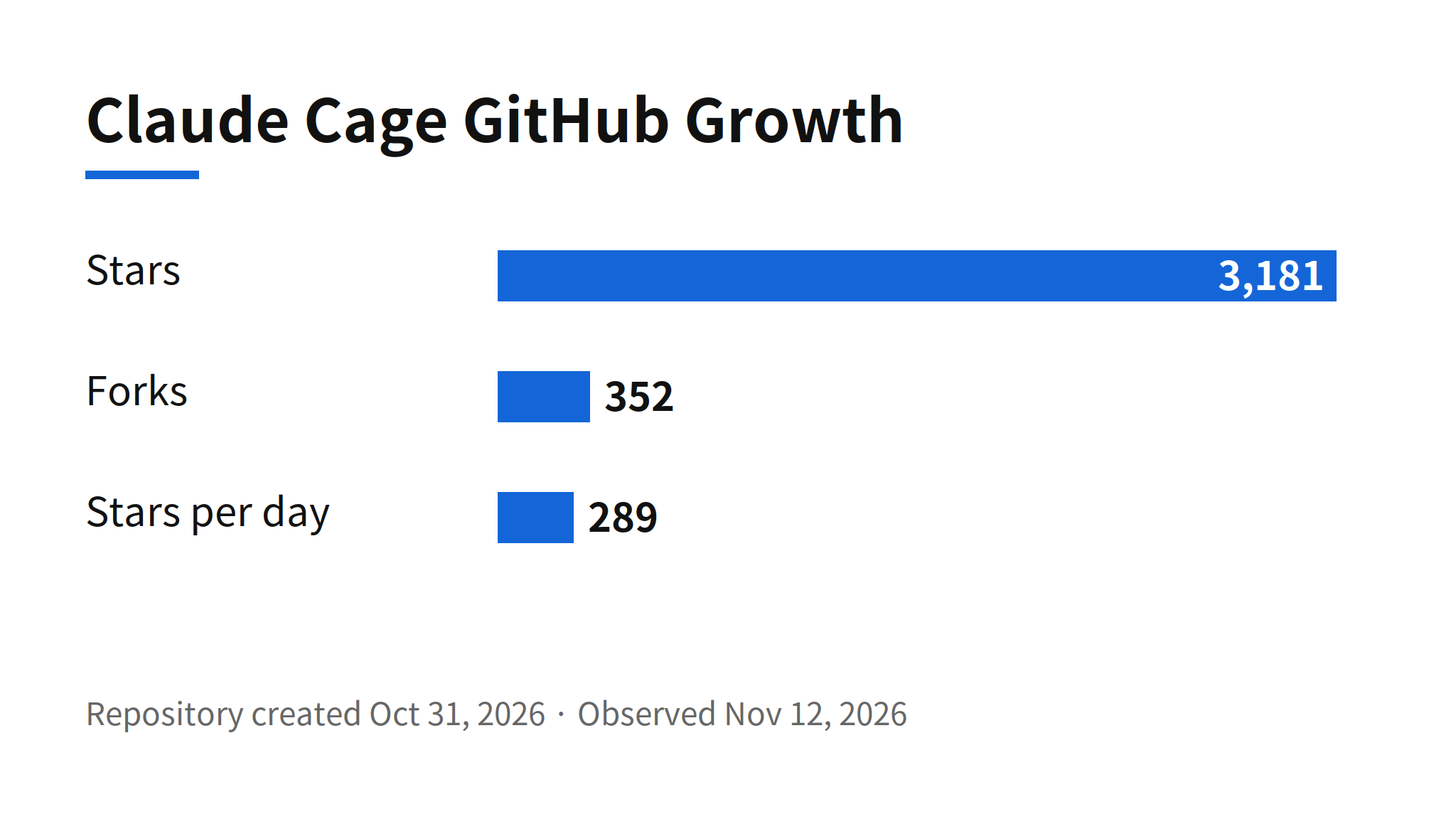
The growth numbers deserve a measured reading. Stars show curiosity, and a tool that promises relief from account anxiety will attract clicks from people who never install it. The 352 forks are the more practical signal, since forking a desktop VM project usually means someone intends to build or modify it. Even so, neither number verifies the central claim. No independent test of the leak prevention has been published, and the claim of completely preventing network leaks remains the maker's own description.
Platform Support and Network Limits
| Area | What the README states |
|---|---|
| Hosts | macOS 14 or later on Apple Silicon, Windows 10 22H2 or Windows 11 on x64, Debian 12 or Ubuntu 22.04 or 24.04 on x86_64 |
| Guests | macOS, Windows, or a lightweight Linux environment, with an option to auto-match the host system version and download the official image |
| Not supported yet | Intel Macs, Windows ARM64, and Linux ARM64 |
| Windows guest caveat | A Windows 11 guest needs a Windows 11 Pro, Enterprise, or Education host with Hyper-V support; other supported Windows hosts can run Debian or Ubuntu 22.04 guests |
| Default outbound network | IPv4 TCP, with DNS going through the same proxy; public UDP, IPv6, ICMP, and direct host or LAN access are restricted |
| Project isolation | Projects in one Cage configuration share the same guest system, tools, accounts, and file system; projects are not isolated from each other |
These limits are the honest part of the pitch. A reader who needs UDP, IPv6, or per-project isolation will find Cage the wrong tool today, and the documentation says so up front instead of burying it. The Tailscale support cuts the other way: signing in to Tailscale inside Cage lets the environment reach devices on a private network over SSH, web, and other TCP services, which is how a locked-down guest stays useful for real work.
Setup in Three Steps
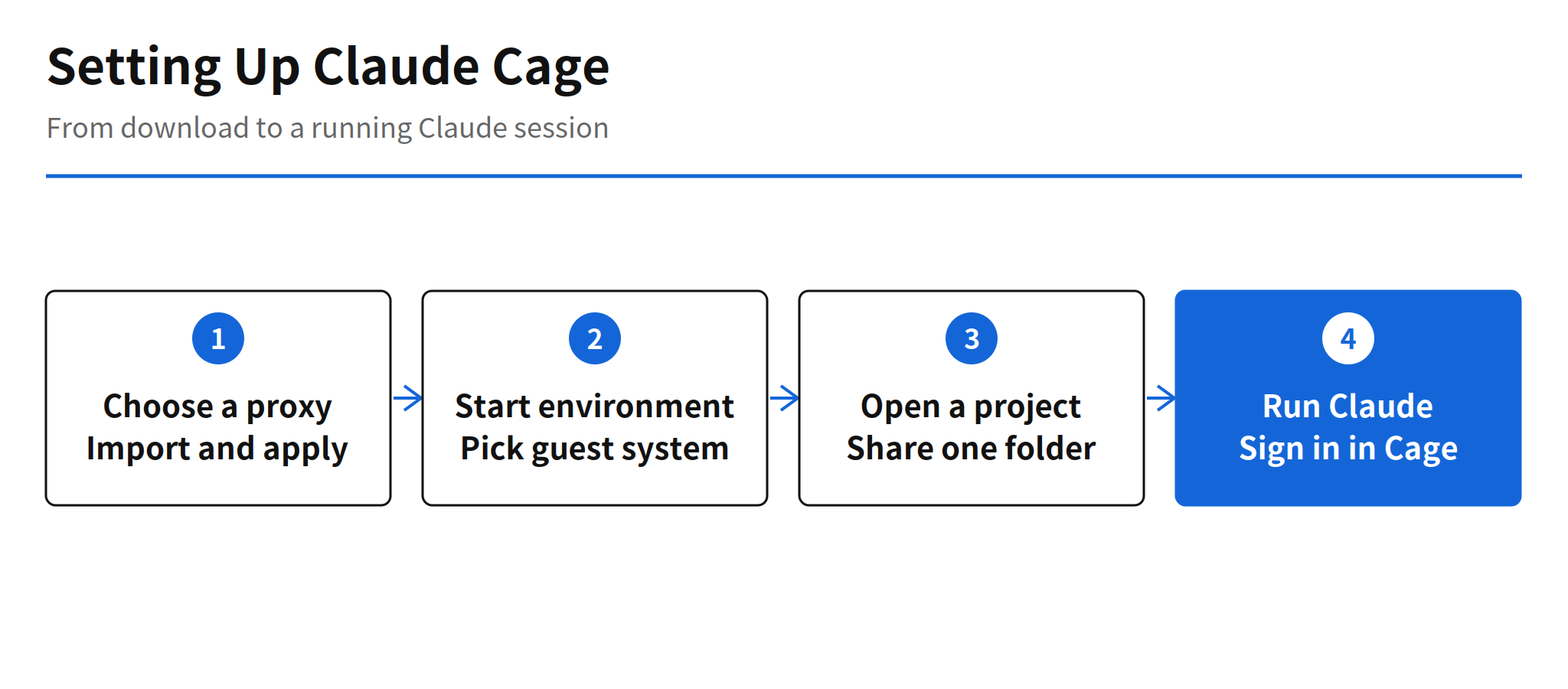
The install is designed to need nothing in advance. The download from the project homepage bundles the workbench and the proxy core, so there is no requirement to install Go, Node.js, Docker, or Clash first. On macOS the app is dragged into Applications; Windows and Linux follow their own install guides linked from the README.
- Step 1, choose a proxy: import a Clash or Mihomo YAML subscription or a local config, pick a node, and apply it. Chain proxies are supported when a relay is needed. The one thing every user must bring is a reliable proxy node of their own, because Cage sells and provides no proxy service.
- Step 2, start the environment: on first launch, choose a guest system or let Cage auto-match the host system version, pick a storage location, and install the guest. Later launches reuse the existing environment, and tools, files, and login state persist on the virtual disk between sessions.
- Step 3, open a project and run Claude: open a local folder as a project, start a terminal, type
claude, and complete account authorization in the Cage browser. A default workspace is available for anyone who wants to try it before sharing a real project.
There is also an agent-driven shortcut in the README: send your own coding agent a sentence asking it to install the repository and point the Cage proxy at your local Clash node. The README jokes that the agent doing this will not be Claude Code itself, which underlines the positioning. Cage is a tool you set up around Claude, not a feature inside it.
Multi-Account, Mobile, and Remote Operation
Three features aim at people who run Claude Code all day. Multi-account management shows the remaining quota across several Claude Code subscriptions, assigns an account to a new session, and, after explicit authorization, can switch accounts to continue a session history. Mobile connection pairs an Android phone or iPhone with the computer so a user can continue Claude Code conversations, approve tool calls, or operate the remote browser and Claude Desktop away from the desk. Remote deployment puts the environment on the user's own server over SSH, including a Linux VPS, with tools, tasks, and data staying on the server and no KVM required.
Read together, these features describe a specific user: someone running multiple subscriptions for long agent sessions, who wants one controlled environment instead of a pile of VPS instances, fingerprint browsers, and manual checks. The README states that motivation directly, describing frustration with exactly that pile and with the fear of account bans and financial loss. That candor is useful context, because it also marks where the tool's purpose touches platform enforcement, which is the open question below.
The Policy Boundary and the Unverified Claims
Fingerprint isolation synced to a proxy IP sits close to evading platform detection and account rules. Whether using Cage conflicts with Anthropic's terms is unconfirmed, and neither the issue nor the README offers a ruling from Anthropic. Readers should treat that as an open risk, not a settled permission.
The README itself supplies the right calibration for its own claims. It states that network checks display the current configuration and sampled evidence, that they cannot guarantee an account will not be restricted by the platform, and that they are no substitute for a complete virtualization security audit. It also states plainly that Cage is an independent community project with no affiliation to Anthropic, and that it provides no system license, no proxy service, and no Claude account.
The fair verdict is therefore two-sided. As engineering packaging, Cage is a coherent answer to a real operational burden, and its fail-closed networking and scoped sharing are concrete, checkable design decisions. As protection against account enforcement, it is a claim with no independent verification and an unresolved terms question. Anyone adopting it for the second reason is taking a risk the documentation, to its credit, does not hide.
What Is Not Known Yet
- Leak prevention: the claim of completely preventing network leaks is the maker's description, with no independent verification confirmed.
- Terms compatibility: whether fingerprint isolation and proxy sync conflict with Anthropic's account policies is unconfirmed.
- Check coverage: how far the built-in isolation checks actually guarantee isolation in adversarial conditions is unconfirmed.
- Sustained growth: the 3,181 stars were observed on November 12, 2026; whether usage follows the attention is not yet measurable from public data.
None of that dims the narrower signal. In 11 days, a Claude-only isolation VM drew thousands of stars because running coding agents all day has created a real environment problem, and most users would rather install one workbench than assemble the equivalent from a VPS, a proxy, and a checklist. Cage's test from here is whether its checks hold up under outside scrutiny.
FAQ
What is Claude Cage?
Claude Cage is a lightweight virtual machine built specifically for using Claude, released by Lee-xeo on GitHub under the MIT license. It isolates network and fingerprint settings from the host, manages all traffic inside the environment through a proxy, and pauses external networking when its built-in checks fail.
How much does Claude Cage cost?
The project is open source under the MIT license, so there is no license price listed. Users supply their own proxy node, their own Claude account, and their own operating system license where one is required, because Cage provides none of those.
Which systems does Claude Cage support?
Hosts are macOS 14 or later on Apple Silicon, Windows 10 22H2 or Windows 11 on x64, and Debian 12 or Ubuntu 22.04 or 24.04 on x86_64. Guests can be macOS, Windows, or Linux. Intel Macs, Windows ARM64, and Linux ARM64 are not supported yet.
How do you set up Claude Cage?
Download the app from the project homepage, import a Clash or Mihomo subscription or local config and apply a proxy node, choose a guest system and storage location on first launch, then open a project folder and run claude in a terminal inside Cage, signing in through the Cage browser.
Does Claude Cage guarantee an account will not be restricted?
No. The README itself states that network checks show current configuration and sampled evidence, cannot guarantee that an account will not face platform restrictions, and are not a substitute for a full virtualization security audit. Whether the fingerprint and proxy setup conflicts with Anthropic terms is unconfirmed.
Related Reading
- Claude Code Cloud Auto Setup: Plans and How It Works, another take on where Claude Code sessions should run
- Antigravity Remote Agents: Cloud Coding Sessions, Pricing, a hosted alternative to a local isolated environment