Claude Code iPhone Duo Simulator: Public Beta Guide
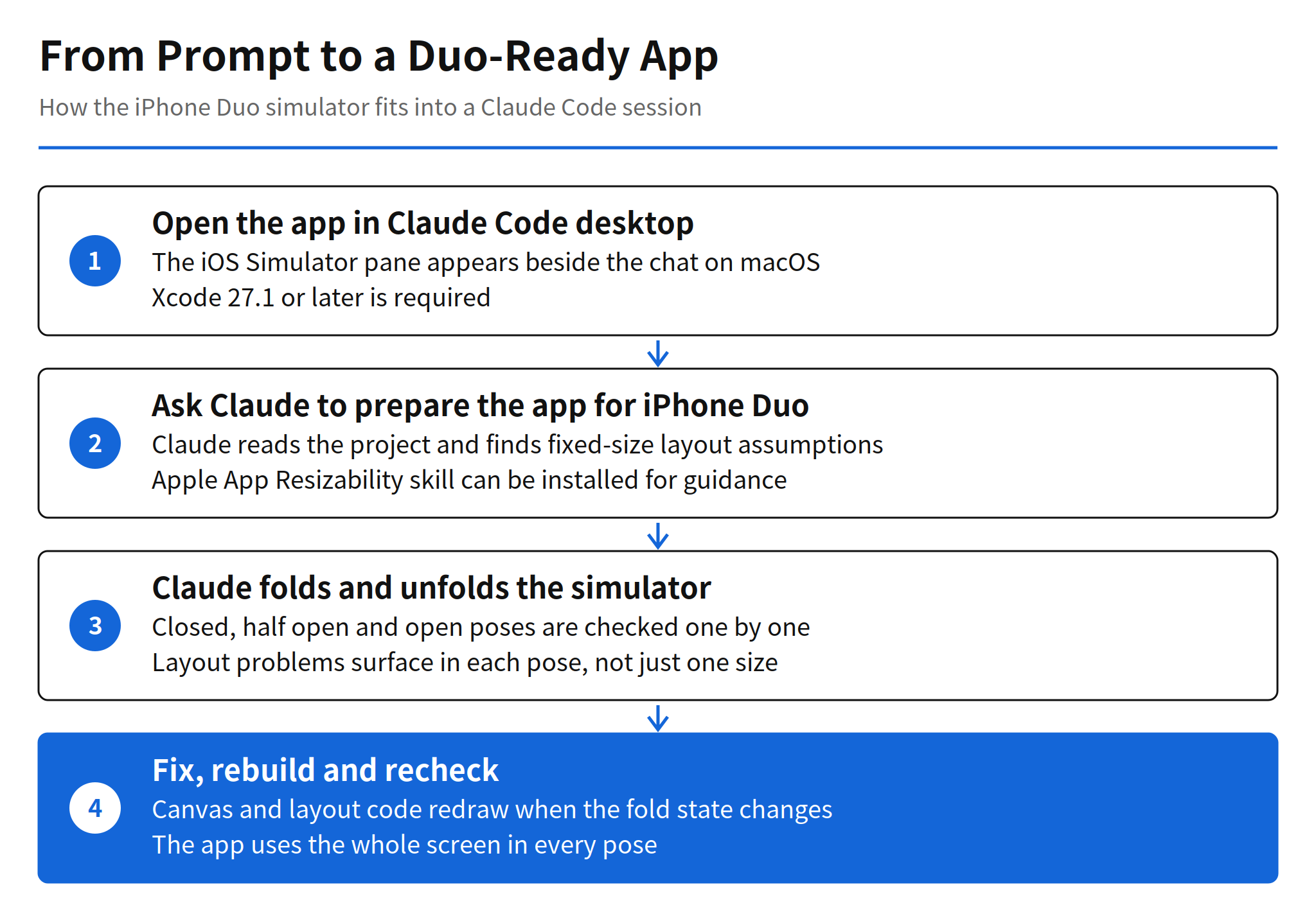
Anthropic has opened a public beta that brings the iPhone Duo to the iOS Simulator inside Claude Code desktop. The simulator pane appears beside the chat, and Claude can fold and unfold the simulated device itself, checking the layout in each pose instead of leaving that inspection to the developer. The beta runs on macOS and requires Xcode 27.1 or later.
The change is small in surface area and large in what it implies about the workflow. Foldable layout testing has traditionally meant a person switching a device between states and looking at each one. Here the agent performs that switching as part of the same session in which it edits the code, so a request such as preparing an app for the Duo can end with the app installed in the simulator and a pose by pose account of what changed.
What the beta adds to Claude Code desktop
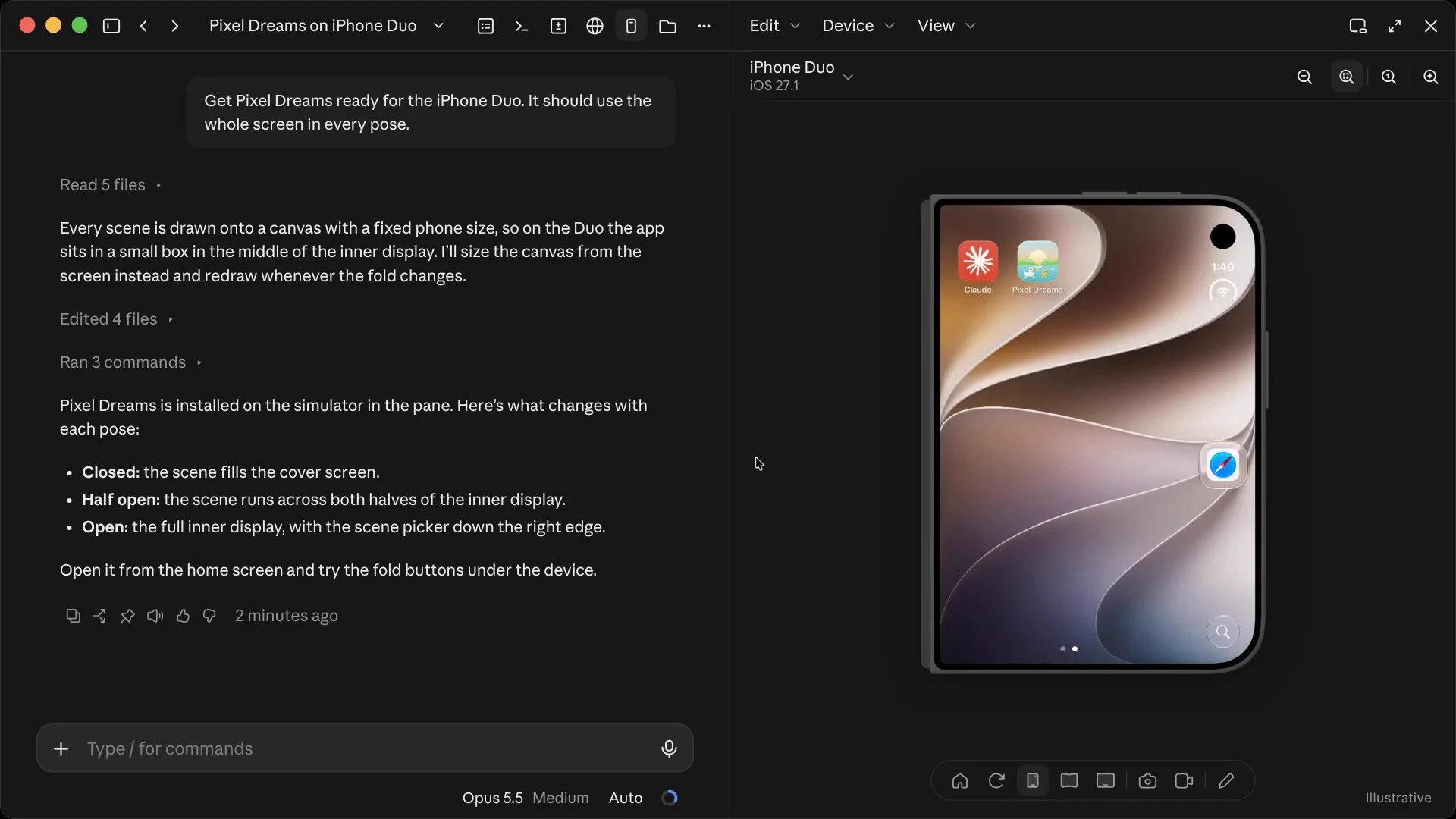
The simulator support itself follows the pattern Claude Code desktop already uses for iOS work: when Claude builds, runs or checks an app, the app opens in a simulator pane next to the conversation. The new part is the device. The iPhone Duo folds, so a single screen size check is not enough. An app that assumes a fixed phone size can end up drawn in a small box in the middle of the inner display, which is exactly the failure shown in the announcement demo.
In that demo, the developer asks Claude to get the Pixel Dreams app ready for the iPhone Duo, with the requirement that it use the whole screen in every pose. Claude reads five files, identifies that every scene is drawn onto a canvas with a fixed phone size, and rewrites the sizing so the canvas comes from the screen and redraws whenever the fold changes. After editing four files and running three commands, the app is installed on the simulator in the pane, and Claude reports the result pose by pose: closed fills the cover screen, half open runs across both halves of the inner display, and open uses the full inner display with the scene picker along the right edge.
That sequence matters more than the device novelty. The agent is not only generating code for a form factor it cannot see. It is operating the target environment, changing the physical state of the simulated device, and reporting evidence from each state. Verification moves inside the agent session instead of sitting in a separate manual pass after the session ends.
Setup paths for desktop and terminal users
Desktop users need a Mac and Xcode 27.1 or later. With that in place, the Duo appears as a simulator device in the Claude Code desktop pane, and a developer can simply ask Claude to prepare the app for the iPhone Duo. Anthropic also points developers to Apple's App Resizability skill, which can be installed so Claude follows Apple's own guidance for resizable layouts while it works.
Terminal users get a different entry point. The Xcode plugin is now available in the official plugin marketplace, and it can be installed from Claude Code with one command:
/plugin install xcode@claude-plugins-official
The plugin itself is not new. Its pull request was already merged on November 8, and this announcement moves it into the official marketplace. What is new is the combination: an officially distributed Xcode plugin, plus a public beta in which the desktop app treats a folding simulated device as something the agent can manipulate directly. Teams that live in the terminal and teams that live in the desktop app now reach the same iOS tooling from their own starting point.
The verification post Anthropic shared the same day
ClaudeDevs paired the beta announcement with a second post the same day, sharing writing by Addy Osmani dated November 16, 2026 about how the team itself verifies work. According to that post, Claude writes and reviews about 90 percent of the code in the team's repository. It also reports an internal test result on structured file generation: adding a separate grader raised task success rates by up to 10 points.
Read together, the two posts describe one position. The team presents Claude as the default worker for its own codebase, and it presents checking as a designed part of that arrangement rather than an afterthought. A separate grader improving success rates is the same idea as the Duo simulator in miniature: output improves when the system that produces the work also runs a distinct verification step against the result, whether that step is a grader model or a folding simulator.
Both numbers need their caveats stated plainly. The 90 percent figure is the team's own published number, with no third party audit. The 10 point gain comes from the team's own internal measurement on one task type, structured file generation. Neither figure tells an outside team what its own results will be. They are evidence about how Anthropic says it works, and a signal that at least one frontier team now runs its repository this way, not a benchmark other teams can claim by adoption.
Limits and unconfirmed points
The scope limits are clear in the announcement itself. Claude operates the simulated device only. It does not control a real iPhone or iPad, so hardware specific behaviour, real hinge sensors and performance on physical silicon stay outside this beta. The announcement also says nothing about support for other foldable or dual screen devices beyond the iPhone Duo, and it gives no end date for the beta and no general release schedule.
There is also a practical dependency worth noting. The whole flow assumes the app's layout problems are visible in the simulator and reproducible across poses. Problems that only appear with real content volumes, real network conditions or accessibility settings still need their own testing pass. The beta removes the manual device switching from foldable layout checks. It does not remove the need to decide which checks matter.
Related articles
- Claude Code Projects Update: Proactive Coordinator Guide
- phoneuse: Control an Unmodified iPhone From a Linux PC
FAQ
What did Anthropic release for the iPhone Duo?
Anthropic opened a public beta that adds iPhone Duo support to the iOS Simulator inside Claude Code desktop. The simulator pane sits beside the chat, and Claude can fold and unfold the simulated device to check the layout in each pose.
What is required to use the Duo simulator?
The beta runs on macOS and requires Xcode 27.1 or later. Terminal users can instead install the Xcode plugin from the official plugin marketplace with the command /plugin install xcode@claude-plugins-official.
Can Claude operate a real iPhone or iPad?
No. Claude works with the simulated device only. The announcement covers the simulator inside Claude Code desktop and the Xcode plugin, not control of physical hardware.
How reliable is the claim that Claude writes about 90 percent of the team repository code?
That figure comes from Anthropic's own team writing, shared by ClaudeDevs on the same day. It is a self reported number with no third party audit, so it should be read as the team's own account of its workflow.