phoneuse: Control an Unmodified iPhone From a Linux PC
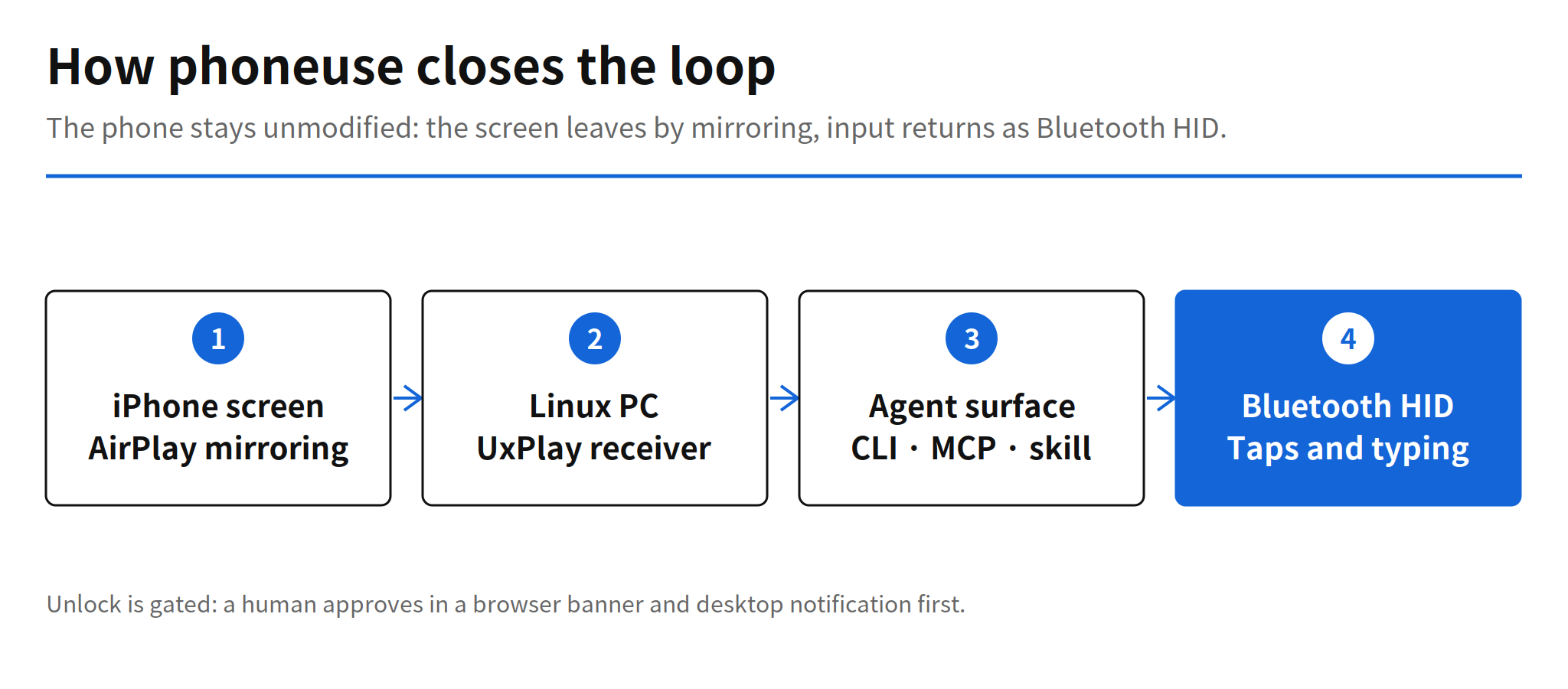
phoneuse, published by lxe on GitHub on November 7, 2026, lets an agent see and operate an iPhone that has not been modified in any way, driven from a Linux PC. The screen arrives through AirPlay mirroring, received on the PC by UxPlay. Input returns as Bluetooth HID: the PC pairs with the phone as a Bluetooth mouse and keyboard and sends taps and keystrokes. The phone side needs nothing beyond screen mirroring and AssistiveTouch. There is no jailbreak, no developer account, no cable, and no app installed on the phone. The repository is written in Python under the MIT license, and it held 475 stars and 48 forks when checked on November 9, 2026.
The design choice is the point. Every channel phoneuse uses is a feature Apple ships for ordinary users: mirroring for display output, Bluetooth peripherals for input, AssistiveTouch for the pointer. Nothing asks iOS for a debugging interface it does not offer, which is why the setup list on the phone is two settings long. The cost of that choice shows up elsewhere, in the PC configuration and in the small set of verified hardware, and both are covered below.
AirPlay as the Eyes, Bluetooth HID as the Hands
The loop has two halves. For output, the iPhone mirrors its display to the PC, and UxPlay acts as the AirPlay receiver, so the agent works from the same mirrored screen a person would see. For input, the PC presents itself as a Bluetooth mouse and keyboard. That pairing can use the PC's own Bluetooth radio, or it can route through an ESP32 bridge, a LilyGO T-Display board kept next to the phone. Either way, the iPhone cannot distinguish the agent's taps from a physical peripheral, because at the protocol level that is exactly what they are.
First contact with a new phone includes a calibration step of about 13 seconds. phoneuse measures how far that phone moves its pointer for a given mouse report, so later taps land where the agent intends. It is a small detail with a practical meaning: pointer scaling differs per device, and a tool that skips measuring it will tap near the target instead of on it.
CLI, MCP Server and Skill File
The agent surface comes in three forms that expose the same actions. The CLI offers partial commands an agent can compose, including phoneuse open Settings to open an app or screen, phoneuse text to pull the current screen as text with locations attached, phoneuse tap-on "Wi-Fi" to find on-screen text and tap it, plus phoneuse screenshot and phoneuse done. The MCP server wraps the same operations for MCP clients and returns the screen once changes settle after an action finishes. A skill file packages the tool for Claude Code.
The text and tap-on pair deserves attention, because it changes how grounding works. Most phone agents screenshot the screen and ask a vision model where a control sits, which is slow and error prone on dense settings screens. A command that returns screen text with positions, and a command that taps a named label directly, gives the agent a text first path and reserves vision for screens where text extraction has nothing to hold. That is the same direction Android tooling gets from its accessibility tree, reached here through a mirrored screen instead of a platform API.
Unlock Approval and the Human Gate
The lock screen is where phoneuse puts a person back in the loop. When an agent runs phoneuse unlock, the tool first asks for approval through a banner in the browser mirror and a desktop notification. Only after a human approves does it type the stored passcode. The passcode itself still lives on the PC, which is a trust decision an operator makes consciously, but the approval step means an unattended agent cannot unlock the phone on its own initiative. For a tool whose whole purpose is unattended operation, that single gated action is a deliberate boundary, and in my view it is placed at the right action: the one that opens everything else.
Costs on the PC and the Verified Combination
The README is frank about maturity. It describes phoneuse as a technical demo that is still under heavy construction, and it lists exactly one verified combination: an iPhone 17 Pro running iOS 26, with Arch Linux, Hyprland and an NVIDIA GPU. Other combinations may need changes before they work. Anyone planning to build on it today should budget for that porting work rather than expect a general installer.
The install also changes the host PC in a way that is easy to miss. phoneuse raises its HID daemon as a system service and disables the input plugin of bluetoothd. After installation, that PC no longer accepts a Bluetooth keyboard or mouse as input devices of its own. On a dedicated agent workstation that trade is harmless. On a daily driver it is a real cost, and it points to the natural deployment shape for now: a spare Linux box or a small bridge board whose only job is driving the phone.
Position Among iPhone Agent Approaches
Until now, handing an iPhone to an agent has mostly meant the WebDriverAgent route, which needs a Mac, Xcode and a signed helper app on the device. Earlier entries in this tracker show the alternatives circling the same problem: a tool that drives a real iPhone from Codex over USB (issue #3191), and a setup where a 7 dollar ESP32 board handles both AirPlay reception and HID input (issue #3264). phoneuse keeps the ESP32 approach's insight, that mirroring plus HID is enough, and moves the receiver role onto a Linux PC that also hosts the agent. One naming caution from the README trail: a cloud phone service also called PhoneUse exists (issue #3408) and is a different project from a different maker, unrelated to this repository.
For builders of phone agents, the practical effect is a reference point on the iPhone side. Android agents lean on adb and the accessibility tree, two affordances iOS does not offer, so iPhone automation kept colliding with signing and helper app requirements. phoneuse shows a complete loop built only from user facing channels, with a text based grounding command included. Whether it hardens beyond a demo depends on how many hardware combinations get verified, but the architecture it demonstrates does not depend on the demo maturing: any team can rebuild the same loop from the same two channels.
Open Questions and Limits
- One verified combination. iPhone 17 Pro, iOS 26, Arch Linux, Hyprland and an NVIDIA GPU is the only stack the README confirms, so behaviour on other phones, iOS versions and desktops is unconfirmed.
- The host PC gives up Bluetooth input. The HID daemon runs as a system service with the bluetoothd input plugin disabled, so the PC stops accepting Bluetooth keyboards and mice for itself.
- The stored passcode lives on the PC. Unlock requires human approval first, but where the passcode is stored and how it is protected is an operator review item, not a detail the release spells out.
- Demo maturity. The README itself calls the project a work in progress technical demo, so reliability over long unattended runs is not yet established.
Related Reading
For a hosted take on the same problem of running iPhone agents under supervision, see the report on DigitalOcean Cuttlefish and iPhone agent supervision.
FAQ
How does phoneuse control an iPhone without modifying it?
The iPhone sends its screen to the Linux PC through AirPlay mirroring, and UxPlay receives it. Input goes the other way as Bluetooth HID: the PC pairs as a Bluetooth mouse and keyboard, either directly or through an ESP32 bridge, so taps and keystrokes arrive as ordinary peripheral input. The phone itself only needs screen mirroring and AssistiveTouch turned on.
What does an agent use to drive phoneuse?
Three surfaces expose the same actions: CLI commands such as phoneuse open Settings, phoneuse text and phoneuse tap-on, an MCP server that returns the screen once it settles after each action, and a skill file for Claude Code. The text command returns the screen as text with locations, so an agent can find and tap on-screen text without relying on vision alone.
How does phoneuse handle the lock screen?
Unlocking asks a human first. When an agent runs phoneuse unlock, a banner in the browser mirror and a desktop notification request approval, and the stored passcode is typed only after that approval. A phone connected for the first time also goes through a pointer calibration that takes about 13 seconds.
What are the limits of phoneuse right now?
The README calls the project a technical demo that is still under heavy construction. One combination is verified: an iPhone 17 Pro on iOS 26 with Arch Linux, Hyprland and an NVIDIA GPU, and other setups may need changes. Installing it also disables Bluetooth input devices on the PC, because the HID daemon runs as a system service and turns off the bluetoothd input plugin.