T3 Code UI Customization: Ask Your Agent, Watch It Change
T3 Code now lets you customize its own user interface from inside the app. Founder Theo announced the feature on X on November 14, 2026, in one sentence: "T3 Code now lets you fully customize your UI in app. Ask your agent to make changes and it will update on the fly." The agent that edits your code can now edit the tool you are looking at while it works, and the change appears in the same session instead of after a rebuild or a restart.
The catch is availability. In a follow-up post Theo wrote, "Only in nightly for now, will hit stable soon!" No stable date was given, so the feature is currently a nightly experiment. That limit matters for how to read the launch: the idea is public and demonstrable, with community videos already attached to the announcement thread, but a normal stable user cannot assume the same experience today.
What shipped in the nightly build
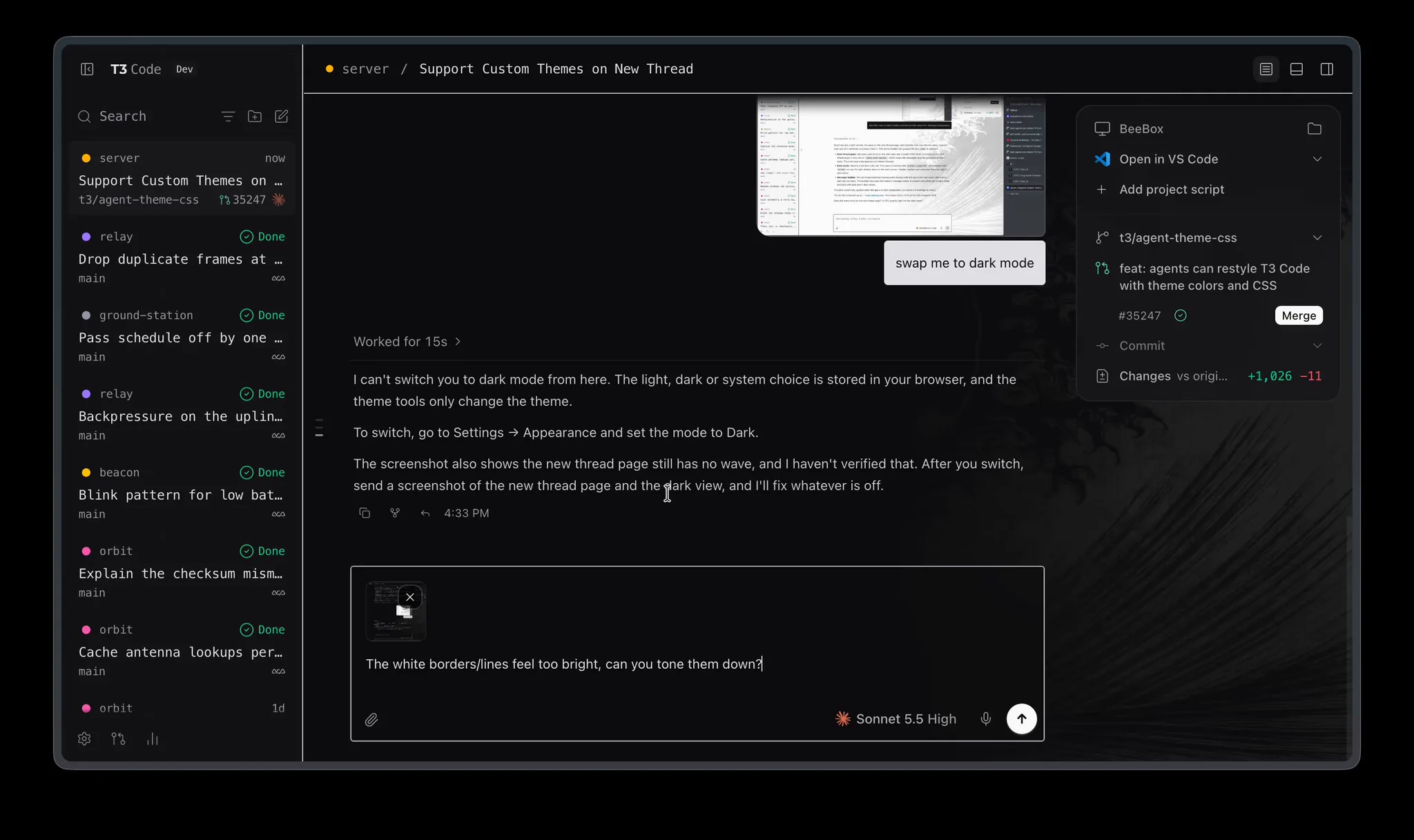
The announcement video shows the workflow as a normal agent thread. A thread titled "Support Custom Themes on New Thread" works on a branch named t3/agent-theme-css, and the change description in the sidebar reads "feat: agents can restyle T3 Code with theme colors and CSS." In other words, the customization is not a settings panel with a few preset colors. The agent writes theme colors and CSS the way it would write any other change, inside a thread the user can follow, and the app applies that work to itself.
The same screenshot shows why iteration speed is the real feature. One visible prompt asks to "swap me to dark mode," and a follow-up at the bottom of the thread asks, "The white borders/lines feel too bright, can you tone them down?" That is a design review loop in plain language: look at the screen, name what feels wrong, and let the agent adjust it while you watch. A static theme gallery cannot do that second step, because the complaint is about a specific screen in a specific state, not about a named theme.
How the customization flow works
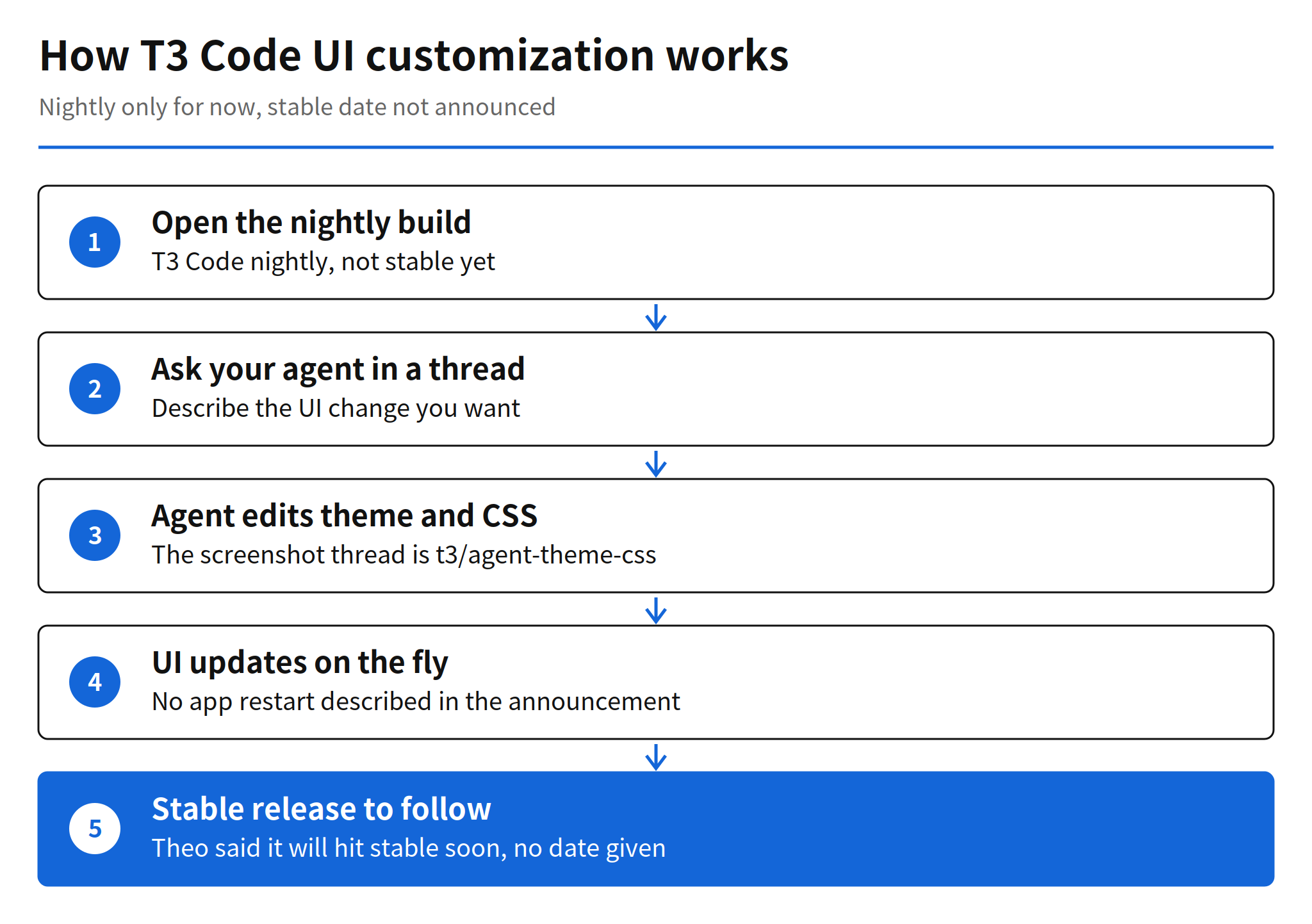
Based on the announcement and the screenshot, the flow has five steps. You open the nightly build, ask your agent for a UI change inside a thread, the agent edits theme colors and CSS, the interface updates on the fly, and the stable release follows at an unannounced date. The announcement does not describe a separate export or install step for a finished theme, and it does not say whether a customization survives an app update.
What T3 Code is, for context
T3 Code describes itself as "the open-source control plane for coding agents." It runs the coding agents on your own machine and gives them one interface: start a thread at your desk, then approve the next step from your phone. The README lists support for Claude Code, Codex, Cursor, OpenCode, Grok Build, Antigravity, Kiro, Pi, Muse Code, fx, and any ACP agent, and it stresses that T3 Code does not resell tokens. It drives the agents you are already signed in to, on your subscriptions.
The rest of the product explains why its UI is worth customizing in the first place. There are desktop, web, iOS, and Android clients showing the same threads, remote access over a local network, Tailscale, or T3 Connect, and Git built in, with each thread able to work in its own worktree and a one-button path to commit, push, and open a pull request. A control surface you may keep open all day, across that many agents and machines, is exactly the kind of surface where a fixed vendor theme starts to feel like a constraint. Letting the agent restyle it is a natural extension of the product's premise, which is that the user, not the tool vendor, directs the agents.
How to try T3 Code
The customization itself needs the nightly build, and the project install guide is the document that covers nightly builds, AppImage, WSL, and NixOS. For the base product, the README gives several routes. Download the desktop app from t3.codes for macOS, Windows, or Linux, or use a package manager: brew install --cask t3-code on macOS and winget install T3Tools.T3Code on Windows. The command line route installs a t3 command with curl -fsSL https://t3.codes/install.sh | sh, and npx t3@latest runs it once without an install.
After installation, T3 Code needs one agent that is installed and signed in on the same computer, for example Claude Code after claude auth login or Codex CLI after codex login. Phone apps are on the App Store and Google Play and connect back to your computer through the remote access guide. There is no T3 Code price in this picture, because the project is MIT licensed and free; the cost a user carries is the underlying agent subscription they already pay for.
Community experiments on the first day
The reaction was immediate and practical rather than rhetorical. Developer Bennett Schwartz posted a video the same day running Doom through the customization features alone, writing, "Don't worry, it runs doom. I didn't even have to modify the app outside of the customization features." A Doom port is a joke with a serious measurement inside it: if a customization system can host a playable game without touching the app outside those features, the editable surface is large, not cosmetic.
A second video shared in the same trend coverage showed eight agents customizing the T3 Code UI at the same time. That second clip reached the issue record through a trend digest rather than a named primary post, so it should be read as reported rather than independently verified here. Even discounting it, the Doom example alone shows users probing the boundary of the feature on day one, which is usually a sign that a feature will be used in ways the launch post did not list.
The same week as Claude Code desktop themes
The timing produced a public double take. Claude Code desktop themes, called mods, were announced in a similar window, and on November 15 Theo quoted a ClaudeDevs post and asked whether the two teams had "actually accidentally do this at the same time," calling it hilarious. Two agent tools shipping agent-editable or themeable interfaces in the same week suggests a shared pressure rather than copying: as agents spend more time inside these clients, the client itself becomes part of the workspace users want to shape.
There is a difference in depth worth keeping. A theme system, as the name implies, usually swaps a prepared set of visual values. What the T3 Code screenshot shows is an agent working on theme colors and CSS in a branch, responding to free-form complaints about brightness. That is closer to pair programming on the interface than to picking a skin. Whether that depth survives contact with ordinary users, who may break their own UI and need a way back, is the open design question.
Limits and unanswered questions
The announcement leaves four things unstated. First, the stable date is only "soon." Second, the scope of customization is not bounded in the post: which UI elements an agent may change, and which it may not, is not listed. Third, rollback is not described. The screenshot thread shows an agent explaining that a light, dark, or system choice lives in browser settings and pointing to Settings, Appearance, which hints at a manual path back for mode at least, but the announcement itself names no undo for a bad customization. Fourth, nightly stability is by definition unsettled, so the polished videos should not be read as the stable experience.
None of that undermines the launch, but it does set the evaluation standard for the stable release. A customization feature aimed at daily drivers needs a known reset path and a clear boundary at least as much as it needs range. If the stable post answers those two points, the feature reads as a product capability. If it does not, it stays a power-user toy, impressive in demos and risky in a work tool.
Why this matters for agent client design
The broader shift is that the agent's work surface is expanding from code to the tool itself. T3 Code built its reputation as a surface for controlling other agents, first covered here as a trending repository and later as a maturing client. This release turns that surface inward: the controlled object now includes the controller's own interface. For teams building agent clients, the comparison standard changes accordingly. The question is no longer only which agents a client can run, but how much of the client a user can reshape, in place, through the agents it runs.
My read is that the winning form will not be unlimited editing. It will be editable themes with a hard reset, a visible diff, and a boundary around navigation and safety prompts, so a restyle cannot hide the controls a user needs to approve or stop an agent. T3 Code has the diff culture already, since its threads work in worktrees with reviewable changes. If the stable customization release presents UI changes with that same review discipline, it will be the version of this idea other clients copy.
Related articles
- Claude Code Projects Update: Proactive Coordinator Guide, on Claude Code taking a more active coordinating role
- OpenCode v2.3.0 Release: Background Subagents by Default, another open agent client moving work into the background
- Self-Hosted Claude Managed Agents: Pricing and How It Works, on running managed agents on your own infrastructure
FAQ
What is T3 Code UI customization?
It is a new T3 Code feature that lets you ask a coding agent inside the app to change the app UI itself. Theo announced it on November 14, 2026, saying the changes update on the fly.
Is T3 Code UI customization available in the stable build?
Not yet. Theo said it is only in nightly for now and will hit stable soon. No stable release date was given in the announcement.
How do you install T3 Code?
Download it from t3.codes, install it with brew on macOS or winget on Windows, or run npx t3@latest to try it once. The project install guide covers nightly builds. T3 Code then needs one coding agent installed and signed in on your computer.
What is still unknown about the customization feature?
The announcement does not say which UI elements an agent may change, how a bad change is rolled back, or what safeguards apply. The stable release date is also unannounced.