Anthropic Always-On Agents Guide: Five Primitives Explained
An always-on agent is not actually always on. In a guide published on November 13, 2026, Anthropic engineer William Hu describes an agent that spends most of its time asleep, wakes for a short stretch of work called a run, saves what happened, and goes back to sleep. The user experience feels continuous because the surrounding architecture keeps state between those runs and decides when the next one starts.
Anthropic defines the pattern as stateful and proactive: the agent manages context across sessions and takes action without direct supervision. The guide argues that two changes made this practical again. Recent models show better judgment about user intent and about when to check in, and intelligence has become cheaper, with long-horizon work gaining the most. The rest of the article is plumbing, and that is the point. The agent loop itself is unchanged, so the useful content for builders is the five primitives around it: event inbox, timers, memory, permissions and outbox.
The cycle behind the always-on agent
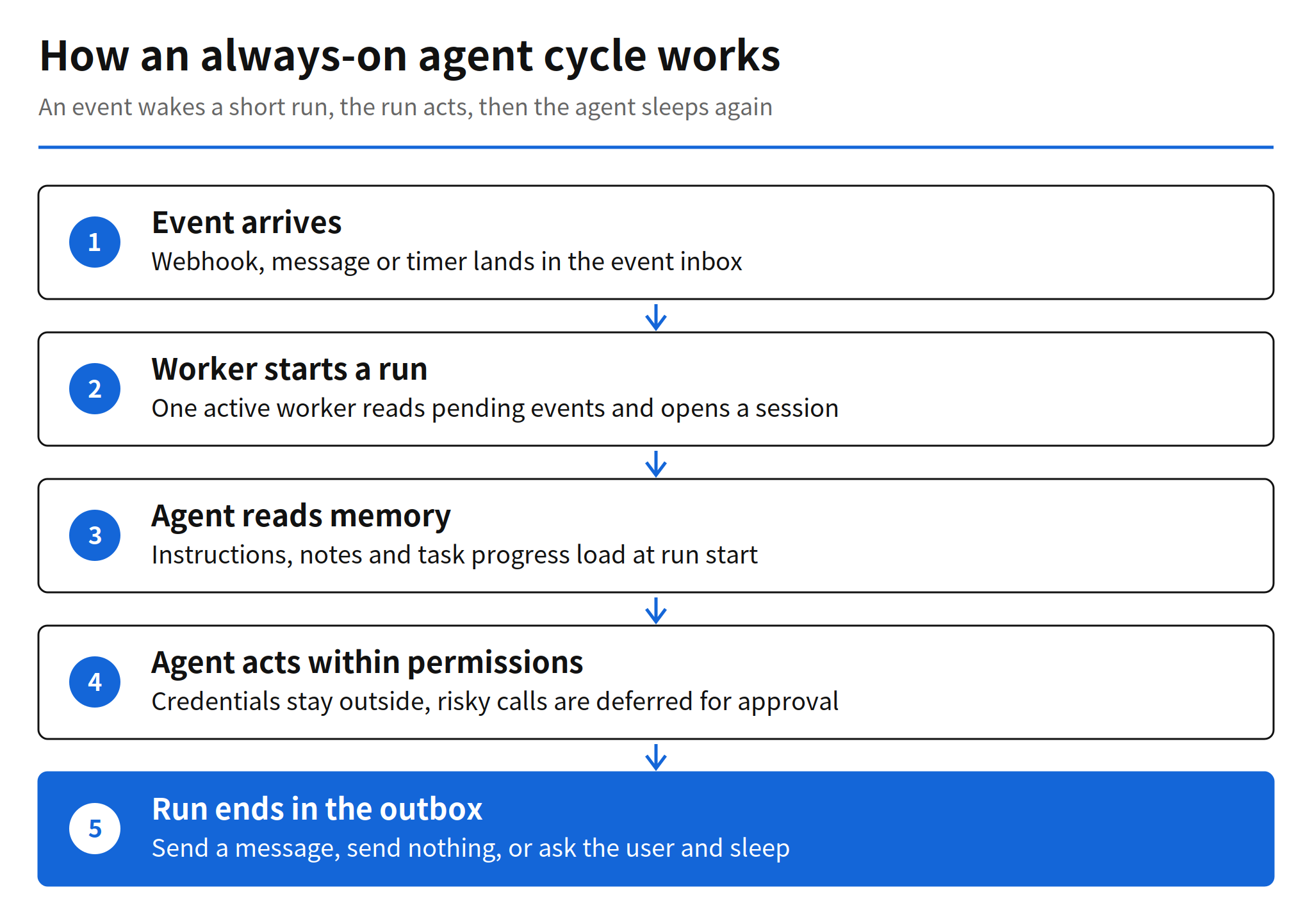
Every run starts with an event. When a worker picks the event up, it starts a run inside a session, which is the transcript of messages and tool calls. The agent reads its memory for a baseline, works within its permissions, updates memory with anything new, and finishes by placing a message in the outbox or deciding that nothing needs to be sent. A run can also set a timer that wakes the agent later, and a user reply returns as a new inbox event, so the cycle can continue indefinitely even though each individual run is brief.
This framing matters because it separates two problems that product teams often merge. The model problem is whether a single run reasons well. The systems problem is whether events are never lost, runs never collide, memory survives the worker, and messages reach the user at a tolerable rate. Anthropic's guide spends almost all of its length on the second problem, using ordinary materials: database tables, HTTP endpoints and background services.
Event inbox as the single entry point
The first primitive solves a failure mode of direct triggering. If every webhook, scheduled task and background job calls the agent directly, two events arriving together can start competing runs, and a crash can lose an event entirely. The inbox replaces direct calls with a queue that every source writes to and one worker reads from.
The simplest version has three parts: a durable list of events, usually a database table; a handler, usually an HTTP endpoint, that writes events to the list; and a worker, usually a background service, that reads pending events and starts runs. Events are deduplicated by a unique identifier from the source, and Anthropic recommends starting with one inbox per user and only one active worker at a time, so two runs cannot duplicate work or overwrite each other. Events that continue earlier work, such as a user reply, resume an existing session, while everything else starts a new one.
Three operating rules in the guide are easy to miss and expensive to learn later. The handler should acknowledge events quickly, because webhook providers treat slow responses as failures, and deeper checks such as prompt injection screening belong inside the run. The inbox is the source of truth, so a replacement worker can pick up the same event after a crash. And the worker should batch pending events, merging several rapid user messages into one run so the agent replies once instead of several times.
Timers for follow-ups and schedules
Timers make the agent proactive, and the guide splits them into two kinds. A follow-up is a deadline the agent sets for itself, such as checking whether a reply arrived. A schedule is a recurring task on a known cadence, such as a daily newsletter. Both live in their own durable store, separate from the inbox, because the inbox should hold only events that are ready to be worked on.
A timer never starts a run by itself. A scheduler polls the store at a fixed interval, finds timers that are due, marks a follow-up as done or advances a schedule to its next occurrence, then adds an event to the inbox and wakes the worker. Anthropic notes that teams can build this scheduler or use a durable execution engine. The design choice worth copying is the indirection: timers produce inbox events, so scheduled work and external events go through the same deduplication, batching and single worker discipline instead of forming a second, weaker path into the agent.
Memory across disjointed runs
Memory is the store that gives separate runs continuity. In Anthropic's own products it takes the form of a directory of files, as in Claude Code auto memory and the Messages API memory tool, and the guide says those directories should map to durable storage such as a database or an object store so memories outlive the worker. The rule of thumb is strict: memory should hold only what the agent cannot look up again, and anything that already lives in another system, such as an issue tracker, should be stored as a pointer.
The guide names four kinds of content. User instructions get their own file and load at the start of every run, because the user is not always present to steer. User notes capture what the agent has learned about the user, including role, preferences and corrections. Past messages record what the agent has already told the user, so nothing is repeated. Task progress files track what is done and what remains for each ongoing task, so a new run can resume where the previous one stopped. Notes and progress scale by splitting into small files behind an index that loads every run, with individual files pulled into context only when needed.
On top of that sits dreaming, a separate process that reviews past sessions to curate memory, replacing outdated entries and finding patterns that only appear across many runs. Anthropic covered agent memory in more depth in an earlier post, and the guide links the two: memory written during runs keeps the agent coherent day to day, while dreaming keeps that memory from quietly rotting over months. The guide also warns that the initial context loaded into every run, system prompt, tool definitions and memory files, should stay lean, with prompt caching used to cut the repeated cost.
Permissions as the highest risk primitive
Anthropic calls permissions the area where always-on agents carry the most risk, for a structural reason: a run holds the user's access and operates unattended by design. For each tool call the agent has to proceed on its own, block the call, or wait for approval, and the guide describes three supporting components.
First, credentials stay outside the agent. The recommended pattern is a proxy outside the agent environment that injects real credentials into outgoing requests, so the agent sends requests without ever holding passwords or access tokens. Second, auto mode classifiers, the approach already used in Claude Code, review higher risk actions and block the ones judged dangerous, while the guide is explicit that user review is still necessary for the most important decisions. Third, a tool call that needs clarification or approval becomes a deferred tool call: the run ends, the session is saved mid-call, the request is shown to the user, and the answer returns as an inbox event that starts a new run resuming the saved session. While that call waits, the worker can process other events, so one pending approval does not freeze the agent.
My read is that this section is the real gate for production use. Inbox and timer patterns are standard backend engineering, but deferred tool calls define whether an unattended agent degrades gracefully or either stalls on every sensitive step or acts without a check. Teams evaluating this architecture should prototype the deferral path first, including how long a saved session stays resumable and what happens when the user never answers.
Outbox and the discipline of sending less
The outbox exists because an always-on agent works in the background. Unlike a chat session, where the user watches the answer stream in, the user here receives an outcome and a few details. A run ends in one of three ways: it sends a message to the outbox, it decides nothing needs to be sent, or it uses a deferred tool call to ask for permission or more input.
Anthropic is candid that most agents can start with a simple send tool. A formal outbox, a separate table of outgoing messages with a dispatcher service that reads pending messages and decides what to deliver, earns its place when a team wants to pace messages or recover from delivery errors. The harder problem is volume. An agent that sends too much becomes noise, and one that sends too little misses things the user needed. The guide recommends building evals to find the balance, and starting quiet, earning more of the user's attention over time rather than spending it on day one.
The 78 percent cost claim and its limits
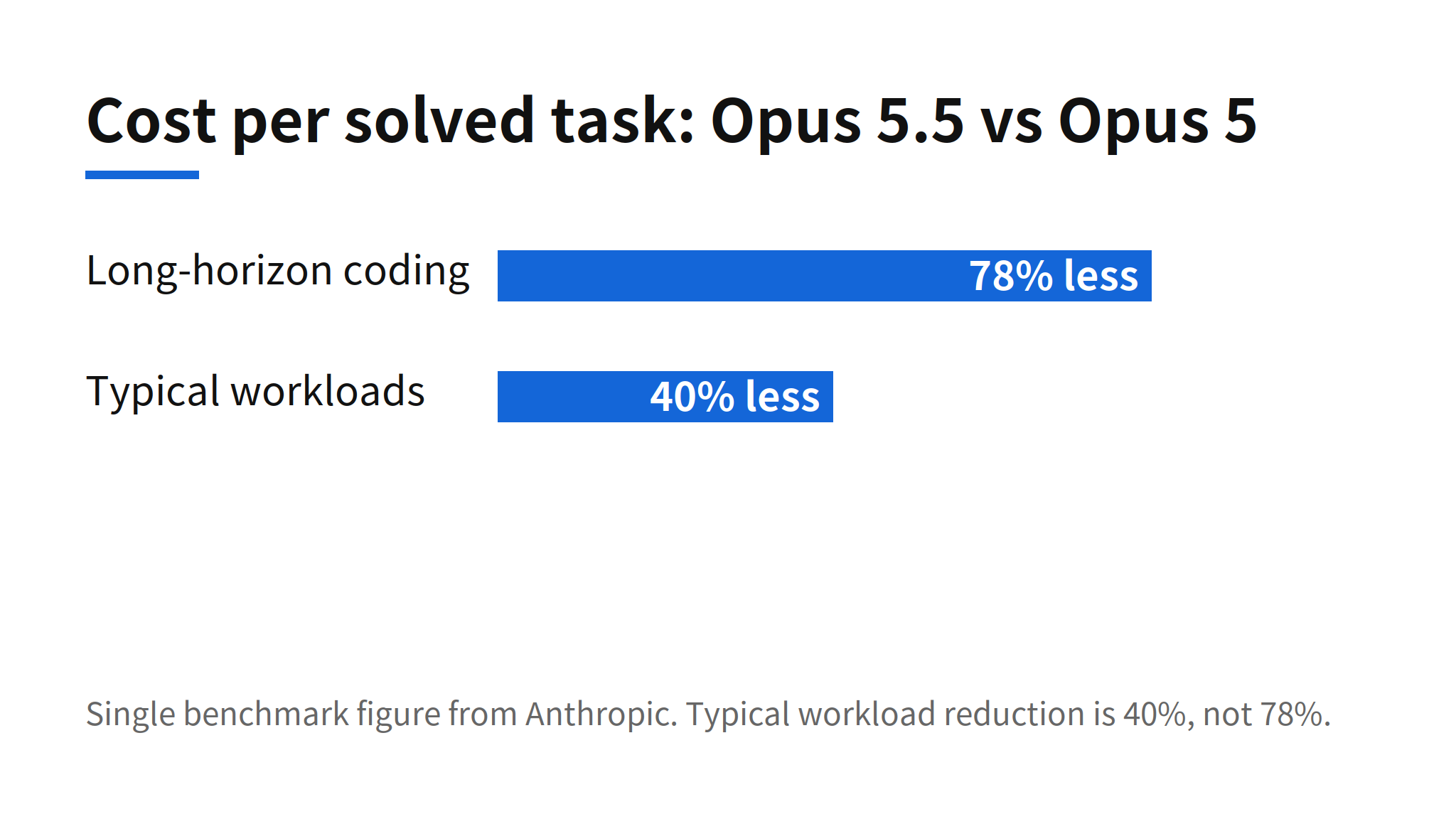
The guide gives exactly one cost comparison. On one long-horizon coding benchmark, Opus 5.5 cost 78% less per solved task than Opus 5, compared with 40% less on typical workloads. Anthropic uses the pair to argue that cheaper intelligence helps long-horizon tasks the most, which is the workload always-on agents create: many runs, long sessions and repeated context loading.
The limit is in the wording. The 78% figure is a single benchmark result, and the guide itself supplies the smaller 40% number for typical work. A team budgeting an always-on product should plan around the typical figure and treat anything better as upside, because an always-on agent also adds costs the benchmark does not capture, including memory curation, dreaming passes, scheduler polling and runs that end by sending nothing.
Limits and unanswered questions
The guide is a design document, not a release. No reference implementation, code or library was identified in the article, so every primitive has to be built from the description. It gives no prescription for which model an always-on agent should run, and it gives no effectiveness numbers for the permission layer, including how often auto mode classifiers block dangerous actions or how often they block safe ones. The cost evidence is one benchmark plus one typical workload figure, both from Anthropic itself.
Those gaps do not weaken the guide much, because its value is architectural vocabulary. Before this post, a team building a proactive agent had to invent names and boundaries for the inbox, the timer store and the deferral path. Now those boundaries come with a concrete reference design from the lab whose own products, Claude Code auto memory, the Messages API memory tool and auto mode, already use pieces of it. The sensible way to use the guide is as a checklist against an existing design: one entry point for events, one active worker, timers that only produce events, memory that stores pointers instead of copies, credentials held outside the agent, and an outbox tuned to send less at first.
Related articles
- Anthropic Agent Memory: Dreaming, Wiki Scores and Design, the earlier Anthropic post on agent memory that this guide builds on
- Kiro Bots Release: Persistent Agents, Pricing and Memory, a shipped product built around persistent agents
- Self-Hosted Claude Managed Agents: Pricing and How It Works, on running managed agents on your own infrastructure
FAQ
What is an always-on agent in Anthropic's guide?
It is a stateful, proactive agent that manages context across sessions and acts without direct supervision. In practice it spends most of its time asleep and wakes for short runs when an event arrives.
What are the five primitives of an always-on agent?
The five primitives are an event inbox, timers, memory, permissions and an outbox. Together they control when the agent wakes, what carries over between runs, how risky actions are handled and how results reach the user.
What does the 78% cost figure in the guide actually cover?
Anthropic says Opus 5.5 cost 78% less per solved task than Opus 5 on one long-horizon coding benchmark. On typical workloads the reduction was 40%, so the 78% figure should not be applied to a general workload.
Does the guide ship code or a library for always-on agents?
No reference implementation was identified in the article. The guide describes design principles and components, such as database tables and background services, that developers build themselves.