Kiro Bots Release: Persistent Agents, Pricing and Memory
AWS has made Kiro Bots generally available inside Kiro Crew, its open source multi agent development environment, as reported by InfoWorld and VentureBeat on November 5, 2026. A bot is not a session that runs one task and disappears. It is a standing agent that owns one part of a development workflow, spawns worker agent sessions in parallel, watches their progress, pulls back sessions that drift from the plan, and reports one combined result.
The bottleneck this targets is coordination rather than model quality. Anyone running several coding agents at once spends real time checking which session stalled, restating context, and reconciling outputs. Kiro Bots move that supervision work to an agent with a defined role and its own memory, which makes the bot, not the individual session, the unit a team manages.
A Persistent Role Instead of a Session
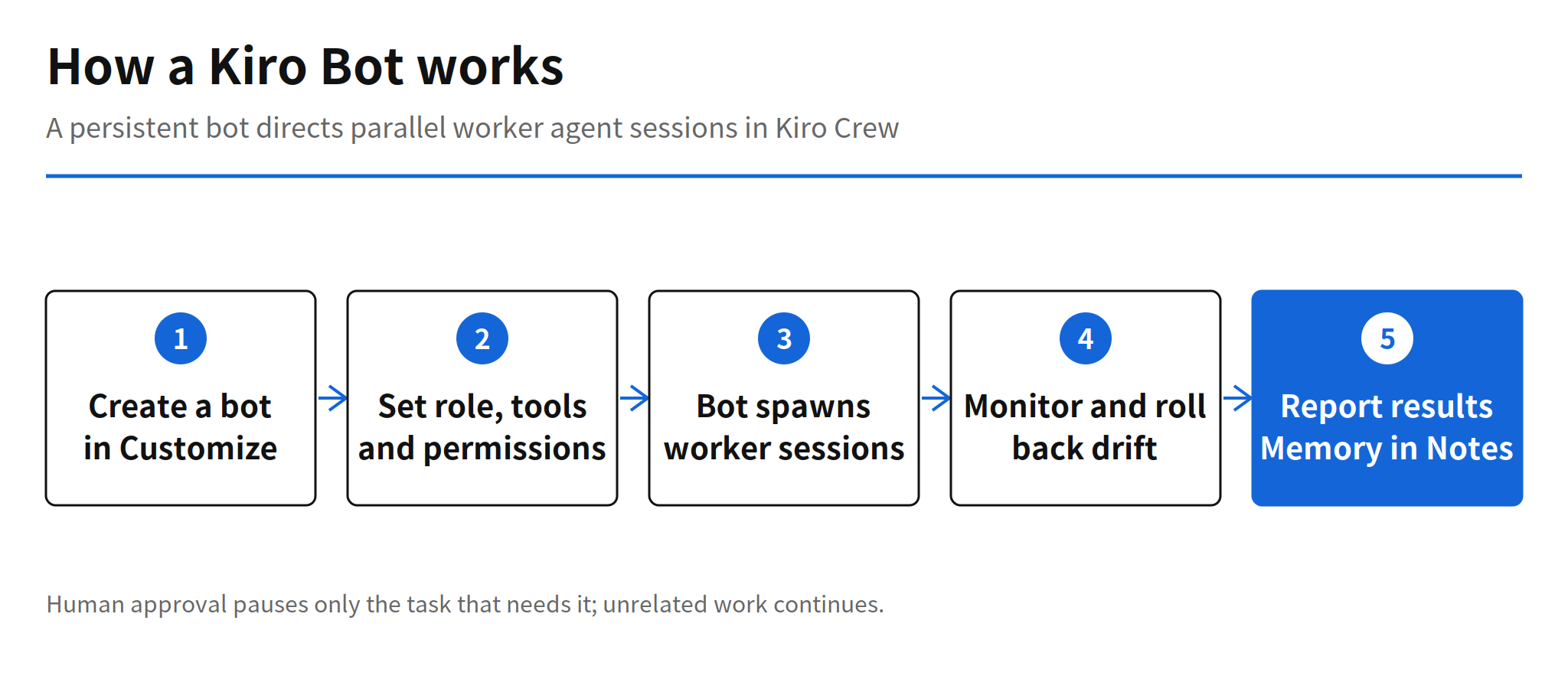
Creating a bot is deliberately simple. In Kiro Crew, open Customize, choose Add a bot, and start from a base agent or an existing custom agent. Each bot then gets its own name, avatar, instructions, tools and permissions. The jobs AWS names as examples are the recurring ones that usually fall back on a human: classifying incoming issues, watching builds, and checking release readiness.
That framing matters because it changes what persists. A session holds context until it ends. A bot holds a role indefinitely, so the instructions and limits are written once for the role and then applied every time the bot acts. The developer decides in advance how far each bot may go on its own, and that decision stays attached to the role rather than being renegotiated per task.
How Bots Direct Worker Agents
A bot does the directing itself. It opens several worker agent sessions in parallel, monitors their progress, returns sessions that stray from the plan, and merges the outcomes into a single report. When a step needs human judgment, the bot requests approval, and work unrelated to that approval keeps moving in the meantime. One pending decision does not freeze the whole queue.
Schedules are set in chat. A bot can be told to investigate overnight CI failures every weekday morning, or to prepare release notes on a set date. A companion feature, Dashboards, visualizes each bot's ongoing activity and reports in a chosen format, which is the surface a team would watch instead of reading raw session logs.
Notes as Per-Bot Persistent Memory
Each bot carries Notes, a persistent memory where developer preferences, decisions already made, and project requirements and constraints accumulate. Developers can open the notes, edit them and delete them, so the memory is inspectable rather than a black box. Memory is also separated per bot: the context one bot builds does not leak into another bot's judgments.
The separation is a sensible default with a real cost. Two bots serving the same team can hold different notes and reach different conclusions about the same change, and the longer a bot works, the harder it becomes to trace why it decided as it did, even with the notes open. Persistent memory solves the context loss of sessions and creates a governance problem in its place.
Four Example Bots as Working Patterns
AWS published four example bots, and together they read as a map of where standing agents fit first:
- A triage bot that classifies incoming issues and finds duplicates.
- A build bot that checks the pipeline for new failures.
- A review support bot that compares proposed changes against past engineering decisions.
- A release bot that verifies tests and documentation before a release.
None of these jobs is a single heroic coding task. They are recurring checks with clear inputs and repeatable criteria, which is exactly where a supervised standing agent is easiest to trust and easiest to audit.
Scoped Permissions and Mixed Models
Permissions are narrowed per role. A research bot only reads files. A deployment bot must get approval before making changes. A review bot can leave comments and request revisions, but it holds no approval or merge rights. Attaching a new tool to a bot also requires user approval, so the developer, not the bot, sets the ceiling on what the bot can reach.
The directing bot and its workers can also run different models. A strong model can handle planning while a cheaper model handles repetitive checks. Kiro's model catalog includes models from OpenAI and Anthropic alongside open weight alternatives, and each model differs in availability and in how many credits it consumes. Execution can run on a laptop, a Mac Mini or an Amazon EC2 instance.
Pricing and Credit Accounting
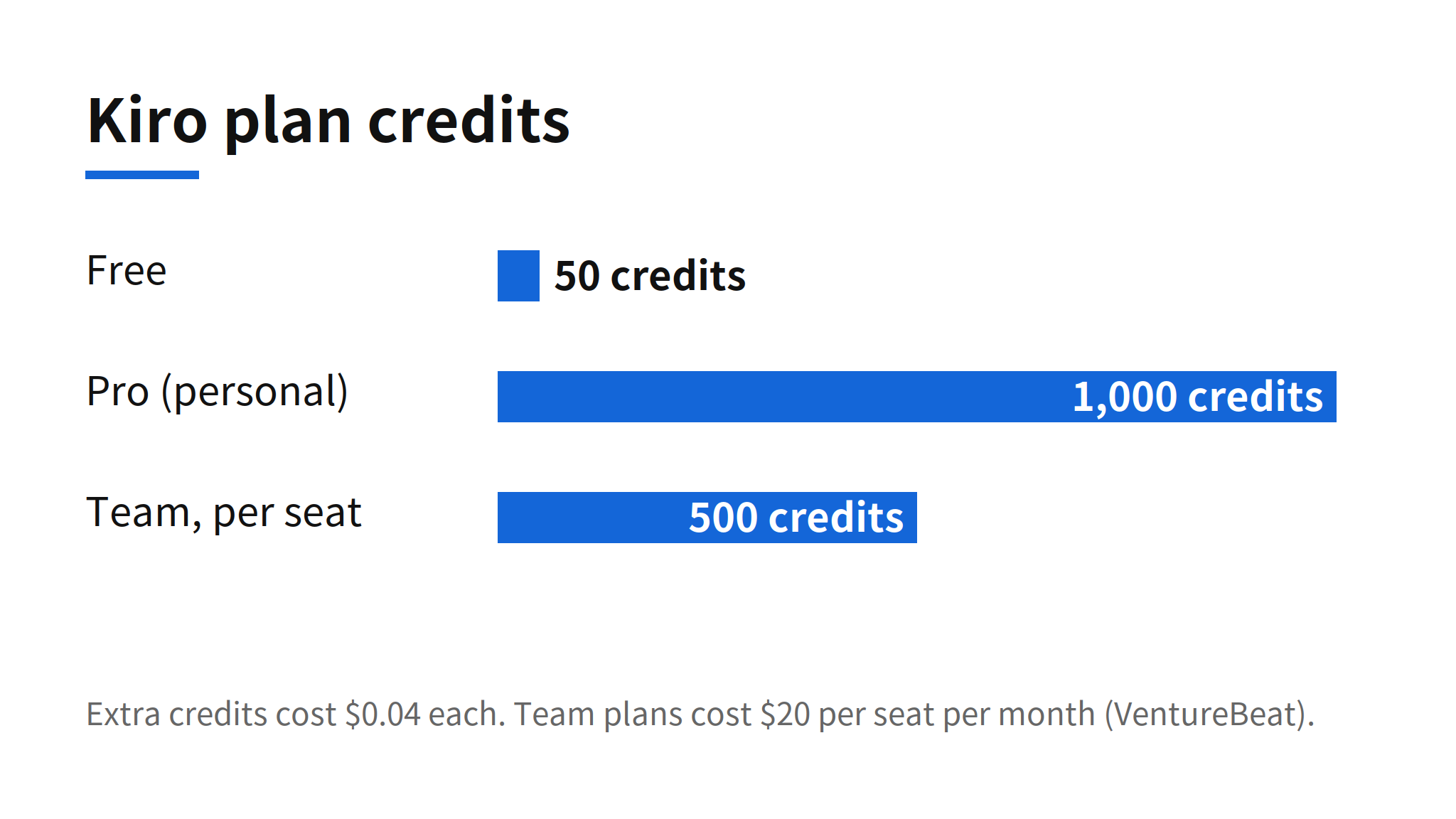
There is no separate bot price. Bot usage folds into the existing Kiro subscription. For individuals, the Free plan includes 50 credits, Pro costs $20 per month with 1,000 credits, and higher personal plans cost $40, $100 and $200, with extra credits at $0.04 each. Team plans pool pricing at $20 per seat per month, and each seat adds 500 credits to the shared pool.
The number to treat carefully is the credit itself. A credit is not a completed task. A standing bot that retries, calls tools and supervises parallel workers burns credits at a rate set by task complexity and model choice, so the subscription price alone does not predict the real monthly cost of running bots continuously. Teams budgeting for Kiro Bots should measure credit burn per bot role in the first weeks rather than extrapolating from the plan table.
From MeshClaw to Kiro Crew
Kiro Crew grew out of MeshClaw, an internal Amazon project. Within half a year, 39,000 Amazon builders had used it, with close to 500 contributors, according to AWS's Kathy Kam in The AI Economy. Crew itself launched in August as an open source orchestrator for running multiple agents at once, so the framework predates this release. What Bots add is the long lived unit inside that framework: context that used to vanish with each session is now held by role.
The sequence inside Kiro is consistent. Kiro CLI 3.0 recently reset the agent harness defaults, and Bots now define who works on top of that harness. Across the industry the same shape keeps appearing: Antigravity Remote Agents keep sessions running in Google's cloud, and Perplexity Teammates hold ongoing work as named agents. The standing agent is becoming a product category, not a feature.
Costs, Permissions and Other Open Questions
The launch coverage includes no comparison benchmarks. No productivity figures and no measured bot error rates were published, so claims about time saved remain unverified for now. The risks named by analysts are concrete. Dave McCarthy of IDC warned about a coordination tax: parallel retries and overlapping tool calls can inflate token and compute costs quickly. Ashish Chaturvedi of HFS Research pointed at permission growth: bots keep requesting tool access, developers approve out of habit, and excessive permissions accumulate quietly.
For a team evaluating Kiro Bots, the deciding questions sit outside the feature list. Can credit burn be tracked and capped per bot? Can permissions be audited per role before they grow? Can Notes be reviewed as a team record rather than one developer's private context? The release answers the supervision problem convincingly. Whether the management tooling around cost and authority keeps up is what adoption will turn on.
Related Reading
For sessions that keep running after the laptop closes, see the report on Antigravity Remote Agents and cloud coding sessions. For named agents that hold ongoing work, see Perplexity Teammates and persistent agents.
FAQ
What are Kiro Bots?
Kiro Bots are persistent agents inside Kiro Crew, the open source multi agent development environment from AWS. Each bot owns one part of a development workflow on an ongoing basis, directs parallel worker agent sessions, and reports the combined result instead of ending with a single session.
How is a Kiro Bot created?
In Kiro Crew, open Customize and choose Add a bot, starting from a base agent or an existing custom agent. Each bot gets its own name, avatar, instructions, tools and permissions, matched to the job it owns, such as issue triage, build watching or release readiness checks.
What is Notes in Kiro Bots?
Notes is the persistent memory attached to each bot. Developer preferences, decisions already made, and project requirements and constraints accumulate there. Developers can open, edit and delete the notes, and memory stays separated per bot so one bot's context does not leak into another.
How much do Kiro Bots cost?
Bot usage folds into the existing Kiro subscription, and no separate bot price was announced. The Free plan includes 50 credits, Pro costs $20 per month with 1,000 credits, higher personal plans cost $40, $100 and $200, and extra credits cost $0.04 each. Team plans cost $20 per seat per month, and each seat adds 500 credits to a shared pool.
What is still unconfirmed about Kiro Bots?
The launch posts include no comparison benchmarks, no productivity figures and no measured bot error rates. Analysts quoted in the coverage warn about a coordination tax from parallel retries and tool calls, and about permissions quietly accumulating as bots request more tool access over time.
Sources
- InfoWorld, AWS launches Kiro bots to help devs coordinate AI coding agents (November 5, 2026)
- VentureBeat, AWS launches agentic AI Kiro bots with memory and support for recurring development jobs (November 5, 2026)
- SD Times, Kiro introduces Kiro Bots, goal-oriented agents (November 5, 2026)
- Original issue: ax-trend issue #3849