Vercel UI SDK Beta: Behaviors, Release and How It Works
Vercel Labs announced UI SDK on November 12, 2026, and the design choice is the news. Instead of shipping finished components, the library ships more than 50 behaviors that an agent assembles into components: keyboard navigation, focus, selection, dismissal, popups, drag and drop, and the ARIA attributes those interactions need. The package is in beta at version 0.1.0-beta.1, open source under Apache 2.0, and built by shadcn and Shu Ding.
The practical claim is that coding agents fail at interaction details more often than at markup. An agent can generate a dropdown quickly, then miss typeahead, focus recovery or correct dismissal behavior. UI SDK moves those parts into tested primitives, so the agent composes a select, an autocomplete or a combobox from the same popup, selection and typeahead pieces instead of reinventing each one. Vercel CEO Guillermo Rauch described the library as an x86 instruction set for agents building new UI components on the spot, and that analogy captures the layer it targets: below components, above raw DOM code.
Release contents and framework adapters
The behaviors live in @ui-sdk/core, which is independent of any framework. Adapters cover React, Vue, Svelte, Solid and Web Components, and the same parts model works across all five. In the repository example, a primitive is defined once with definePrimitive, given state and an API, and then rendered in each framework through createParts. A search field, for instance, pairs an input slot with a clear slot whose visibility follows the current value and whose press action resets that value.
Components built this way ship unstyled, and the library uses no providers and no portals. That keeps the output easy to restyle inside an existing design system, but it also means the styling work remains with the project. UI SDK does provide finished components as starting points, yet they still need styling before they match a product. How much work it takes to align those components with an existing design system has not been measured yet, and teams evaluating the beta should budget for that step rather than assume the components arrive production ready.
Installation and agent skill setup
Installation has two halves, one for the developer and one for the agent. The developer installs core plus one adapter. The agent then receives a dedicated UI SDK skill, which is how Vercel expects the assembly code to be written. The repository README states this plainly: developers do not need to learn how to write the primitive code, because their agents will, and Vercel says it made agents very good at it. The React adapter requires React 19 or later, which is an immediate constraint for projects still on React 18.
npm install @ui-sdk/react @ui-sdk/core
npx skills add vercel-labs/ui --skill ui-sdk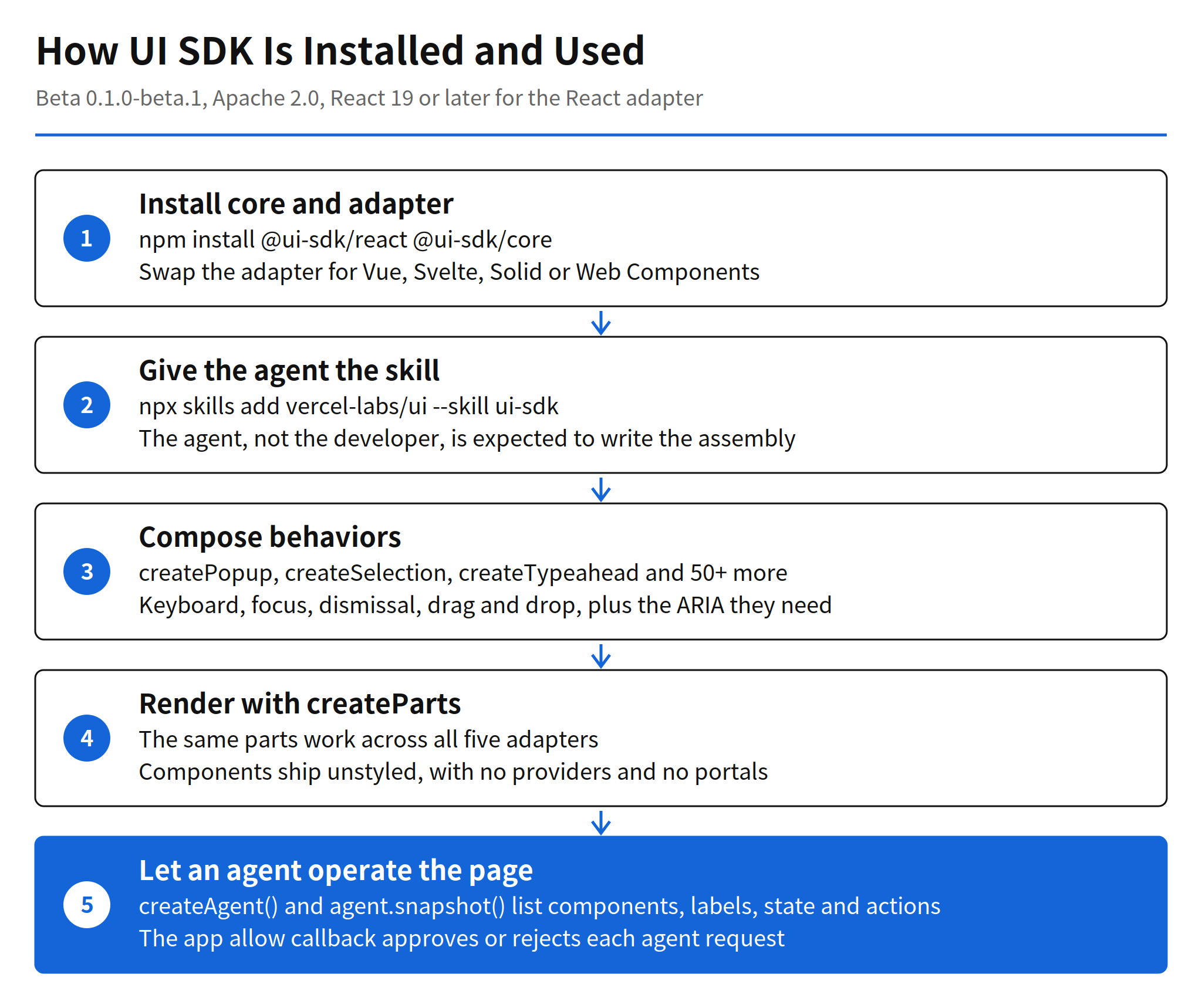
Agent bridge and WebMCP registration
The second half of the release points in the opposite direction. UI SDK is not only for agents that build interfaces; it also exposes interfaces for agents to operate. With createAgent(), an agent can call agent.snapshot() to read the list of components on a page together with their labels, state and available actions, then change values through each component's own API. The app keeps control through an allow callback that approves or rejects agent requests, and the same tools can be registered with the browser through WebMCP.
That bridge matters because it replaces screen reading with state reading. An agent that works from a screenshot has to guess where a control is and whether it worked. An agent that receives a structured snapshot gets names, states and permitted actions directly, which is a narrower and more checkable surface. The approval callback is the safety boundary in that design: the snapshot describes what exists, while the allow decision decides what the agent may actually change.
Measured results from the Vercel experiment
Vercel published its own comparison on a project setup task. With UI SDK, tool calls fell from 16 to 5, text read fell from 39.8k characters to 6.8k, completion time fell from 41 seconds to 16 seconds, and cost fell from $0.073 to $0.032. Both conditions used Claude Code with Sonnet, and each figure is the median of three runs.
The limits of that evidence need to stay attached to the numbers. The task count is one and the run count is three, so the ratios show that the approach can cut agent work sharply on a task shaped for it, not that every interface task will see the same reduction. Whether the gains hold on larger screens, legacy codebases or design systems with strict custom components is unconfirmed. Independent replication has not been published yet.
Position against shadcn/ui and component libraries
The clearest context is shadcn/ui, which popularized copying component code into a project instead of depending on a packaged component set. UI SDK splits one layer lower. Where shadcn/ui hands over a finished select, UI SDK hands over popup, selection and typeahead behaviors, so the agent can build the select and also the autocomplete and combobox variants that a fixed component catalog would need to list separately. For human developers this granularity adds assembly work; for agents, assembly is cheap and the failure risk sits in the interaction details the behaviors already cover. That trade is the bet behind the library, and it explains why the intended author of the assembly code is the agent rather than the developer.
Adoption signals are early but real. The vercel-labs/ui repository passed 1,000 GitHub stars on launch day and stood at 4,091 stars when observed on November 14. Star counts measure attention rather than production use, and the beta warning in the official documentation is explicit: the framework, APIs, documentation and behavior may change before general availability, under the Vercel beta terms. Pricing is simple by comparison: the library is open source under Apache 2.0, so there is no per seat or per component price; the costs are the agent usage and the styling and integration work inside each project.
Related articles
- VS Code 1.146 Release: Agent Inbox and Local Harness End
- Claude Code v2.1.323 Release: Code Mode and 1M Context
FAQ
What is Vercel UI SDK?
UI SDK is a Vercel Labs library that gives agents more than 50 behaviors, such as keyboard navigation, focus, selection, dismissal, popups and drag and drop, instead of finished components. The behaviors live in the framework independent @ui-sdk/core package, with adapters for React, Vue, Svelte, Solid and Web Components.
How is UI SDK installed?
Install core and one adapter, for example npm install @ui-sdk/react @ui-sdk/core, then give the agent the dedicated skill with npx skills add vercel-labs/ui --skill ui-sdk. The React adapter requires React 19 or later.
Is UI SDK free and production ready?
The code is open source under Apache 2.0 and the current npm version is 0.1.0-beta.1, so there is no license price listed. It is still a beta, and the official documentation says the API may change before general availability.
What did Vercel measure in its own UI SDK test?
On a single project setup task, Vercel reported tool calls falling from 16 to 5, text read from 39.8k characters to 6.8k, time from 41 seconds to 16 seconds and cost from $0.073 to $0.032. Both runs used Claude Code with Sonnet, and the figures are medians of three runs.