VS Code 1.146 Release: Agent Inbox and Local Harness End
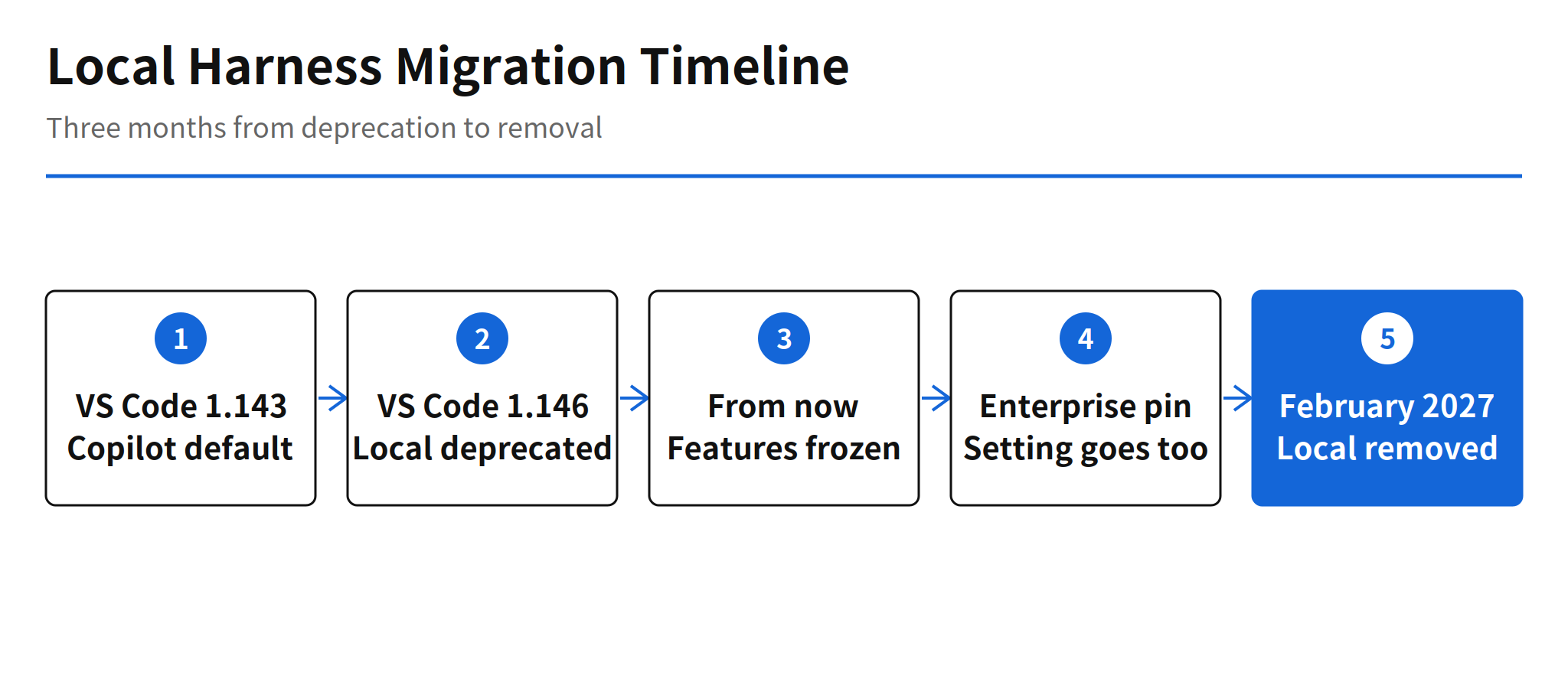
Microsoft released Visual Studio Code 1.146 as Stable on November 11, 2026, and the headline is a deadline. The Local harness is deprecated in this release and will be removed in February 2027. It stays usable for the next three months, but it is functionally frozen, and new agent features will land only on the Copilot harness, which has been the default for new sessions since VS Code 1.143.
Around that deadline, 1.146 adds the tooling for running several agent sessions at once. An experimental Inbox mode collects the sessions that need attention across projects, chat windows let a chat live in a window of its own, and model comparison can now place Copilot Fusion in any seat of a comparison, as an attempt, a judge or a synthesizer. Every one of these features assumes the Copilot harness and the Agents window, which is the real message of the release: the new workflow is being built in one place only.
The Harness Deadline
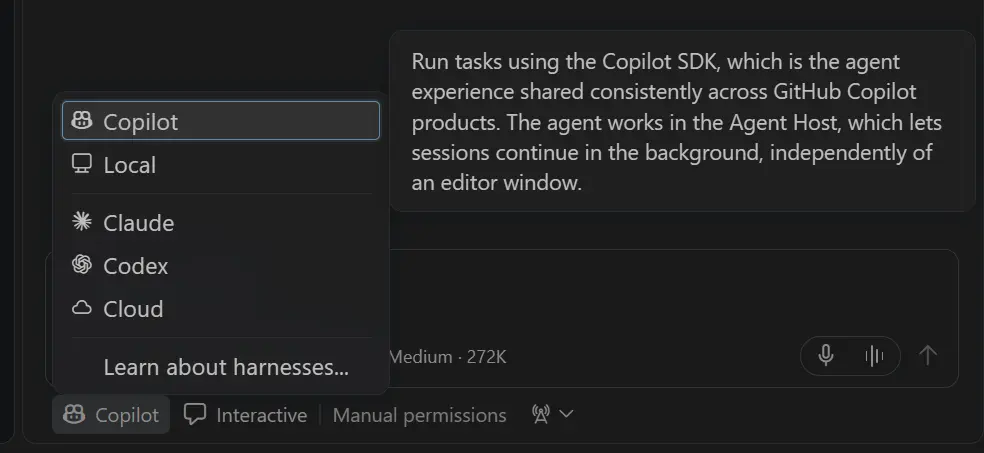
A harness is the runtime that executes an agent session. The Copilot harness is built on the Copilot SDK and runs sessions through the Agent Host, so a session keeps running in the background after its editor window closes and can be opened from both the editor window and the Agents window. For organizations, the Copilot harness also enforces managed sandbox and permission policies, which the Local harness does not offer. Microsoft states both points in the release notes as reasons the new features target the Copilot harness only.
The migration check itself is small. Start a new session and look at the harness picker. If it shows Copilot, that workflow is already on the surviving path. If it shows Local, the workflow has three months to move. Microsoft publishes a Local to Copilot transition guide covering customization compatibility, continuing existing Local conversations, and organization rollout and verification. What the guide cannot do is test a given setup. Custom agents and extensions tied to the Local harness need to be checked workflow by workflow, and no automatic conversion tool is announced in the release notes.
Organizations have the sharpest version of this deadline. The enterprise managed setting vscode.temporaryDefaultToLocalHarness, introduced in 1.142 to keep the Local harness as the default, is removed at the same time as the harness itself. A team that pinned the old behavior at the policy level loses both the harness and the pin in February 2027, so the rollout work belongs in this quarter, not in the removal month.
Inbox Mode and Inline Actions
Inbox mode answers a problem that only appears once agents run in parallel: sessions finish, fail or wait for review in different projects, and checking each workspace one by one stops scaling. With the setting sessions.list.inboxEnabled enabled and Grouping set to Inbox Mode in the Agents window sessions list, sessions that need attention rise to the top. The rest sort into Working, Ready to merge, On hold and Done. A session that can wait can be dismissed from the Inbox, put on hold or snoozed, and dismissing is not archiving. Marking a session as done is the separate archiving step.
The companion feature is inline actions in the same sessions list, enabled with sessions.list.inlineActions. A row can offer to fix failing checks or address review comments, and choosing the action sends the request to that session in the background without opening it. The release notes are careful about scope here: the setting does not enable Agent Merge and does not change action permissions. Both Inbox mode and inline actions are experimental and off by default in Stable, so today they are opt in previews of the multi session workflow, not the new default experience.
Chat Windows and Extensions in the Agents Window
Chat windows, in preview, let a chat leave the Agents window and live in a window of its own. A chat can be opened through the Open in New Window command on a session or dragged out of the Agents window, and its parts, chat, editors and terminals, can be rearranged freely inside that window. The practical gain is task shaped layout: one window per task, with the terminal placed under the editor, under the chat or at full width, instead of one crowded Agents window that hides the session you are waiting on. In Stable the feature needs sessions.chatWindows.enabled. In Insiders it is already on by default, which signals where the Stable default is heading.
The Agents window also stops depending on the editor window for extension management. Extensions can now be searched, installed and uninstalled from the Agent Customizations section of the Agents window, including Marketplace results with publisher, install count and rating. Extensions that contribute views, debuggers, status bar items or walkthroughs without declaring Agents window support show a warning listing the unsupported features before install, and extensions blocked by organization policy show the reason. That warning matters more than the convenience: an agent workflow that silently loses a debugger or a view is worse than one that never installs the extension.
Model Comparison With Copilot Fusion
Compare Models in the Agents window runs the same prompt across models, evaluates the attempts with a judge and can combine their strengths with a synthesizer. In 1.146 a judge and synthesizer can be added without selecting a workspace, and synthesis starts on demand and creates a new chat, leaving the original attempts untouched. The larger change is that Copilot Fusion can now be selected, with its supported effort tiers, as an attempt, as the judge or as the synthesizer. Fusion stops being only a contestant and becomes part of the evaluation machinery itself.
The automation layer sits behind sessions.chat.compareAgents.tools.enabled. With it on, an agent can discover models, launch comparisons and read the results and conversation references to summarize findings across scenarios. The tools are off by default and require Compare Models to be enabled. Turning them off leaves manual comparison fully available, so the release keeps a clean split: human run comparisons by default, agent run evaluations only where a team opts in.
Skills over MCP and Permission Changes
VS Code 1.146 adds support for SEP-2640 Skills over MCP, enabled with chat.agentHost.mcpSkills.enabled. An MCP server can provide skills directly to the model instead of shipping them as files on disk. The consent point is explicit: the first time you connect to a server that provides skills, you are asked whether to allow them into the model context, and afterwards the skills appear on the Skills tab of the Agent Customizations editor. For skill authors this widens the distribution path from files to servers. For users it adds one more supply chain decision, which is why the up front approval is part of the design rather than a detail.
Permissions move in the opposite direction, from broad to narrow. The Copilot harness previously suggested session wide allowances for operations such as web fetches, terminal commands and file reads. Prompts now add allowances for specific domains, commands and directories by default. Sandboxed sessions gain a matching protection for secrets: chat.agent.sandbox.credentials.envVars lists environment variables to mask, tools receive placeholders, and the real value is supplied only to approved HTTPS destinations named in injectHosts. The settings hold variable names, never secret values, and the chat input now shows a sandbox enabled note so the state is visible without opening the Permissions menu.
The pattern across this release is consistent. Multi session features get more powerful, and each one arrives with a narrower permission or an explicit opt in: granular allowances instead of session wide ones, masked variables with named injection hosts, and experimental tools that stay off until a setting turns them on.
Copilot CLI Handoff and Other Changes
A Copilot CLI session can now continue inside VS Code. Running /code in the CLI, or /code-insiders for Insiders, exits the CLI and opens the same session in the Chat view of the window for that folder. Conversation history, model, reasoning effort, mode and permissions carry over. Permissions that apply only to the CLI process, such as --allow-tool flags or approvals granted for that session, do not, and the CLI lists them before handing off. The command is experimental and requires Copilot CLI 1.0.107 or later with experimental features turned on.
Smaller changes fill out the release. The Copilot harness now works in virtual repositories, so a GitHub repository viewed without cloning gets the same Copilot workflow as a local folder. Canvases gain permission prompts for privileged capabilities and restore without another prompt when a session resumes. Copilot sessions follow VS Code proxy configuration, including PAC files and Kerberos, behind enterprise proxies. Markdown previews, chat and notebooks now render with Mermaid 12, which adds diagram types such as use case diagrams.
Limits and Unconfirmed Points
- Compatibility is per workflow: how far custom agents and extensions built on the Local harness carry over to the Copilot harness has to be verified in each setup. A transition guide exists, but no automatic conversion tool is announced.
- Preview and experimental defaults: Inbox mode, inline actions, Skills over MCP and the comparison tools are off by default in Stable. Chat windows are on by default only in Insiders. Microsoft gives no date for when these become Stable defaults.
- Local session history after removal: the release notes do not say what happens to Local harness session records after February 2027.
- Enterprise timing: because the
vscode.temporaryDefaultToLocalHarnesspin is removed with the harness, organizations cannot stage the policy change after the harness change. Both land in the same release.
My read is that 1.146 is less a feature release than a consolidation release. Microsoft picked one harness in 1.143, and this release puts a removal date on the other one while shipping the multi session tooling, Inbox, chat windows, agent run comparisons, that only makes sense on the surviving stack. The three month window is generous for an individual developer and short for an organization with managed settings and custom agents. The work is also front loaded by design: every new capability in this release is a reason to finish the migration early rather than a feature to evaluate after it.
FAQ
When is the Local harness removed from VS Code?
Microsoft says the Local harness is deprecated in VS Code 1.146 and will be removed in February 2027, three months after this release. It stays usable until then, but its features are frozen.
How do I turn on the agent Inbox in VS Code 1.146?
Set sessions.list.inboxEnabled to true, then choose Grouping and Inbox Mode in the sessions list of the Agents window. The setting is off by default in Stable.
What happens to the enterprise setting that kept the Local harness as default?
The vscode.temporaryDefaultToLocalHarness setting, introduced in VS Code 1.142, is removed together with the Local harness in February 2027. Organizations that pinned it need to plan the move earlier.
Can a Copilot CLI session move into VS Code?
Yes, as an experimental feature. Running /code in Copilot CLI 1.0.107 or later opens the same session in VS Code with its history, model and reasoning effort kept. Permissions granted only inside the CLI do not carry over.
Related Reading
- OpenSpec 2.0 Release: Shared Skills, No /opsx Commands, shared skills distribution through a different route than Skills over MCP
- Jane Street Agent Skills Release: 5,794 Stars in 8 Days, an earlier look at how agent skills get packaged and shared