OpenSpec 2.0 Release: Shared Skills, No /opsx Commands
Fission-AI released OpenSpec v2.0.0 on November 11, 2026 at 22:41 UTC. The release makes one structural change with wide consequences: skills now install once, in a shared .agents/skills/ folder, instead of a separate copy inside each coding agent's own folder. Every /opsx:* slash command is removed in the same release, because each command already has a matching skill. The OpenSpec workflows themselves have not changed.
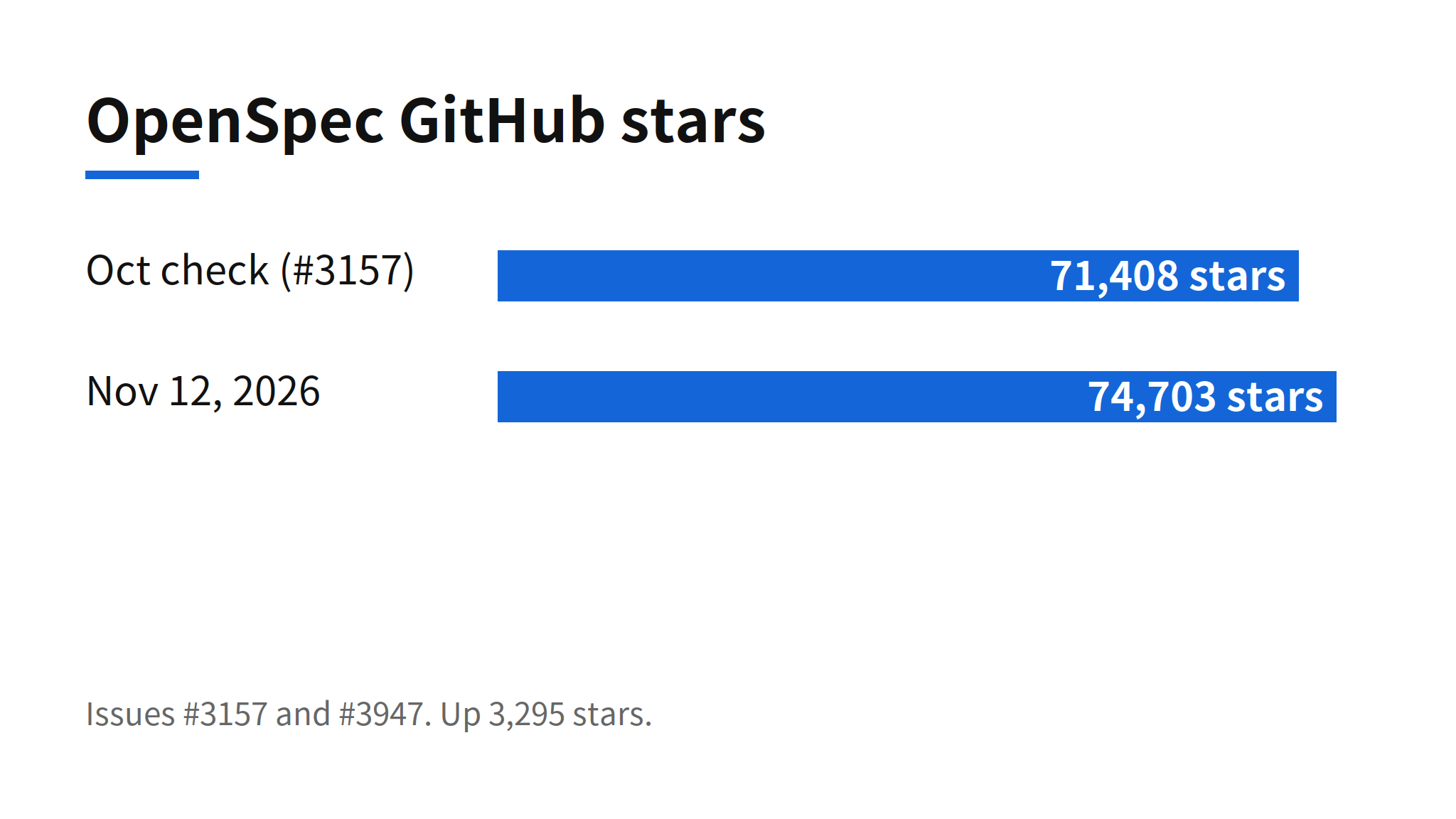
The repository had 74,703 stars when checked on November 12, 2026, up from 71,408 stars at the October check covered in issue #3157. That scale is why a folder layout change matters here. OpenSpec is a spec-driven development framework used across more than 30 coding tools, so its decision about where skills live is a data point for where the skills convention itself is heading: one shared location per project, with per-tool links only where a tool cannot read the shared folder directly.
One Shared Skills Folder in .agents/skills
Under 1.x, each tool received its own copy of the OpenSpec skills in its own folder. A project set up for several tools therefore carried several copies of the same instructions, and an edit made in one copy did not reach the others. In 2.0 the skills are written once to .agents/skills/. Tools that read that folder directly, such as Cursor and Codex in the upgrade guide's example, need nothing else. Tools that do not read it, named in the release notes as Claude Code and Kiro, get one link per skill in their own skills folder, pointing back at the shared copy.
The link list in the supported tools documentation is longer than the two examples in the release notes. It names Claude Code, Continue, ForgeCode, Kiro, CodeBuddy, EasyCode, iFlow, CodeArts, Lingma, GigaCode, Veai, Rovo Dev, Code Studio and Hermes Agent as link-based tools, and says every other supported tool reads .agents/skills/ directly, so it never loads a skill twice. Where a link cannot be created, OpenSpec writes a plain copy instead and refreshes it on openspec update. Links are never followed out of the project.
The practical gain is a single place to review and edit. The practical cost is that the shared folder becomes a single point of failure for careless edits, which is exactly where the upgrade risk below sits. A marker file, .openspec-target, records which tools are set up in the project and which skills were already the user's own, so update knows what belongs to OpenSpec and what it must never touch.
Slash Command Removal and Skill Equivalents
The /opsx:* commands are gone, not deprecated. Version 1.17.0 had already warned that command files would disappear in OpenSpec 2.0, and 2.0 executed that warning one day later. The reasoning in the release notes is simple: each command already had a matching skill carrying the same instructions, so maintaining both surfaces was duplication. Invocation changes shape rather than disappearing. In most tools a skill is called as /openspec-propose, in Codex as $openspec-propose, and any skill can also be triggered by asking the agent for the work in plain words.
| 1.x command | 2.0 skill |
|---|---|
/opsx:propose | openspec-propose |
/opsx:explore | openspec-explore |
/opsx:apply | openspec-apply-change |
/opsx:update | openspec-update-change |
/opsx:sync | openspec-sync-specs |
/opsx:archive | openspec-archive-change |
/opsx:new | openspec-new-change |
/opsx:continue | openspec-continue-change |
/opsx:ff | openspec-ff-change |
/opsx:verify | openspec-verify-change |
/opsx:bulk-archive | openspec-bulk-archive-change |
/opsx:onboard | openspec-onboard |
The breakage is real for anyone who wired the old commands into automation, scripts or team habits. Those call sites do not fail gracefully; the command files are deleted by update, so a workflow that invokes /opsx:propose stops working until it is rewritten to the skill name. Teams should grep their repos and runbooks for opsx: before upgrading, not after.
Upgrade Procedure in Practice
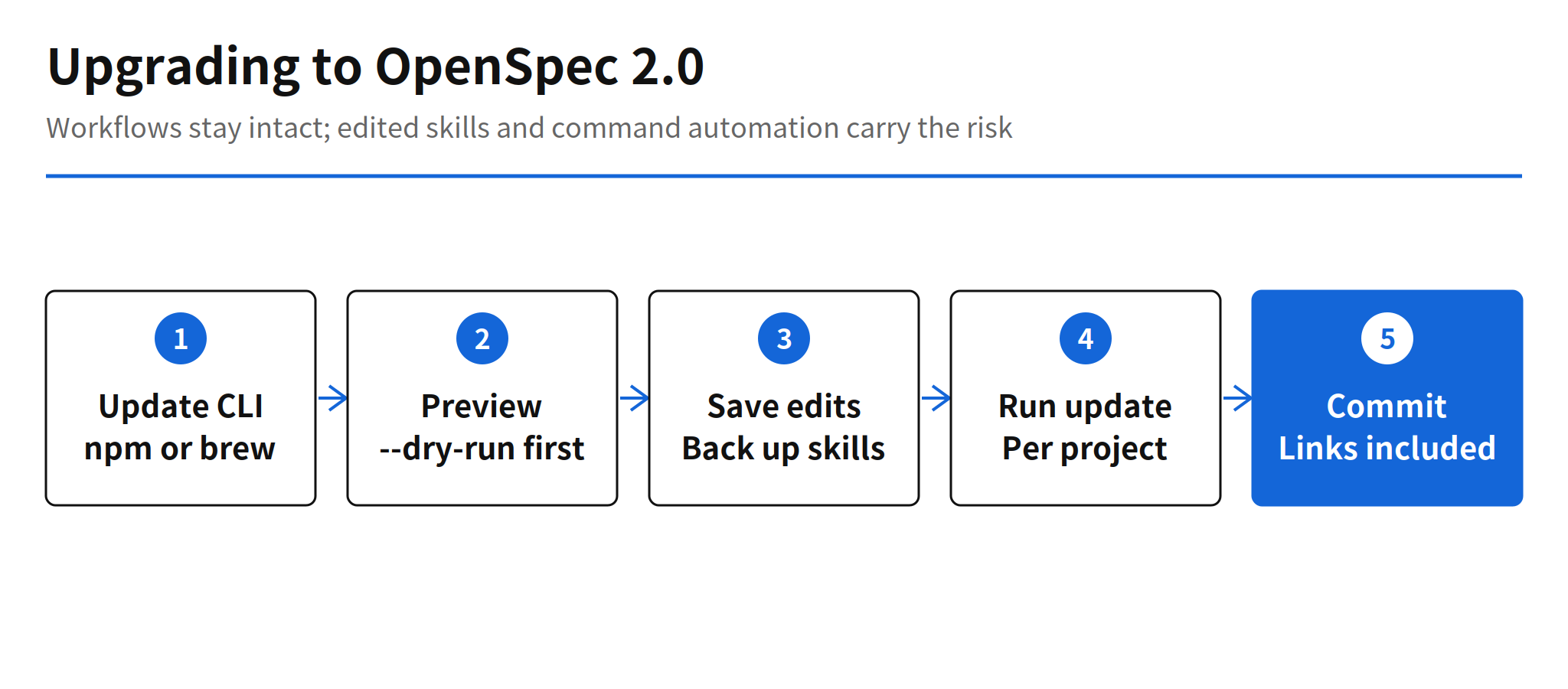
The documented sequence is short. Update the CLI the way it was installed, run openspec update inside each project, and commit the result. The CLI itself installs by a standalone script (curl -fsSL https://openspec.dev/cli/install.sh | sh on macOS or Linux, an irm installer in PowerShell on Windows), by npm with npm install -g @fission-ai/openspec@latest, which requires Node.js 22.12.0 or higher, or by Homebrew with brew install openspec and brew upgrade openspec for later updates. Running update a second time changes nothing, so the operation is idempotent once a project has moved.
openspec update --dry-run   # preview first
openspec update             # then apply, per project
Two preparation steps in the upgrade guide deserve emphasis because they are easy to skip. First, commit your work before upgrading. That commit is the only copy of any edit you made inside a skill that OpenSpec installs in .agents/skills/, and git stash cannot substitute, because git cannot stash a folder that became a link. Second, Windows teammates need two settings for the committed links to check out as links: git config --global core.symlinks true (or cloning with -c core.symlinks=true) and Developer Mode turned on in Windows settings. Without them, each link arrives as a small text file, and openspec update replaces it locally.
Edited Files, Kept Files and the Overwrite Risk
If you edited a skill that OpenSpec installs in .agents/skills/, openspec update overwrites that edit and keeps no backup. The dry run names each affected skill in advance. Save those edits before upgrading.
Update treats edited files in three different ways, and the distinction decides what survives. Old command files and duplicate skill copies that match what an earlier version generated are removed. A command file or an old skill copy that you edited inside a tool's own folder is kept and listed, because update will not silently delete user work; the guide then tells you to move anything worth keeping into the shared skill and delete the kept file by hand, since a tool that reads both folders may otherwise load the same skill twice, and a kept command file may still show up as a command. The third case is the sharp one: a skill OpenSpec itself installs in .agents/skills/ is refreshed in place on every update, as in 1.x, and an edit inside it is replaced with no copy kept. Update reports which skills this happened to, and the dry run prints the same warning before anything changes.
The durable way to customize is therefore to keep customizations where update does not write. The guide points to project instructions in openspec/config.yaml for context and rules, and to a skill of your own under a name that does not start with openspec-, such as .agents/skills/team-propose/, which update never touches. One narrow exception exists for MiniMax Code, whose skills live in a global folder: there, update saves an edited copy beside the original as SKILL.md.bak before refreshing it. Projects set up before 1.0 carry older files, and for those, update removes unchanged files without asking, asks before removing edited ones, leaves them alone in a non-interactive run, and with --force removes them either way, which is why the guide says to back them up first.
Retired Pieces: Delivery Setting and Amazon Q Developer
Two smaller retirements ride along with the layout change. The delivery setting, which used to choose whether a tool received skills, commands or both, is no longer needed because everything is skills now, and existing configuration files keep working without it. Amazon Q Developer support is removed outright. The stated reason is structural: it cannot load skills, so a skills-only OpenSpec has no surface left for it. The release notes recommend Kiro as the replacement, and the upgrade guide adds that update removes the OpenSpec files for Amazon Q. No other migration path for Amazon Q users is offered in the release material.
The release also carries two fixes unrelated to the layout. openspec completion install no longer edits PowerShell profiles when run from Windows cmd.exe, and openspec instructions apply no longer cuts off tasks that span several lines in tasks.md. Both are small, but the second one touches the core apply workflow, where a truncated task list could silently drop work.
Limits and Open Questions
- Per-tool link behavior in detail: the release notes do not specify the exact conditions for every tool, and how far each of the more than 30 supported tools follows the
.agents/skills/convention is documented tool by tool, not in one place. - Automation breakage: workflows and habits built on
/opsx:*commands must be rewritten to skill invocations. The release provides the mapping, but no compatibility shim. - Amazon Q path: Kiro is the only alternative presented to Amazon Q Developer users.
- Edited shared skills: customizations made directly inside OpenSpec-installed skills do not survive update by design, which will surprise anyone who treated those files as their own.
The broader read is favorable to the direction and strict about the migration. Skills started as a feature of individual agents, and OpenSpec 2.0 treats them as a shared project asset with one canonical location, which matches how multi-tool teams actually work. At the same time, this is a major version that deletes files and overwrites a specific class of edits, so the safe order is the one the guide itself lays out: commit first, dry run second, read the list of replaced skills, and only then update and commit again.
FAQ
What changed in OpenSpec 2.0?
OpenSpec 2.0 installs skills once in .agents/skills instead of keeping a separate copy for each coding agent. Tools that do not read that folder, such as Claude Code and Kiro, receive links to the same skills. Every /opsx:* slash command is removed because each command already has a matching skill, and Amazon Q Developer support ends because it cannot load skills.
How do you upgrade a project to OpenSpec 2.0?
Update the OpenSpec CLI first, then run openspec update in each project and commit the changes. Run openspec update --dry-run first to preview which files will change and which edited skills would be replaced. Commit your work before upgrading, because that commit is the copy of any edit made inside a skill in .agents/skills.
What replaces the /opsx:* commands?
Each old command has a skill with the same instructions. For example, /opsx:propose becomes /openspec-propose in most tools and $openspec-propose in Codex, /opsx:apply becomes openspec-apply-change, and /opsx:archive becomes openspec-archive-change. You can also ask the agent for the work in plain words.
Does openspec update delete files you edited?
It removes old command files and duplicate skill copies that match what older versions generated. A command file or skill copy you edited in a tool folder is kept and listed. The exception is a skill OpenSpec itself installs in .agents/skills: update rewrites it and keeps no copy, so save those edits first or move lasting customizations into your own skill with a name that does not start with openspec-.
How much does OpenSpec cost and what does it require?
OpenSpec is open source under the MIT license, so there is no license price. The npm install requires Node.js 22.12.0 or higher, and the project also ships a standalone installer and a Homebrew formula. The README says it works with more than 30 AI coding tools.
Related Reading
- Jane Street Agent Skills Release: 5,794 Stars in 8 Days, another project packaging agent skills as a shared library
- Hallmark v2 Design Skill: 50 Themes for Coding Agents, a design skill built for the same multi-agent skill ecosystem