Gemini Google Wallet Finance: Spending Insights Guide
Google added Google Wallet to the Gemini app on November 13, 2026, and the change is specific: Wallet is now one of the connected apps inside Personal Intelligence, the Gemini feature that already draws on Gmail, Photos, YouTube and Search to personalize answers. All Gemini app users in the United States can connect Wallet, and the answers that follow can be informed by their actual spending habits rather than by generic budgeting advice.
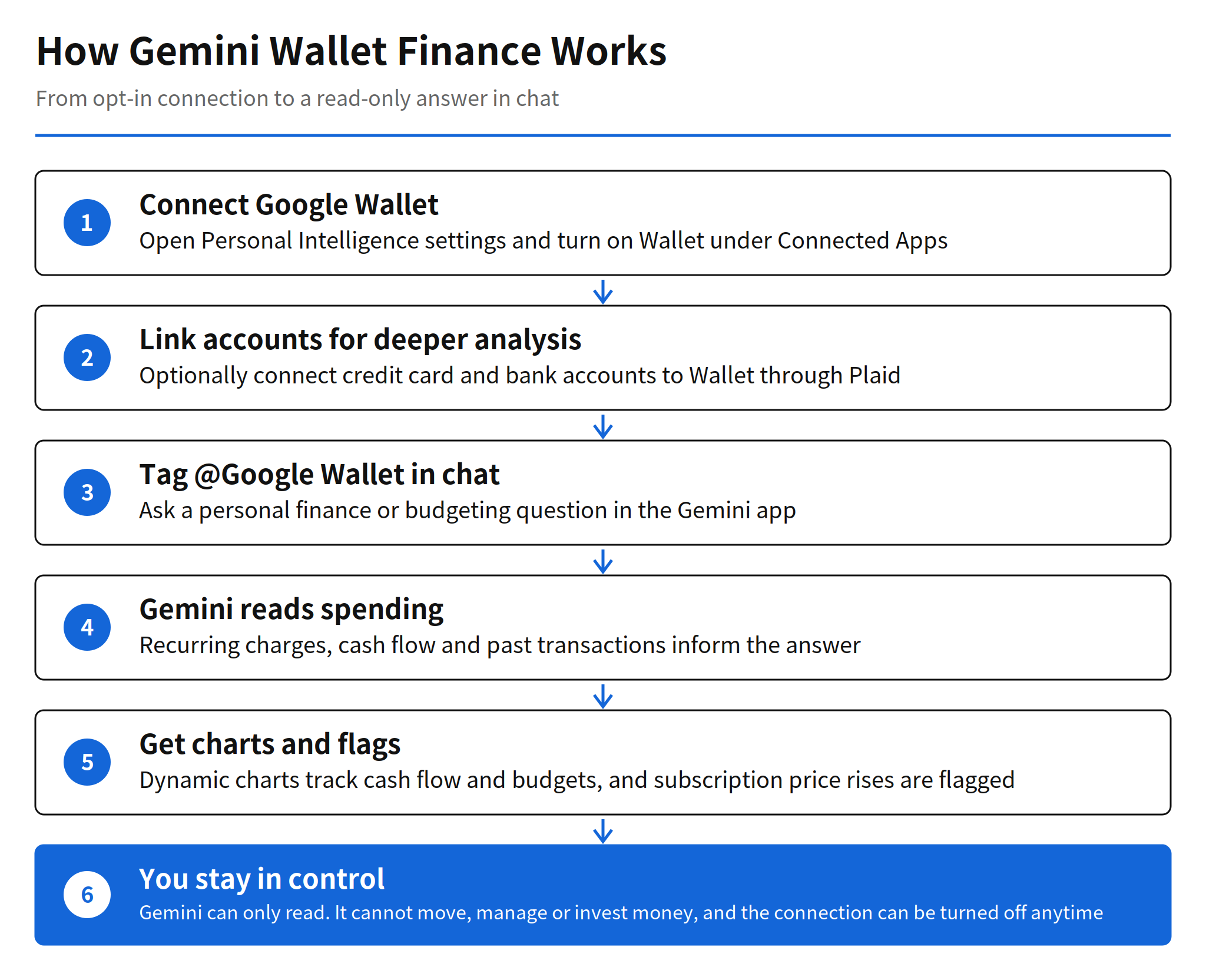
The interaction is a tag, not a separate finance app. A user opens Gemini, tags @Google Wallet in chat, and asks a question about personal finance or budgeting. Google is explicit about the boundary of that access: Gemini can only read information from the accounts. It cannot move, manage or invest money. That read only limit is not a footnote to this release. It is the design decision that separates Google's wallet from the payment executing wallet OpenAI announced the same day.
What the Wallet connection does in chat
Google gives three worked examples, and each one depends on transaction history that a chatbot without account access simply does not have. The first is spending visualization. A question such as asking Gemini to review spending from last quarter so the user can save $1,000 over the next three months produces dynamic charts inside the chat that track cash flow, asset allocation and budgets. The chart is generated from the user's own transactions, so the savings target is tested against real outflows instead of a template.
The second example is the one most likely to matter in daily use: forgotten subscriptions. Asking what subscriptions are still being paid for, and whether any of them went up in price this year, makes Gemini search recurring charges across the linked accounts and flag price increases. Subscription creep is a problem of attention, not of arithmetic. People rarely cancel a service because they decided to keep it at the new price; they keep paying because the increase was small, quiet and easy to miss. A system that reads every recurring charge and compares prices over time attacks exactly that failure mode.
The third example is seasonal budgeting. Asking how much was spent on gifts and travel last year, and using that figure to set a holiday budget for this year, turns last year's transactions into a planning baseline. The value here is calibration. A budget built from what a household actually spent last December is harder to dismiss than a round number picked in November, and the same logic applies to any recurring spending season.
Connection steps and the optional Plaid link
The setup follows the Personal Intelligence pattern. The user decides whether to connect Wallet under Connected Apps in the Personal Intelligence settings, and the connection can be turned on or off at any time. Nothing in the announcement suggests the connection is on by default; it is an opt-in that the user enables.
Wallet on its own covers the payment activity that already runs through Google Wallet. For deeper analysis, users can also link financial accounts from credit cards and banks to Wallet through Plaid. Google describes this link as an option for unlocking deeper insights, not as a requirement. The distinction matters for the subscription use case in particular: recurring charges spread across several cards and a bank account are only fully visible when those accounts are linked, and a partial view can miss the very charges the feature is meant to surface.
The rollout covers web and mobile, for Gemini app users on both Android and iOS. Google uses the phrase rolling out for the launch, so availability can differ by account even inside the United States.
Read only access and the same day contrast with ChatGPT Wallet
The permission boundary deserves a direct comparison, because the same day produced the opposite choice. OpenAI launched ChatGPT Wallet on November 13 as well, and its structure lets an agent execute an actual payment after user approval, without the agent seeing the real card details. Google's structure stops one step earlier: the agent reads, analyzes and proposes, and the human does any spending.
Each boundary has a cost. A read only assistant cannot act on what it finds, so a flagged subscription still needs the user to go and cancel it. A payment capable agent removes that friction but takes on the risk profile of moving money. Google's framing puts security and privacy at the center of the announcement, and the read only rule is the concrete form that framing takes. Which model users trust with transaction data first is an open question, and the answer will likely decide how fast either wallet expands its permissions.
Memory Summary and control over what Gemini remembers
The same announcement adds a control surface for the personalization layer itself. Memory Summary shows a clear, readable snapshot of the saved preferences, interests and ongoing goals that Gemini uses to tailor responses, gathered in one place. Users can review the contents and edit or remove details at any time, through Profile, then Personal Intelligence, then Memory Summary.
Memory Summary is available on web and mobile for all Gemini app users in regions where Personal Intelligence is available. Pairing it with the Wallet launch is a sensible sequence. Asking users to connect spending data in the same release that gives them a visible, editable list of what the assistant remembers addresses the obvious objection before it hardens: personalization that cannot be inspected feels like surveillance, while personalization with an edit button is a setting.
Limits and unverified points
Three gaps in the announcement should stay attached to any plan built on this feature. First, there is no schedule for regions outside the United States. The announcement does not mention one, and Personal Intelligence availability itself varies by region. Second, the range of financial institutions that can be linked through Plaid, and the exact point at which individual US accounts receive the feature during the rollout, are not specified. Third, how long Wallet data read by Gemini is retained, and whether it is used for training, is not confirmed by the announcement itself; Google points readers to linked support documentation for the details.
The practical reading is narrower than the headline. This is a US only, opt-in, read only finance layer inside a chat app, launched with three concrete uses: spending charts, subscription price increase flags, and budgets grounded in last year's transactions. That is still a meaningful step. An assistant that can see real spending is a different product from one that can only discuss money in the abstract, and the subscription flag alone is a use case that needs no further features to be worth turning on.
Related articles
- Gemini 4 Hydrogen Release: Pricing, Speed and Benchmarks
- Gemini Decisions API: Pricing, Speed and How It Works
FAQ
What did Google add to Gemini on November 13, 2026?
Google added Google Wallet to the connected apps list of Gemini Personal Intelligence. All Gemini app users in the United States can connect Wallet so responses can draw on their spending habits.
How do users ask Gemini about their spending?
Users tag @Google Wallet in a Gemini chat and ask a personal finance or budgeting question. Gemini can then build dynamic charts for cash flow, asset allocation and budgets, find recurring subscription charges, and suggest a holiday budget from last year spending on gifts and travel.
Can Gemini move money through Google Wallet?
No. Google states that Gemini can only read information from connected accounts. It cannot move, manage or invest money, and users opt in through Connected Apps settings and can turn the connection off at any time.
Is the Wallet connection available outside the United States?
The November 13, 2026 announcement covers all Gemini app users in the United States, on web and mobile for Android and iOS. It gives no schedule for other regions, and account level rollout timing inside the United States is described only as rolling out.