DeepSeek App APIs: Search, Files and Voice Pricing
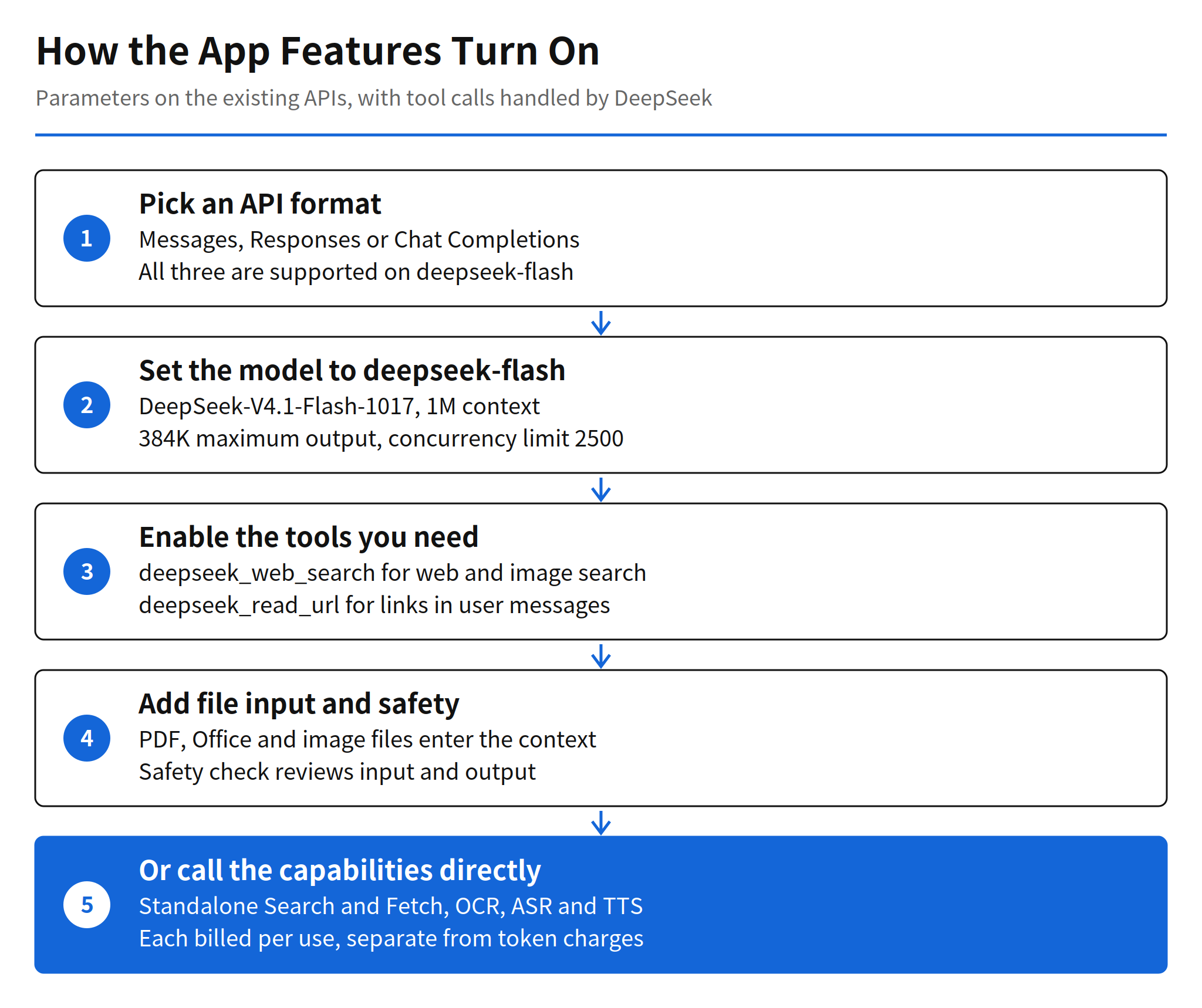
DeepSeek opened the feature set of its own app to developers on November 13, 2026. Web search, file input, URL reading, voice interaction and a safety check now work inside the existing APIs on the deepseek-flash model. A developer enables a parameter, and the service handles the tool calls and the context assembly that used to require separate integrations for a search engine, a document parser and a speech provider.
The release matters less as a model update than as a packaging change. The model itself is DeepSeek-V4.1-Flash-1017, the version shipped on October 17, with a 1M token context, a 384K token maximum output and a concurrency limit of 2500. What changed is everything around the model. The capabilities that made the DeepSeek app feel complete are now line items a third party can buy, each with a published per-use price.
Features inside the existing APIs
Web search runs in two modes, and the difference is the thinking setting. With thinking disabled and the deepseek_web_search tool enabled, the model runs a web or image search as the question requires and answers with citations. With thinking enabled, the same tool turns into a longer process in which the model searches and reads links on its own across multiple reasoning steps. The first mode suits a chatbot that needs a sourced answer quickly. The second suits research style questions where the path to the answer is part of the work, and it will consume more reasoning tokens along the way.
File input accepts PDFs, Office files, images and more. DeepSeek extracts plain text or parses the file while preserving its layout, then places the result in the conversation context for the model to answer from. URL reading works through the deepseek_read_url tool, which detects links in the user message, fetches the pages and answers with them in context. Both features remove plumbing that product teams normally build themselves, and both inherit the limits of that plumbing. A page that blocks fetching or a document whose layout parses badly will still fail, only now the failure happens inside a service call instead of inside code the developer owns and can debug directly.
The safety check reviews model input and output when its parameter is enabled, and returns a refusal marker when it finds a risk. DeepSeek describes this plainly as basic risk control, and the change log adds a compliance note for anyone serving the public: enable the parameter, and meet obligations such as content safety review, large model registration and AI labeling. No filtering accuracy, false positive rate or category breakdown is published, so a team with its own moderation requirements cannot treat this switch as a measured substitute for its own checks. It is a floor, presented as a floor.
Standalone APIs and the demo client
The same underlying capabilities are also sold separately. Search and Fetch, OCR, ASR and TTS can each be called directly, without a chat completion in front of them. That split is useful for pipelines that need only one step, such as transcribing a recording or parsing a batch of documents, and it makes the pricing easier to audit because each call maps to one charge.
DeepSeek also built and open-sourced a demo chat client on these APIs. The client can import an existing DeepSeek chat history, which makes it a reference implementation rather than a toy. A developer evaluating the suite can run the client first, see how the tool calls and context assembly behave in a real conversation, and then decide which parts to rebuild and which parts to keep buying.
This release also completes a sequence that started on October 17, when DeepSeek opened its in-house search API. That engine, the company says, handles hundreds of millions of search requests a day, indexes hundreds of billions of pages, and filters SEO spam, GEO manipulation and low quality generated content. Search was the first app capability to leave the app. Now the rest of the suite has followed it, which suggests the October release was a test of demand rather than a one-off.
Pricing and the real cost shape
Tool charges sit on top of token charges, and the pricing page keeps them in separate tables for a reason. Search covering text and image costs $0.75 per 1,000 searches, and web fetch costs the same per 1,000 fetches. File parsing and OCR cost $0.225 per 1,000 pages. Text to speech lists at $0.45 per 10,000 characters, currently half price at $0.225, and speech to text lists at $0.116 per audio hour, currently $0.058. Charges are deducted from a topped-up or granted balance, with the granted balance used first.
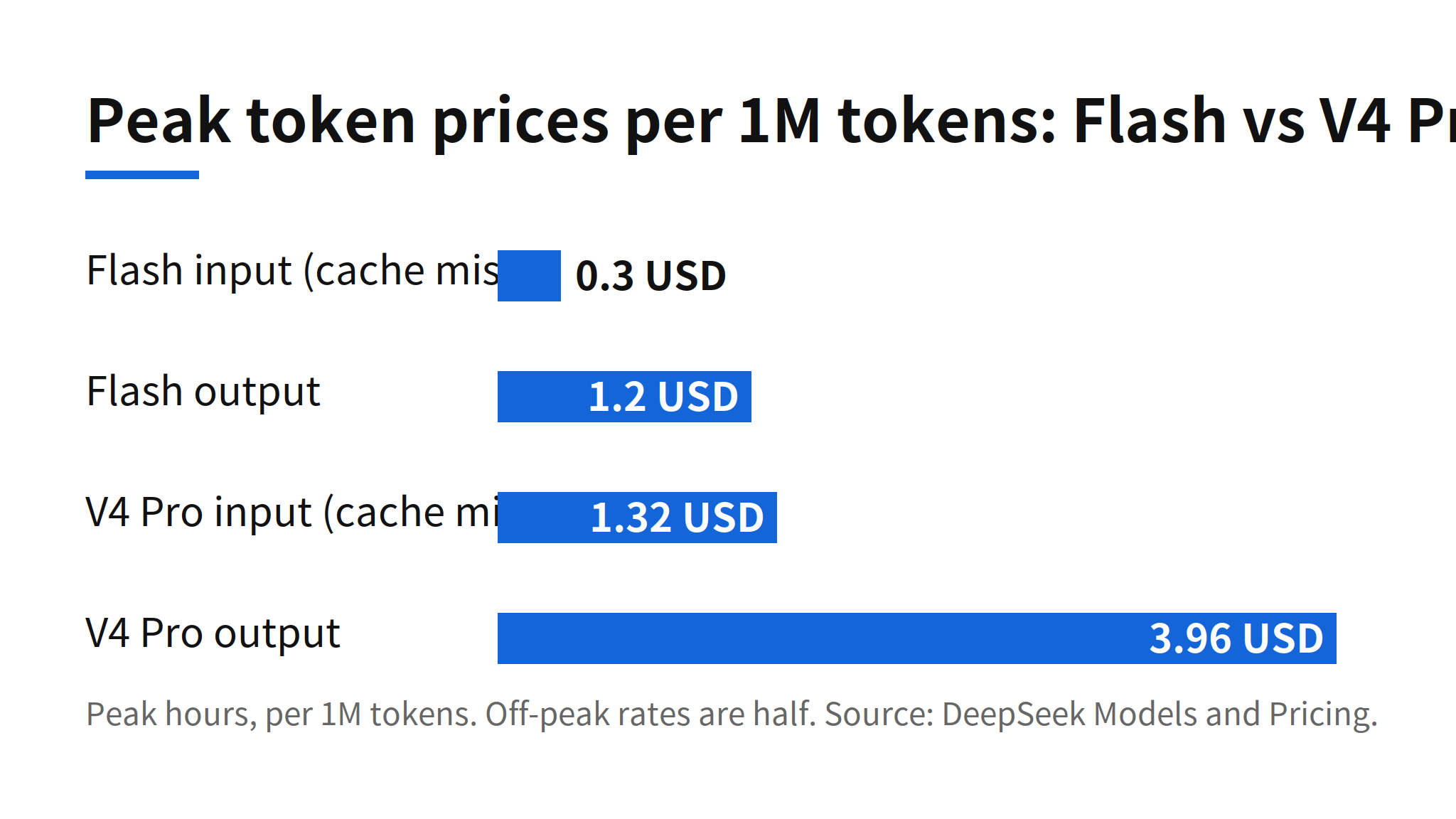
Token prices for deepseek-flash stay low, especially off-peak. At peak, a cache-miss input costs $0.30 per 1M tokens and output costs $1.20. Off-peak rates are half of peak, and peak hours are defined as 01:00 to 04:00 and 06:00 to 10:00 UTC on weekdays, excluding Chinese public holidays. The practical consequence is that a search-heavy product can spend more on tools than on tokens. A conversation that triggers several searches and fetches per answer pays for each one, while the tokens for a short answer stay small. Cost modelling for this suite has to start from expected tool calls per session, not from token volume alone, and the change log does not publish call limits for the new tools, so capacity planning still has an open variable.
Compatibility and adoption path
The features work across the Messages, Responses and Chat Completions APIs. Messages compatibility matters in practice because clients written against the Anthropic format can be pointed at DeepSeek with limited changes, and the base URLs reflect that split: https://api.deepseek.com for the OpenAI format and https://api.deepseek.com/anthropic for the Anthropic format. A minimal call still looks like a normal chat completion with the model set to deepseek-flash, as in the documented example below. The new work sits in the parameters and tools layered on top of that call, not in a new client.
curl https://api.deepseek.com/chat/completions \
  -H "Content-Type: application/json" \
  -H "Authorization: Bearer ${DEEPSEEK_API_KEY}" \
  -d '{
    "model": "deepseek-flash",
    "messages": [
      {"role": "user", "content": "Hello!"}
    ],
    "stream": false
  }'
The sensible adoption order follows the risk order. Search and URL reading are easy to trial behind an existing answer flow because citations make failures visible. File input needs a check against the documents a product actually receives, since parsing quality varies by layout. The safety switch should be enabled for public services, as DeepSeek itself instructs, while keeping any existing moderation in place until the new check has been observed in production. Voice is the most separable piece, and its limited-time half pricing is a reason to test it now rather than a reason to commit a roadmap to it.
Related articles
- Brave Search API x402 Payments: $0.005 Per Query, No Key
- Claude Code v2.1.323 Release: Code Mode and 1M Context
FAQ
What did DeepSeek release on November 13, 2026?
DeepSeek opened the features of its app to developers through the existing APIs. On deepseek-flash, developers can enable web search, file input, URL reading and a safety check by setting parameters, while the service handles tool calls and context assembly. Search and Fetch, OCR, ASR and TTS are also available as standalone APIs.
How much do DeepSeek search and file parsing cost?
Search covering text and image, and web fetch, cost $0.75 per 1,000 uses. File parsing and OCR cost $0.225 per 1,000 pages. These charges are separate from token charges and are billed per use whether the model calls the tools or the developer calls the standalone APIs directly.
Which API formats support the new features?
The deepseek-flash model supports the features in the Messages, Responses and Chat Completions APIs. The model is DeepSeek-V4.1-Flash-1017, with a 1M token context, a maximum output of 384K tokens and a concurrency limit of 2500.
What does the DeepSeek safety check do?
With the safety parameter enabled, DeepSeek reviews model input and output and returns a refusal marker when it finds a risk. The company describes this as basic risk control and tells developers serving the public to enable it and to meet obligations such as content safety review, large model registration and AI labeling. No measured filtering performance is published.