Meta Muse Spaces: Custom App Spaces You Describe in Words
Meta announced Spaces for the Muse app on November 6, 2026. A user describes an idea in words, and Muse builds a custom space for it inside the app. The examples Meta leads with are deliberately ordinary: a holiday gift tracker, a daily word game, and a DIY project planning board. The point is not a new chat trick. It is a persistent screen, shaped around one person's routine, living inside an agent app.
Spaces is available from day one in every region where Muse is offered. That breadth matters because the feature changes what the app is. Muse stops being a single interface Meta designs for everyone and becomes a container where each user accumulates small tools of their own. The release also landed one day after Muse Voice rolled out across the United States, and on the same day as the specialized Muse Wonder models, so November 6 reads as a coordinated push on the Muse product line rather than an isolated feature drop.
How Creation, Placement and Scheduling Work
Creation starts with a description. The user explains what they need, and Muse generates a space matched to it. The first version is not final. Meta says a space can be refined in conversation while it is being used: ask for a missing feature, change how it looks, or change how it behaves. That edit loop is the practical core of the feature, because a generated screen is rarely right on the first pass, and a space that cannot be adjusted becomes a novelty that gets deleted within a week.
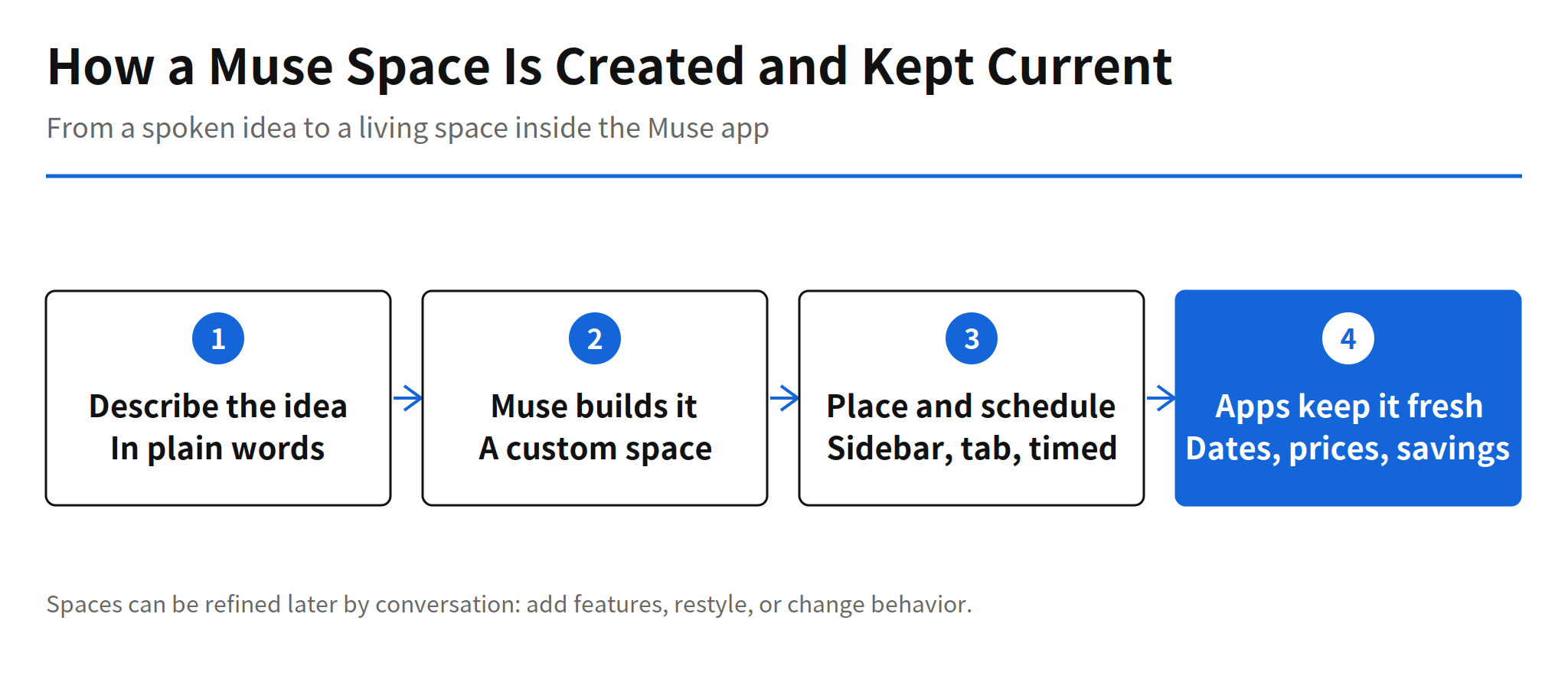
Placement is also under user control. A space can sit in the sidebar, move to a main tab, or be hidden when it is not needed. Spaces can be scheduled to appear at set times. Meta's example is a weekly planner in front during the week that gives way to a weekend plan on Saturday. Scheduling is a small detail with a large implication: the app's front surface becomes time aware, and different tools compete for the same home position across the week rather than sitting in a static list.
The Nine Example Spaces Meta Published
Meta published nine example uses. The first group covers personal organization and play: a shopping hub, a school dashboard, a music tracker, a wedding planner, and a quiz game. The second group leans toward work: a podcast studio, a small business order tracker, a freelancer client hub, and a travel planner. Read as a list, the nine examples sketch the market Meta is aiming at. Four of the nine are small business or solo work tools, which suggests Spaces is not only a consumer toy. A freelancer client hub or an order tracker is a lightweight business app, the kind of thing that today lives in a spreadsheet or a paid SaaS subscription.
The most consequential claim sits behind the examples. When connected apps are linked, a space keeps itself current in the background. New performance dates, price changes, and savings progress appear without the user asking. Inside the space, the user can check items off and leave notes and edits. A static generated page would be a curiosity. A generated page that pulls fresh data from connected apps and accepts direct edits starts to behave like software, and it raises the questions that come with software: how often it refreshes, what it is allowed to touch, and what happens when the data source changes.
Availability, Sharing and the Unanswered Questions
Meta says Spaces works in all Muse regions from November 6. Sharing is the exception. Letting other people into a space is still under review, with no launch date given. That gap is significant, because several of the nine examples, a wedding planner or a freelancer client hub, are naturally collaborative. A space only its creator can open is a personal dashboard. A shared space becomes a small group app, and that is a different product with different privacy and permission problems, which likely explains why Meta is holding it back.
Three further points are undisclosed in the announcement. Meta has not said how often a space refreshes in the background. It has not said whether a space can act on its own, for example sending a message or making a purchase, rather than only displaying information. And it has not mentioned Spaces specific pricing or usage limits, or confirmed that the existing Muse pricing simply carries over. Until the action question is answered, Spaces should be read as a display and organization layer, not as an autonomous agent that transacts on the user's behalf.
The shift to watch is the unit of competition moving from model quality to the persistent workspace an agent maintains for each user.
For Android developers, the open questions are concrete ones. A space that refreshes in the background and surfaces on a schedule has to live alongside notifications, widgets, and background sync limits. How Muse handles that on Android will decide whether Spaces feels like a resident tool or a page the user has to remember to open. The concept, a described tool that builds itself and stays current, is now in production at Meta scale, and the implementation details that follow will be the real story.
Related Reading
Spaces arrived in a dense week for Muse. See the coverage of the specialized models trained with Muse Wonder, released the same day, and of Muse Voice, the video call conversation feature that rolled out across the United States the day before Spaces.
FAQ
What is Muse Spaces?
Spaces is a Muse feature Meta announced on November 6, 2026. A user describes an idea in words and Muse builds a custom space inside the app, such as a holiday gift tracker, a daily word game or a DIY project planning board.
Can a space be changed after it is created?
Yes. Meta says users can keep refining a space in conversation, asking for missing features, a different look or different behavior. Users also control placement, putting a space in the sidebar or a main tab, hiding it, or scheduling when it appears.
How do spaces stay up to date?
When connected apps are linked, a space keeps itself current in the background. New performance dates, price changes and savings progress show up without the user asking, and the user can check items off and leave notes and edits inside the space.
Where is Muse Spaces available and can spaces be shared?
Meta says Spaces is available in every region where Muse is offered, starting November 6, 2026. Sharing a space with other people is still under review, and Meta has not announced pricing or usage limits specific to Spaces.