stack-diagram: One Sentence to an Architecture Diagram
stack-diagram, an agent skill published by caru-ini on GitHub, turns one sentence describing a stack into an architecture diagram with official logos. The repository was created on November 1, 2026 and had collected 862 stars by the November 2 check. Releases moved quickly in that window: v0.1.0 shipped on November 1 and v0.3.0 followed on November 2. The skill is written in TypeScript.
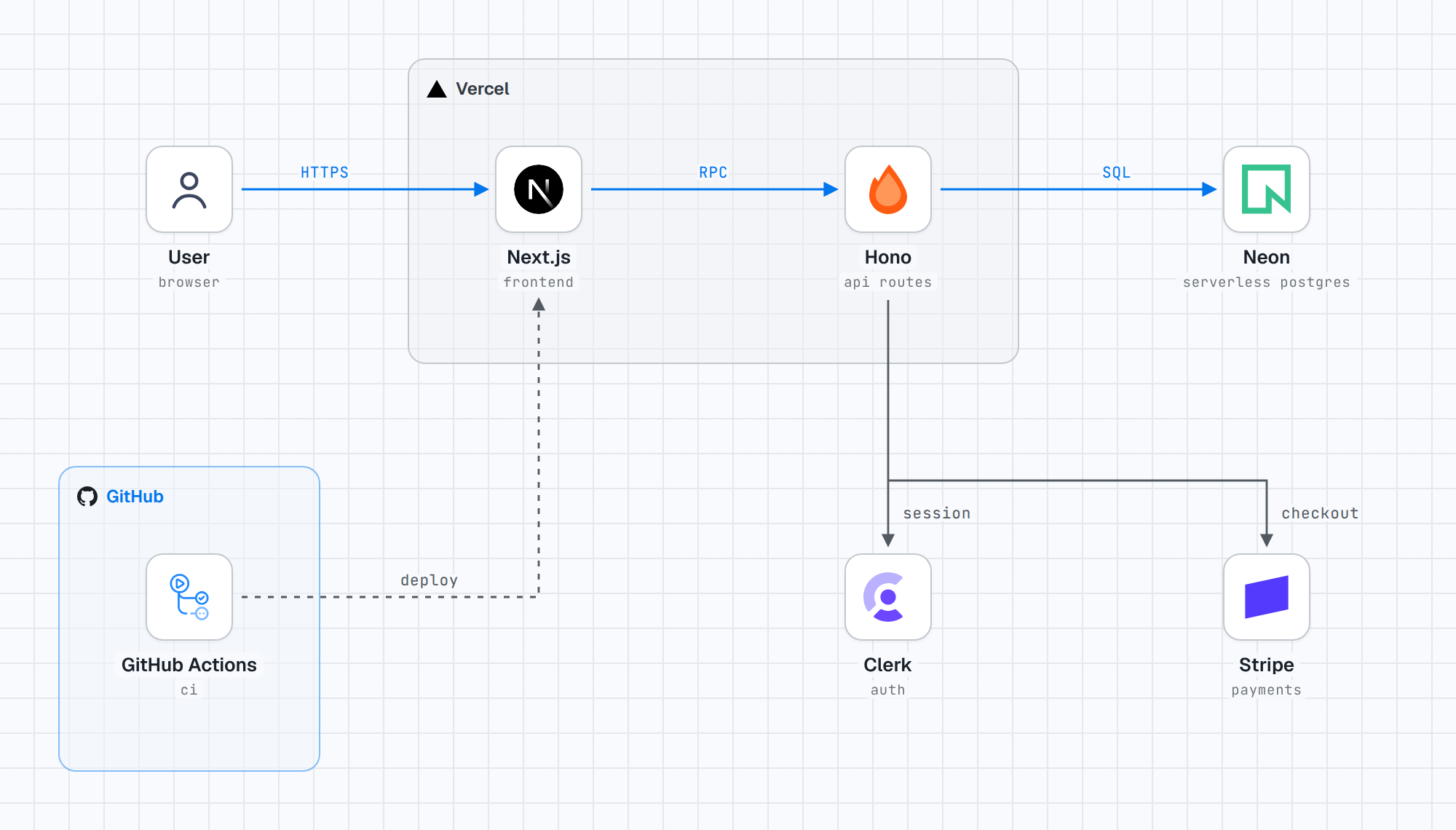
The input is deliberately small. The README example is a single description: Next.js and a Hono API on Vercel, Postgres on Neon, auth with Clerk, payments with Stripe, and GitHub Actions for deploys. From that one sentence the skill produces the diagram a developer would otherwise draw by hand in a separate editor, placing each named service with its official logo and connecting the pieces the sentence names.
That placement matters because the description usually already exists. In an agent session, a developer has often just explained the stack in words to get help with code or a design review. A conventional diagram tool asks for that same information again, this time as boxes and arrows placed manually. stack-diagram removes the second pass: the sentence in the conversation becomes the diagram input, and the drawing happens in the same place the explanation was given.
How the Skill Runs in Practice
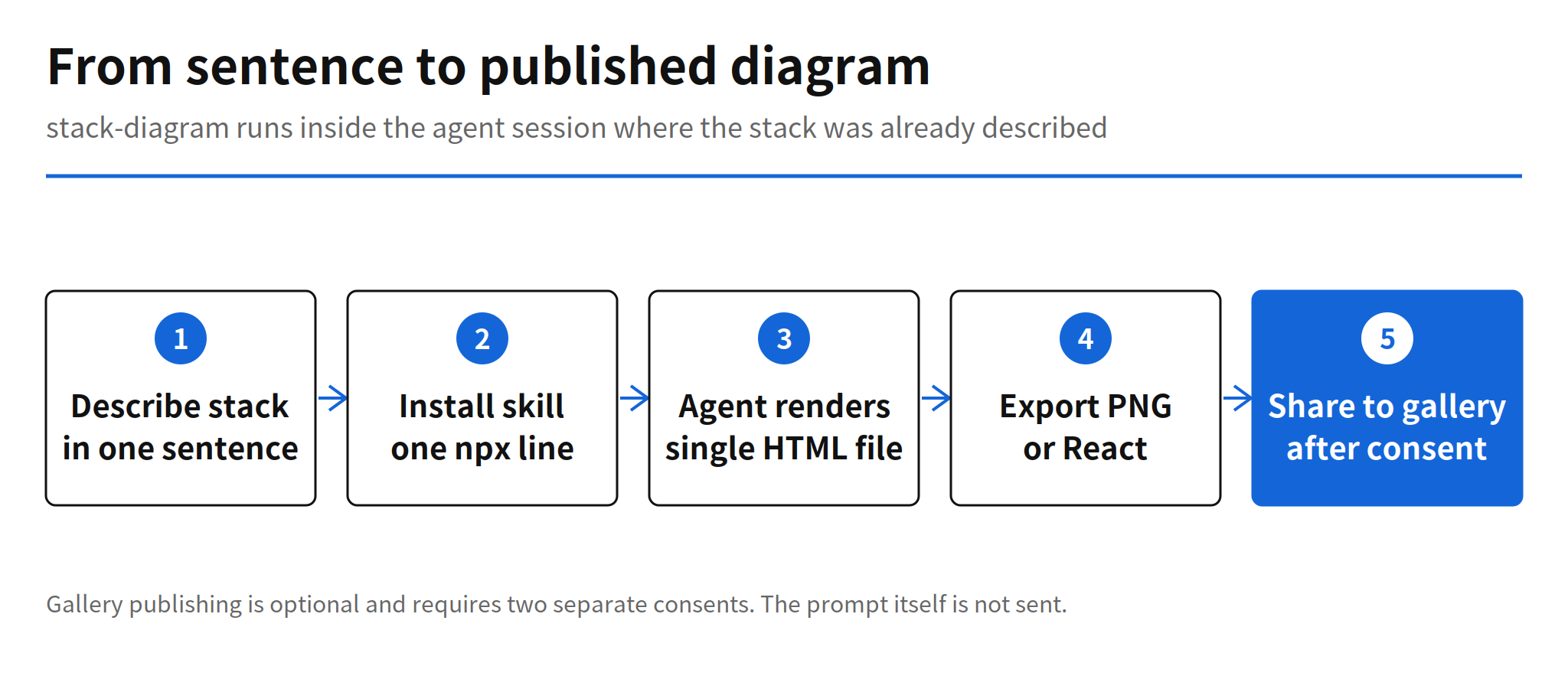
Installation is one line: npx skills add caru-ini/stack-diagram. The skill runs in Claude Code, Codex, Cursor and other agents that support the agentskills.io format. In the Claude app, the route is different but still short: the stack-diagram.zip file from Releases is uploaded as a skill. That cross-agent support is the structurally important part. A skill that installs the same way in three competing coding agents is a distribution unit that is not tied to one harness, so a team can standardize the diagram step even when its members use different agents.
The output format reinforces the portability point. A diagram is a single HTML file with fonts and logos embedded, so it renders anywhere without a network connection. A PNG and a React component can also be extracted from the same file, which covers the three places diagrams normally end up: a document, an image slot, and a codebase. Every diagram renders in both light and dark themes, so the same file survives a documentation site that switches modes.
Gallery Sharing and Consent
Finished diagrams can be posted to a public gallery at stacks.caru.moe. The publishing flow is conservative in a way worth noting. Before posting, the agent shows the user the scope of what will be public, and it posts only after the user consents twice. The prompt itself is not sent. For a tool that works from a sentence describing a real system, that distinction is practical: the diagram may be shareable while the wording that produced it, which can contain internal context, stays local.
The gallery rule also sets a limit that users should know before relying on it. According to the README, deleting a diagram from the gallery is possible only when a GitHub login has been linked. Sharing is therefore easy to grant and narrower to undo, which is an argument for treating the double consent step as a real decision rather than a formality.
Limits and Unconfirmed Details
- Services without logos: how the skill handles a service that has no official logo, or an internal system, is not stated in the README and remains unconfirmed.
- Complex stacks: how accurately connections are inferred for a large or ambiguous stack has no independent verification yet.
- Gallery deletion: removal from the public gallery requires a linked GitHub login, according to the README.
Those gaps do not weaken the confirmed core: one sentence in, one self-contained HTML diagram out, across the main coding agents. They do set the questions for a serious trial. A team evaluating the skill for design reviews should test it on a stack with internal services and a tangled dependency graph first, because that is exactly where the README is silent and where hand-drawn diagrams are hardest to replace.
Related Reading
Turning a codebase into a visual map for coding agents is also the subject of Floorplan Maps Your Codebase for Claude Code and Codex. Floorplan maps code that already exists, while stack-diagram draws the stack a sentence describes, and both move diagram work into the agent session. Agent skills as a packaging format are covered further in Hallmark v2 Design Skill: 50 Themes for Coding Agents.
FAQ
What is stack-diagram?
stack-diagram is an agent skill by caru-ini, written in TypeScript and published on GitHub on November 1, 2026. You describe a stack in one sentence and the skill draws an architecture diagram with official logos for the services in that sentence.
How do you install stack-diagram?
Installation is one line, npx skills add caru-ini/stack-diagram. It works in Claude Code, Codex, Cursor and other agents that support the agentskills.io format. In the Claude app, you upload the stack-diagram.zip file from Releases as a skill.
What does stack-diagram output?
The output is a single HTML file with fonts and logos embedded, so it renders anywhere without a network connection. PNG and React component versions can be extracted from the same file, and every diagram renders in both light and dark themes.
What is not yet known about stack-diagram?
The README does not say how services without a logo or internal systems are handled, and there is no independent verification of how accurately connections are drawn for complex stacks. Deleting a gallery diagram requires linking a GitHub login, according to the README.