Gemini Computer Use on Mac: Release, Controls and Limits
Google introduced computer use in the Gemini app for Mac on November 19, 2026, and the design choice that defines the release is where the work happens: inside an isolated background window, not on your main screen. You describe a multi-step task that spans local files, desktop apps and the web, and Gemini handles the clicking, typing, menu navigation and form entries. A live preview runs inside the chat, and your screen and cursor stay free for your own typing, design work or calls.
This moves a capability that was previously a developer tool into a consumer app. Google made the Gemini API Computer Use generally available on October 30, and earlier reporting in October described a full access sandbox being tested in Gemini Desktop. The Mac app launch is the same idea packaged for everyday users, with the permission and approval controls doing the work that API keys and code did for developers.
How the Background Window Workflow Runs
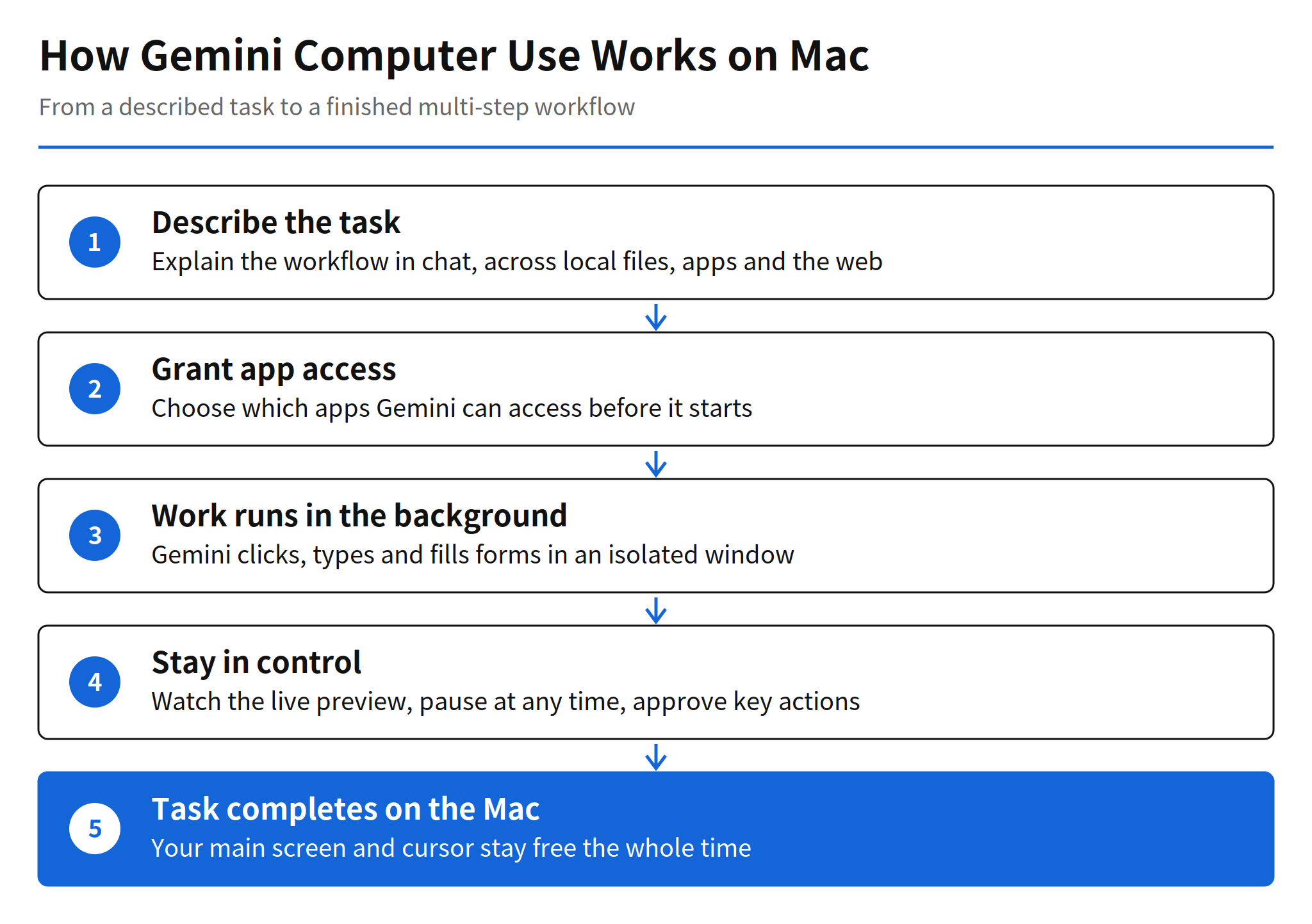
The flow starts with a description, not a script. You explain the workflow in chat, and Gemini plans the steps across whatever surfaces the task touches. Before and during the run, four controls apply. You choose which apps Gemini can access at the app level. You watch every step in the live preview. You can pause at any time. Key actions wait for your approval before they happen. That combination is the practical answer to the obvious objection to desktop agents, which is that handing over the mouse without a way to intervene is a hard sell for real work.
The isolation matters as much as the automation. An agent that drives the visible screen forces a choice between supervising it and using the computer. Running in a separate window with a preview removes that trade-off for monitoring, although it does not remove the need to check results. Google frames the target as repetitive work that normally takes dozens of clicks, and the examples below all share that shape: many small, verifiable steps rather than one judgment call.
Workflows Google Demonstrates at Launch
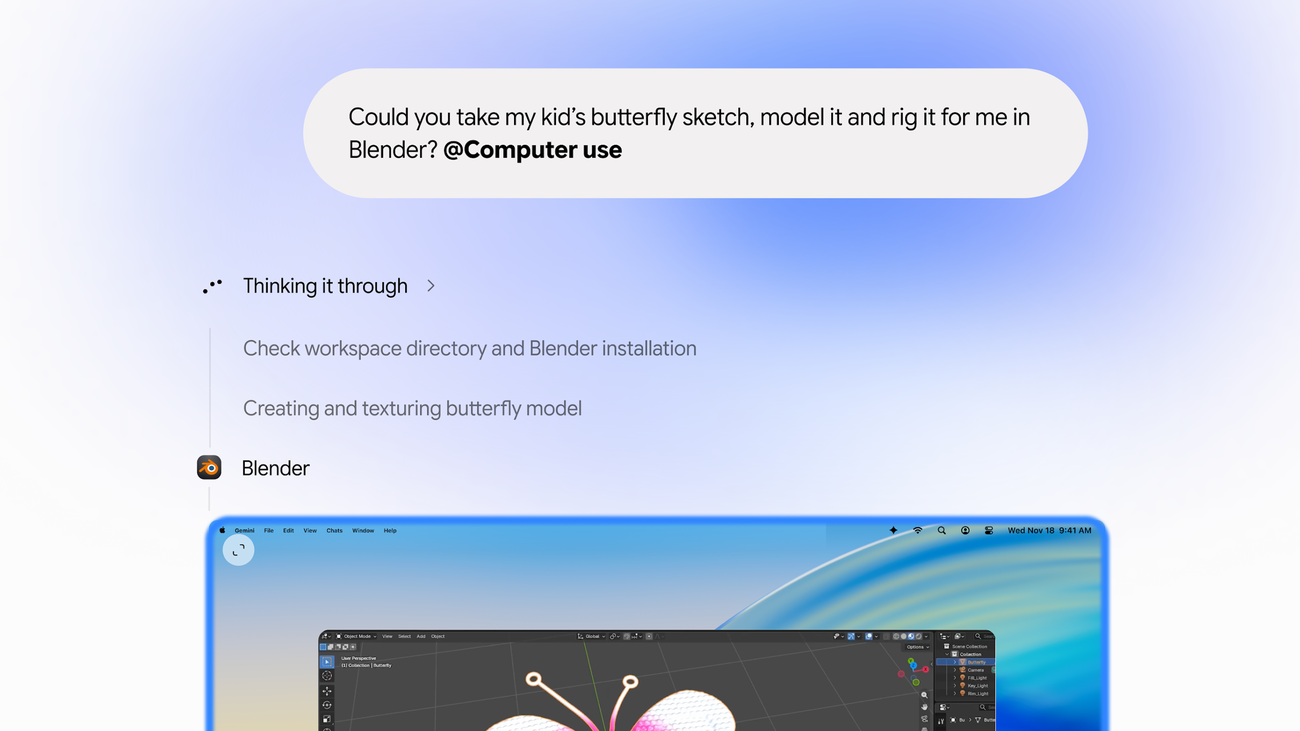
Google lists four starting workflows. For creative work, Gemini can batch color grade photos in design software or set up complex 3D scenes, and the product image above shows the 3D case in progress, with Gemini checking the workspace and Blender installation before creating and texturing a model. For paperwork, it can extract weights, dimensions and addresses from local PDFs and fill in multi-box shipping quote forms, a task that is tedious precisely because the data lives in one app and the form lives in another.
The other two examples follow the same cross-app pattern. Gemini can pull metrics and screenshots from live dashboards across multiple regions and assemble them into a Google Slides presentation. It can also analyze clothing photos from a local folder, research pricing, log item details and stage listings on resale platforms. None of these requires new reasoning ability so much as reliable movement between files, apps and websites, which is exactly what computer use adds to a chat assistant.
Availability, Requirements and Download
Computer use is rolling out in English in the United States in the Gemini app for Mac, and the app is available at gemini.google/mac. Google states the requirements in the launch post footnote: an Apple silicon Mac running macOS Sequoia 15.0 or later, a personal Google account for users aged 18 or older, and a Google AI Plus, Pro or Ultra subscription. The post was written by Michael Friedman, Group Product Manager for the Gemini App.
For anyone outside that first rollout, the practical position is simple. There is no confirmed date for other regions or languages, and no confirmed Windows version. Teams evaluating desktop agents today can still use the launch as a reference design, because the control model of per-app access, live preview, pause and pre-action approval is described in full even where the feature itself is not yet available.
Limits and Unconfirmed Points
- Model not disclosed: Google has not said which Gemini model drives computer use in the Mac app.
- No performance numbers: the launch post publishes no success rate, completion time or benchmark for the tasks it demonstrates.
- Prompt injection not addressed: the official post does not describe how the agent resists hidden instructions on web pages it visits during a task.
- Rollout scope: expansion beyond English and the United States, and any Windows app support, are unconfirmed.
Those gaps set the right reading of the launch. The news is the packaging and the control design, not a measured performance claim. A desktop agent has become a standard feature of a mainstream assistant app, shipped with a specific answer to how much control the user keeps. Whether it completes long tasks reliably enough for daily use is a question the published material does not answer yet.
FAQ
What is computer use in the Gemini app for Mac?
It is a feature Google introduced on November 19, 2026. You describe a multi-step task and Gemini handles clicking, typing, menu navigation and form entries across local files, desktop apps and the web.
Does Gemini take over the Mac screen while it works?
No. Google says the work runs in an isolated background window with a live preview inside the chat. Your main screen and cursor stay free, so you can keep typing, designing or taking calls.
What control does the user keep during a task?
You choose which apps Gemini can access, watch every step live, pause at any time, and approve key actions before they happen. Those four controls are the safety design Google describes in the launch post.
Who can use Gemini computer use on Mac?
The launch starts in English in the United States. Google states that it requires an Apple silicon Mac running macOS Sequoia 15.0 or later, a personal Google account for users aged 18 or older, and a Google AI Plus, Pro or Ultra subscription.
Which model powers computer use in the Mac app?
Google has not said which Gemini model drives the feature in the Mac app. The launch post also publishes no success rate or task completion time, so performance is unconfirmed.
Related Reading
- Gemini Tasks Free Rollout, an earlier step in Gemini taking on scheduled and delegated work