Cloudflare Kitesurf Open Source: Browser Engine for Agents
Cloudflare has released Kitesurf as open source under the Apache 2.0 license. Kitesurf is a stateless browser engine built for AI agents, and it runs entirely on Cloudflare Workers. It parses HTML, applies CSS, executes page JavaScript and renders screenshots without a browser container, and it speaks the Chrome DevTools Protocol (CDP), so a client such as Puppeteer can connect to it directly. Developers can now read the code, run it locally, modify it and deploy their own instance to their own Cloudflare account.
The release completes a promise Cloudflare made twice before. Kitesurf was first introduced in August as a stateless agent browser, then updated in September with WebMCP support, new APIs and compatibility improvements, with an open source release promised on both occasions. The practical change is about who operates the browser. Until now, teams that wanted this engine used Cloudflare's managed Browser Run APIs. Now the engine itself can be self hosted, inspected and changed, which matters for agent builders who need to know exactly what their browser does with a page.
A browser engine that runs without a browser container
The defining choice in Kitesurf is what it leaves out. A conventional agent setup starts a full Chromium instance, usually in a container, for each browsing session. Kitesurf instead runs on Workers, Cloudflare's serverless runtime, and assembles the browser from components. Cloudflare states the goal plainly: a lightweight browser that loads websites, executes JavaScript and interacts with pages while using less CPU and memory than a full browser such as Chromium, scaling on demand across the Workers network.
That efficiency claim needs careful handling, because the launch post contains no comparative measurements. Cloudflare describes lower CPU and memory use as the design goal, and points readers to separate benchmark and compatibility pages that track Web Platform Tests evolution and efficiency work. Until independent measurements exist, the honest summary is that the architecture removes the container and the full browser binary from the session cost, while the size of the saving on real pages is still unproven in the release material itself.
Compatibility with existing tooling is the part that works today. Because Kitesurf supports CDP, an agent harness built on Puppeteer does not need a new control protocol to try it. The engine accepts the same style of connection a developer would use against a debugging port, navigates pages, and returns screencast frames and screenshots through that channel. For teams evaluating the engine, that lowers the trial cost to running the engine and changing one endpoint.
Components inside the engine
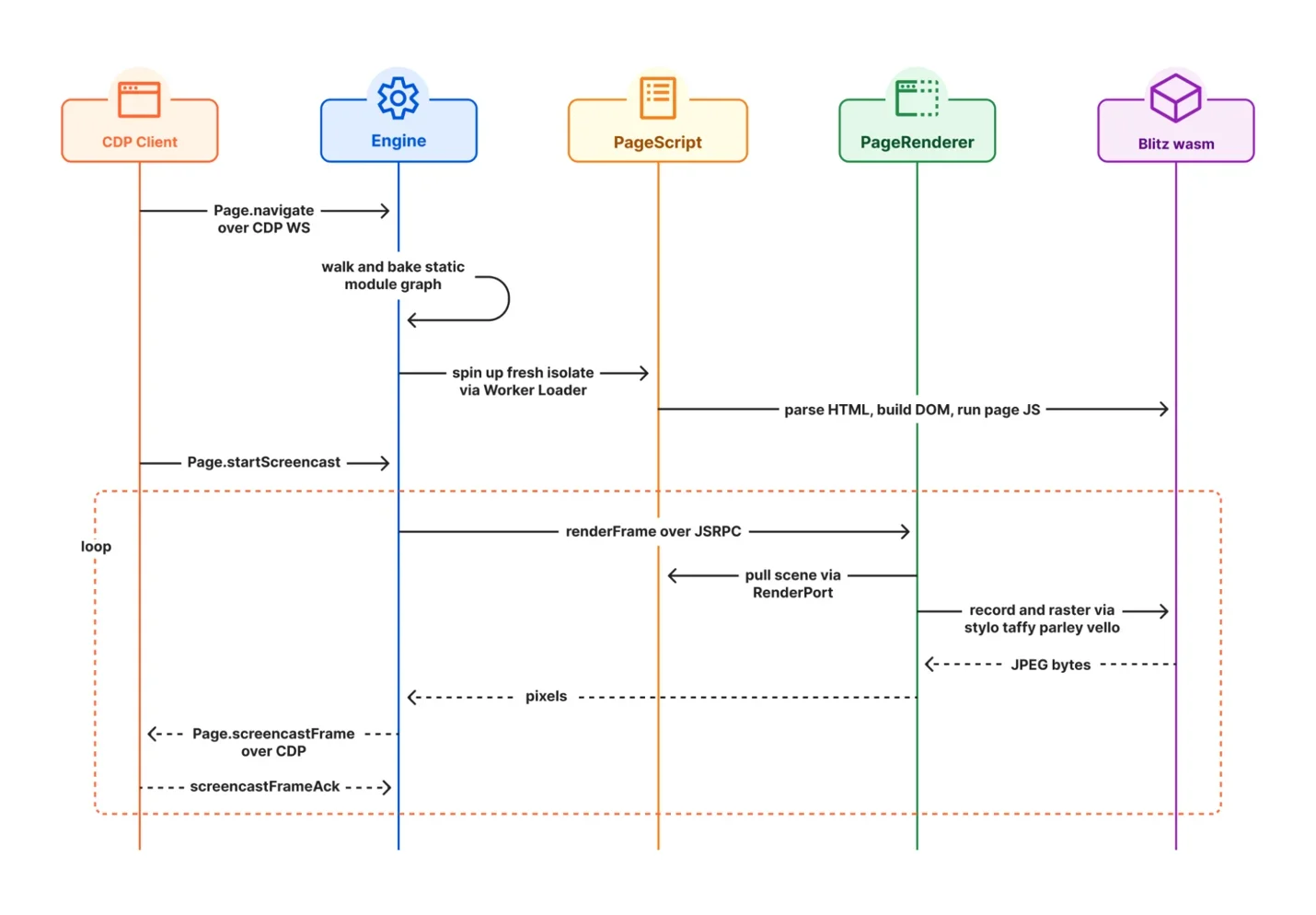
Kitesurf is a composition of open source Rust packages compiled to WebAssembly, plus Cloudflare platform pieces. Blitz provides HTML parsing, the DOM, layout and painting. Stylo handles CSS parsing, cascading and computed styles. Boa runs JavaScript inside WebAssembly, and Cloudflare is explicit that Boa is the last resort, used only when page JavaScript cannot run directly in Dynamic Workers. Linebender libraries provide text layout and 2D graphics, and Krilla generates PDF output. Each project keeps its own license, documented in the repository NOTICE file.
| Component | Role in Kitesurf |
|---|---|
| Blitz | HTML parsing, DOM, layout and painting |
| Stylo | CSS parsing, cascading and computed styles |
| Boa | JavaScript inside WebAssembly, as a last resort |
| Linebender | Text layout and 2D graphics |
| Krilla | PDF output |
The engine itself has three main parts. The Engine manages browser sessions and client connections. PageScript runs the page and its JavaScript, in a fresh isolate created through the Worker Loader. PageRenderer draws the result, pulling the scene from PageScript and rasterizing it through the Blitz wasm module. This split is visible in the sequence diagram above: navigation arrives over CDP, PageScript parses HTML and builds the DOM, and rendering loops frame by frame until the client acknowledges each screencast frame.
Running Kitesurf locally and deploying it
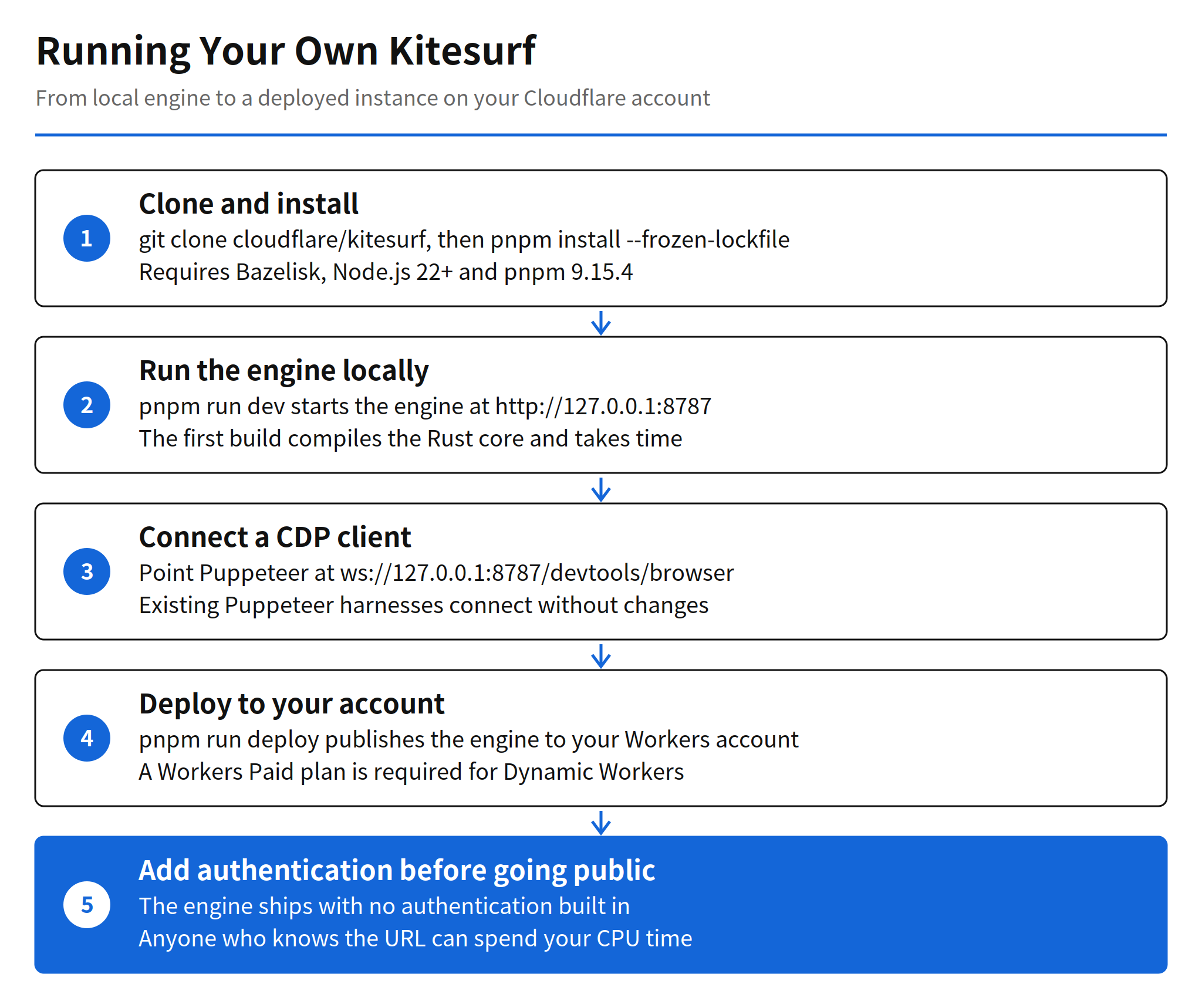
The local path follows the repository build requirements, which call for Bazelisk, Node.js 22 or later and pnpm 9.15.4. After cloning, the developer workflow is three commands:
git clone https://github.com/cloudflare/kitesurf.git
cd kitesurf
pnpm install --frozen-lockfile
pnpm run dev
The first build compiles the Rust core and its dependencies, so it takes time. Later builds reuse the cache. Wrangler then starts a local development server at http://127.0.0.1:8787, which can be opened in Chrome DevTools or used programmatically. A Puppeteer script connects to the local engine like this:
import puppeteer from "puppeteer-core";

const browser = await puppeteer.connect({
  browserWSEndpoint: "ws://127.0.0.1:8787/devtools/browser",
});

const page = await browser.newPage();
await page.goto("https://example.com/");
await page.screenshot({ path: "page.png" });
await browser.disconnect();
Deployment is a single command, pnpm run deploy, run from the repository root. The catch is the plan requirement: a Workers Paid plan is required, because Kitesurf uses Dynamic Workers to create an isolated Worker for each page. The code is free under Apache 2.0, but the runtime it depends on is a paid Cloudflare feature, so the real cost of a self hosted instance is the Workers bill for CPU time and Dynamic Workers usage, not a license fee.
Why a Workers only browser changes agent economics
Agent browsing is a volume business. A research or automation agent may open hundreds of pages in one task, and each page load carries the fixed cost of whatever browser serves it. If a session needs a container and a full Chromium process, that fixed cost is paid per session regardless of how simple the page is. A Workers based engine replaces that with on demand isolates that exist for the page work itself, which is why Cloudflare positions Kitesurf around scaling across its global network rather than around browser features.
The open source release changes the comparison in a second way. A managed browser API is a black box priced per use, while a self hosted engine is infrastructure the team controls: it can be patched, its rendering behaviour can be inspected when a page breaks, and its costs appear as the team's own Workers usage. The trade is operational responsibility. Compatibility, reliability and efficiency are, in Cloudflare's own words, under heavy development, so a self hosting team inherits an experimental engine rather than a finished browser. The early GitHub response, 1,308 stars and 59 forks measured on November 15, 2026, about a day and a half after release, suggests many teams want to run that experiment themselves.
Limits, security warning and unverified points
The most concrete limit is authentication, or rather its absence. The engine ships with no authentication built in, and the repository README warns against deploying it without adding an authentication layer. Anyone who knows the instance URL can drive the engine through DevTools and Puppeteer while the account owner pays for the CPU time and Dynamic Workers consumed. The default workers.dev address is public and its name pattern is predictable, which makes an unprotected deployment easy to find. This warning is part of the release documentation, not a third party finding, and it should be treated as a deployment prerequisite.
Two further points remain unverified. First, the efficiency advantage over Chromium is stated as a goal without comparative figures in the launch post, so any cost projection for a real workload needs the team's own measurement. Second, compatibility is a moving target: Cloudflare says it is focusing on Web Platform Tests compatibility, reliability and efficiency, and asks contributors to open an issue with a minimal reproduction and get vouched by a maintainer before opening a pull request. Pages that render incorrectly today are therefore an expected cost of adoption, and the contribution path is the documented remedy.
Related articles
- Cloudflare Codex Harness: Durable Objects, Resume Guide
- browser-use 1.0 Release: CDP Direct, 80% Code Deleted
FAQ
What is Kitesurf and where does it run?
Kitesurf is Cloudflare's stateless browser engine for AI agents. It runs entirely on Cloudflare Workers, parsing HTML, applying CSS, executing page JavaScript and rendering screenshots without a browser container.
How do existing tools connect to Kitesurf?
Kitesurf supports the Chrome DevTools Protocol, so clients such as Puppeteer can connect to it directly, for example at ws://127.0.0.1:8787/devtools/browser for a local instance.
What does it cost to deploy Kitesurf to a Cloudflare account?
The code is open source under Apache 2.0, but deploying it requires a Workers Paid plan because Kitesurf uses Dynamic Workers to create an isolated Worker for each page.
What is the main security warning for a self hosted Kitesurf?
The engine has no built in authentication. The repository README warns against deploying it without an authentication layer, because anyone who knows the URL can use the engine while the account owner pays for the CPU time and Dynamic Workers.