Codex CLI 0.169 Release: Side-Chat Tabs and --trust Gate
OpenAI published two Codex CLI releases on November 13, 2026: rust-v0.168.0 at 03:54 UTC and rust-v0.169.0 at 08:37 UTC, under five hours apart. The first release introduces an opt-in terminal workspace with a side conversation beside the main chat. The second turns that side area into multiple tabs, adds search over older tasks, and changes a security default: codex exec now keeps project configuration and MCP servers disabled in untrusted directories unless the user passes --trust.
There is no new model and no pricing change in either set of notes. The story here is the terminal itself. Codex sessions have become long enough that managing several conversations, finding an old task, and controlling what a project can load automatically are now product problems, and both releases work on exactly those problems.
The Terminal Workspace in 0.168
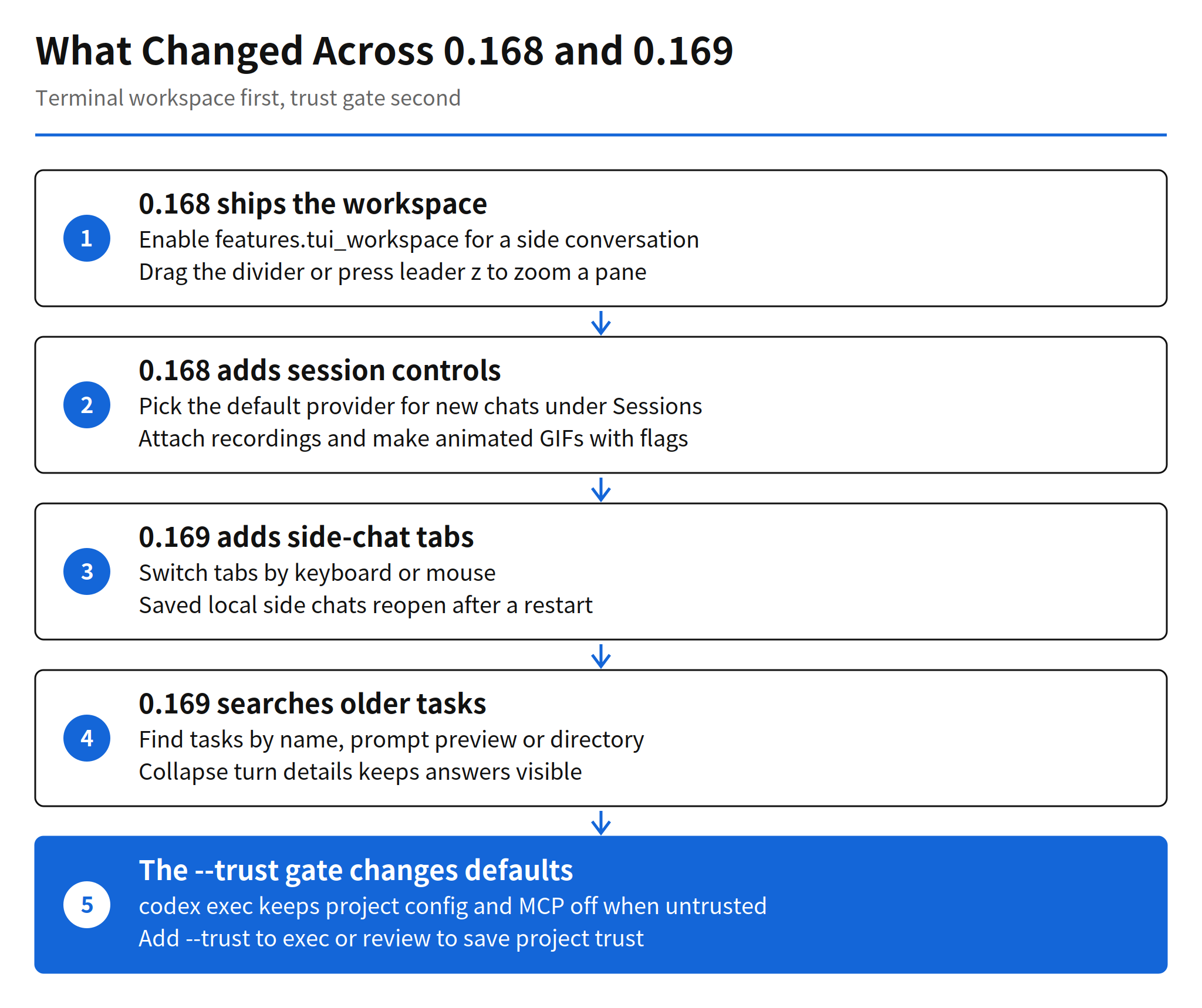
Version 0.168 adds the workspace. Enabling features.tui_workspace places a side conversation next to the main chat, inside the same terminal window. The divider between the panes can be dragged to resize them, and pressing leader z zooms the focused pane. That is a small interaction model, but it changes how a long session is run: a side question, a log watch, or a second line of investigation no longer needs its own terminal window or a lost scrollback.
The same release adds session controls around the workspace. Under Sessions, Model providers, users can browse model providers and choose the default for new chats, while open and resumed chats keep their saved provider. Audio-capable models can take recording attachments, and Codex skips confirmed rejected recordings on later turns. Enabling features.image_generation_animation adds animated GIF generation and editing with optional frame count and timing controls. Full-screen Codex also shows image previews and pets in tmux on Ghostty and Kitty, and a new tui.notification_method = "osc777" setting covers terminal notifications.
Side-Chat Tabs and Task Search in 0.169
Version 0.169, published the same morning, extends the workspace from one side conversation to multiple side-chat tabs. Tabs switch by keyboard or mouse, and saved local side chats can be reopened after restarting Codex. Persistence matters here: a tab system that loses its tabs on restart is a viewing trick, while one that restores them becomes a place where work actually lives.
Finding old work gets the matching upgrade. The agent command center can now search older tasks by name, prompt preview, or working directory. In the full-screen transcript, a new Collapse turn details option folds completed activity beneath each prompt, keeps answers visible, and leaves tool output searchable. Read together, the three changes target the same friction: sessions accumulate faster than a linear transcript can be scanned, so the release adds tabs for parallel work, search for past work, and folding for finished work.
Custom providers move into the terminal as well. Users can add or edit a custom model provider without leaving the TUI. With custom gateway onboarding enabled, a provider can be created during sign-in, and a device code covers supported gateways over SSH or on machines with no local browser. Pressing Ctrl+S in the terminal report editor also saves a diagnostic ZIP locally, even when uploads are disabled. With the opt-in Cloud connection on macOS and Linux, the terminal can send images, choose a model and reasoning effort, and archive or restore Cloud conversations.
The --trust Gate and Untrusted Directories
The most consequential change is listed as a bug fix. In 0.169, codex exec keeps project configuration and MCP servers disabled in untrusted directories, even with --sandbox workspace-write. Saving project trust is now explicit: use --trust with codex exec or codex review.
The logic is straightforward. Opening a repository should not, by itself, activate the tools that repository ships. A project configuration or an MCP server definition inside an unfamiliar checkout is code-adjacent content from an untrusted source, and loading it automatically widens the attack surface of a routine inspection. The gate separates looking at a project from trusting it, and it puts the trust decision on a flag the user has to type.
My read: the workspace features will get the attention, but the --trust gate is the change that alters existing behavior. Any script that runs codex exec inside project folders and assumes project settings or MCP servers will load should be retested after this update. If the run suddenly behaves as if the project configuration is missing, the gate is the first place to check, and --trust is the deliberate fix, not a workaround.
Limits and Open Questions
- Both headline features are opt-in: the terminal workspace and the Cloud connection are off unless enabled. The release notes give no date for either becoming a default.
- No performance numbers: OpenAI published no measurements for side-chat tabs or task search on large session histories, so behavior under heavy use is unverified.
- The trust change can break automation: existing scripts that rely on project configuration loading automatically in
codex execmay change behavior after updating, as noted above. - No model change: neither release changes the underlying model, its benchmarks, or its price. Gains, if any, are workflow gains.
That mix is typical of a fast-moving CLI. Codex has shipped minor releases days apart, and the previous release covered in this series, v0.164.0, dealt with preset slots and inline model selection. The center of gravity has shifted from model selection to session management, which is what a tool does once its users stop running one short task at a time and start living inside it for hours.
FAQ
What changed in Codex CLI 0.169?
Version 0.169, published November 13, 2026 at 08:37 UTC, adds multiple side-chat tabs to the opt-in terminal workspace, search of older tasks by name, prompt preview or working directory, and a Collapse turn details option for the full-screen transcript. It also lets users add or edit custom model providers from the terminal.
How does the --trust gate work?
In 0.169, codex exec keeps project configuration and MCP servers disabled in untrusted directories, even with --sandbox workspace-write. To save project trust explicitly, add --trust to codex exec or codex review. Automation that assumed project settings would load should be checked after updating.
How do I turn on the terminal workspace?
The workspace arrived in 0.168 and is opt-in. Enable features.tui_workspace to place a side conversation beside the main chat. Drag the divider to resize the panes, or press leader z to zoom the focused pane. In 0.169 the side area supports multiple tabs.
Is there a new model or new pricing in this release?
No. The release notes for 0.168 and 0.169 describe terminal, provider and security changes, with no new model and no pricing change. Custom model providers can be added or edited in the terminal, and a default provider for new chats can be chosen under Sessions, Model providers.
Related Reading
- Claude Code v2.1.323 Release: Code Mode and 1M Context, the competing terminal agent and its own session changes
- Cloudflare Codex Harness: Durable Objects, Resume Guide, on running Codex sessions that survive restarts