Mistral Studio Managed Agents and Apps: Release Guide
Mistral AI expanded its enterprise platform Mistral Studio on November 5, 2026, adding Managed Agents and Apps and strengthening workflows, enterprise context, observability and evaluation. Studio is the layer that connects Mistral models to company data and systems through connectors and MCP servers. The deployment choice is the part with lasting weight: teams can run in the cloud, in their own VPC, on-premises, or in a combination of those locations.
The announcement pairs with the Mistral Large 4 model release, nicknamed Le Chonk. The model release covered coding, defensive cybersecurity and document reasoning. The Studio expansion covers a different problem, which is how a model gets attached to internal systems, runs under permissions and approvals, and stays observable once it is doing real work. Model capability gets a team to a demo. This release is about the distance between a demo and a governed production deployment.
The shift in this release is from connecting a model to controlling its operation: deployment location, approvals, tracing and pre-release evaluation sit inside one platform.
Managed Agents With Skills, Sandboxes and Subagents
Managed Agents handle complex work that runs through multiple steps. An agent can carry skills that encode a team procedure, a sandbox for executing code, subagents that take over part of a task, and hooks inserted at execution points. Studio manages the agent runtime itself. Mistral grounds that claim in the infrastructure behind Mistral Vibe, which the company says sustains millions of sessions every week.
The example Mistral chose is telling. Its own engineering team built an incident investigation agent that follows a runbook, asks for approval before sensitive actions, and posts results to Slack. That workflow combines three properties enterprises actually ask for: a written procedure the agent follows, a human gate before risky steps, and a record of the outcome in a tool the team already reads. A generic chat demo shows none of those. The limit is that the savings figures attached to these examples, hundreds of hours a month for incident work and about 35 hours a week for a product operations workflow, are Mistral self-reports. No independent measurement sits behind them yet.
Deployment Inside Customer Infrastructure
Studio connects to enterprise systems through connectors and MCP servers, and it can be placed in the cloud, a customer VPC, on-premises, or a mix. For regulated industries, placement is often the deciding factor in a platform purchase, because data residency and network boundaries are set by compliance rather than by engineering preference. A vendor that can run inside the customer boundary removes a whole class of objections before feature comparisons even start.
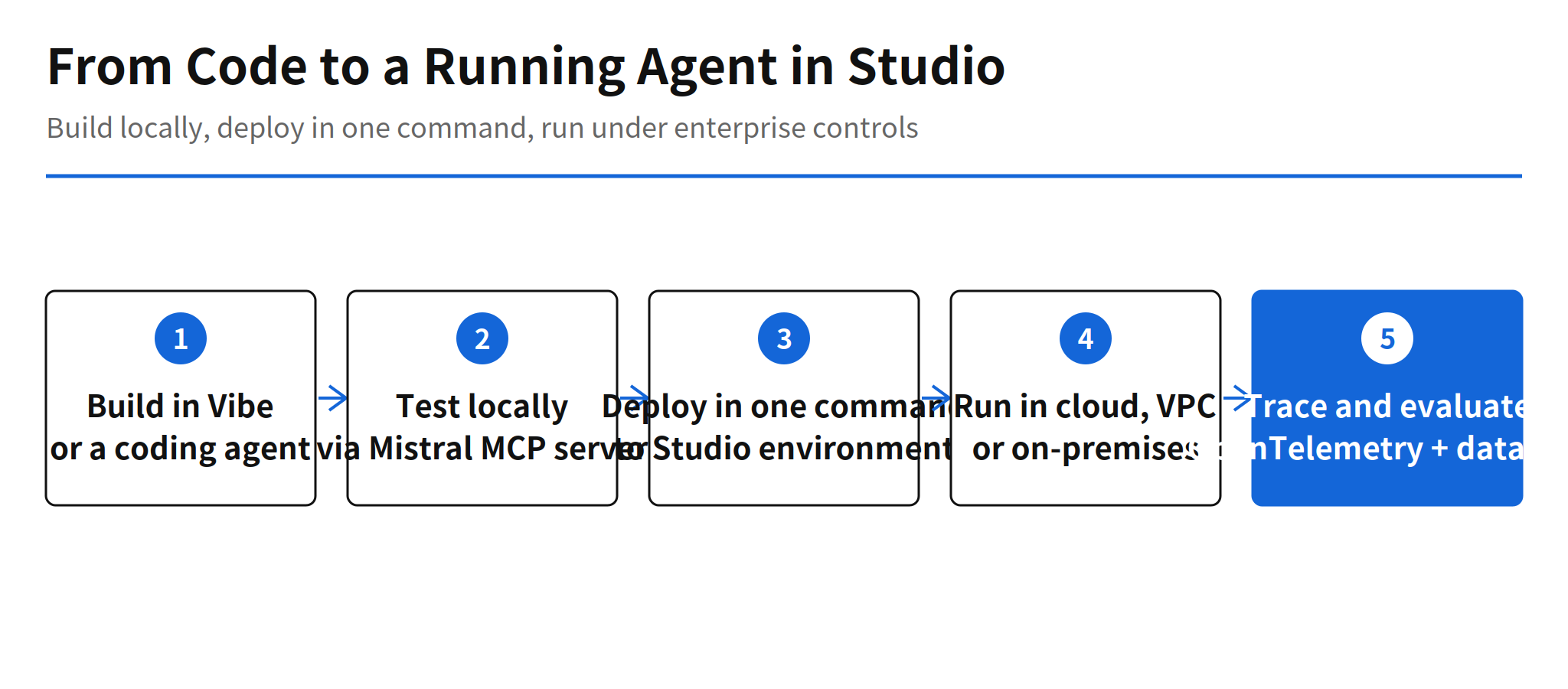
Developers meet the platform through a new Mistral MCP server. They build in Mistral Vibe or in a coding agent they already use, test locally, and deploy to a Studio environment with a single command. That path shortens the gap between agent development, which increasingly happens inside coding tools, and the enterprise platform where the finished agent has to run. The fewer handoffs between those two worlds, the fewer places a working prototype dies in translation.
Workflows That Resume and Apps With Hosting Included
Workflows in Studio resume an interrupted execution from the point where it stopped, instead of restarting from the beginning. This expansion adds event triggers from enterprise systems and a visual graph that shows workflow logic at a glance. Resume matters most for long tasks, where a failure near the end is expensive, and event triggers connect agent work to the systems where work actually originates.
Apps take the platform in a different direction. Studio provides hosting, authentication and access control, and apps can be assembled from pre-approved reusable components. After local testing, a single command deploys an app to its own link or inside Mistral Vibe. Pre-approved components are a governance choice as much as a convenience: an enterprise can let teams ship internal tools quickly while keeping the building blocks inside a reviewed set.
Observability and Evaluation Before Release
Observability is recorded as OpenTelemetry traces. Model calls, tool use and approval steps are logged at each stage of a run, which gives operators a way to reconstruct what an agent did and where a human approved it. Evaluation uses an organization own datasets to test prompt, model and tool changes before release. Together, the two features answer the questions that block production agent work in practice: what did the agent do, and how do we know a change made it better rather than worse.
Mistral names customers and partners already using Studio in production: ABANCA, Accenture, Alten, BNP Paribas, Capgemini, CMA CGM and Tata Consultancy Services. The list mixes banks, logistics and large consultancies, which fits the deployment story. These are organizations where VPC and on-premises options and audit trails are purchasing requirements, not extras.
Pricing and Availability Gaps
Two gaps stand out in the announcement. Pricing is unconfirmed: the post contains no price and no billing model for the Studio expansion, so teams cannot estimate cost from public material. The availability staging for Managed Agents and Apps is also not stated clearly in the announcement body, and readers need the product documentation and release notes to confirm what is generally available and what is still rolling out.
Even with those gaps, the direction is clear. Agent platform competition is moving from model access toward operational control: where the agent runs, what it may touch, who approves sensitive steps, and how its behavior is traced and tested. On that axis, deployment inside customer infrastructure is Mistral clearest differentiator, and the one-command path from a coding agent to Studio is the design choice most likely to be copied.
Related Reading
For another hosted agent runtime with a different packaging model, see the report on Kimi Hosted Agents. For persistent agents aimed at ongoing team work, see Perplexity Teammates and persistent agents.
FAQ
What did Mistral add to Studio on November 5?
Mistral added Managed Agents and Apps to Studio, and strengthened workflows, enterprise context, agent observability and evaluation. Studio connects models to company data and systems through connectors and MCP servers.
Where can Mistral Studio run?
Teams can choose cloud, their own VPC, on-premises, or a combination of those locations. That choice is the main differentiator Mistral presents for regulated industries.
How do developers deploy to Studio?
Through the new Mistral MCP server, developers build in Mistral Vibe or an existing coding agent, test locally, and deploy to a Studio environment with a single command.
What does Mistral Studio cost?
Pricing is unconfirmed. The announcement contains no price or billing model for the Studio expansion, so any cost estimate would be a guess.