Cursor Live Apps: Release, Postgres, Auth and Deployment
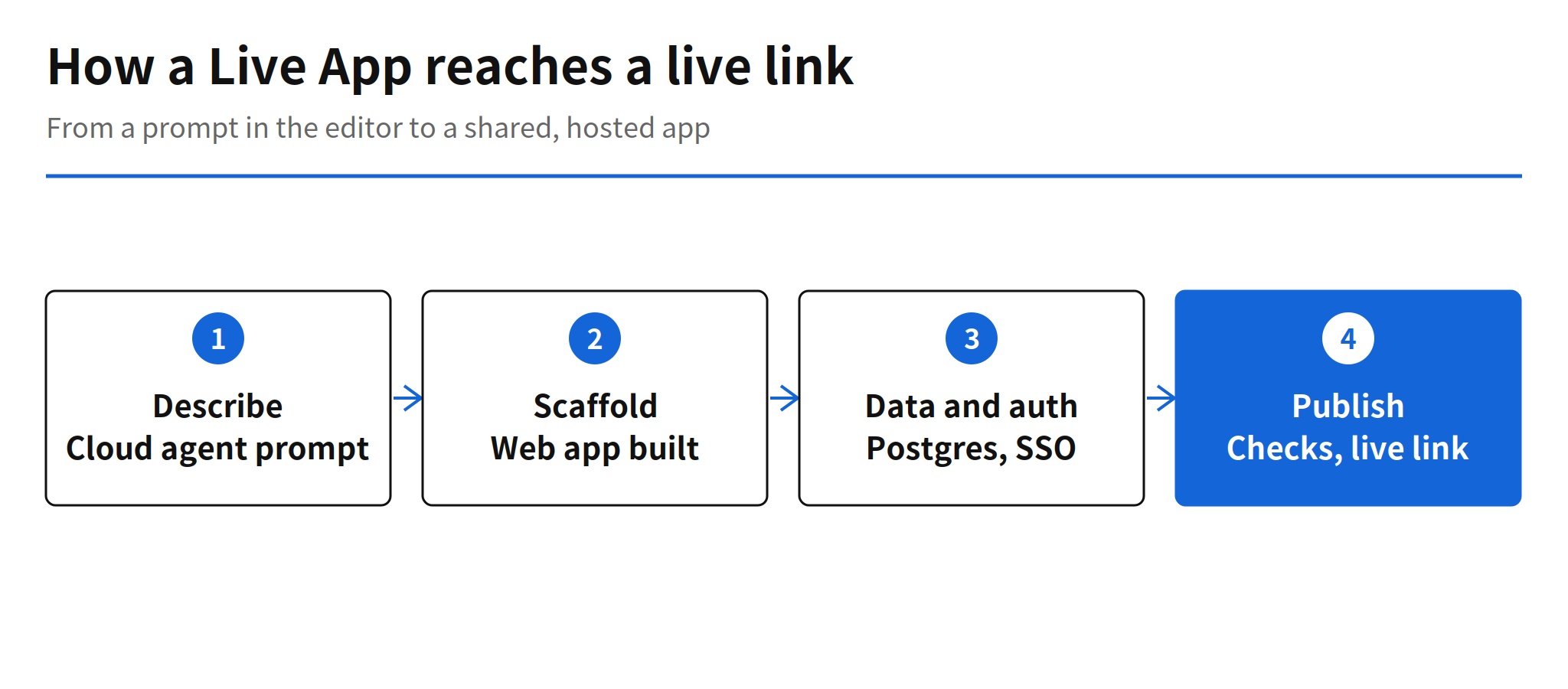
Cursor released Live Apps on November 5, 2026. The feature lets a developer build a live app inside the editor and share it through a link. The work starts by opening a cloud agent and stating that an app is the goal. The agent then scaffolds a web app, starts a Postgres database when one is needed, places authentication behind Cursor SSO and provisions hosting. Picking a unique domain at publication time returns a live link.
Cursor frames the problem directly in the announcement. Agents have lowered the cost of writing code, yet most apps and tools that people build never leave localhost. Live Apps pulls the deployment segment into the editor, so a single cloud agent run covers work that previously meant setting up a database, authentication and hosting as separate jobs for every internal tool.
A Build Flow That Ends in a Link
The flow is deliberately short. A user opens a cloud agent, describes the app, and the agent scaffolds the web app and provisions the surrounding pieces. That bundling matters because the database, the login and the hosting are usually the reason a quick internal tool stalls after the code already works. By treating those pieces as part of the agent task, Live Apps turns a local prototype state into a state a colleague can open.
For apps that need to connect to a user system, such as a data warehouse, the agent requests the secrets it needs instead of assuming access. Cursor also documents a way to provision a Cursor API key so that scripts or a Grok Bot can use an app, which extends the audience of a Live App beyond people clicking a link in a browser.
Repositories, Domains and Connected Systems
The target repository can be new or existing, and the supported providers at launch are Cursor Origin and GitHub. Other git providers such as GitLab are in a coming soon state, with no date given in the announcement. That split is worth noting for teams whose code lives outside GitHub, because the repository support, rather than the agent itself, decides whether Live Apps fits their current stack today.
Publication ends with a domain choice. Selecting a unique domain produces the live link, which keeps the sharing step inside the same flow as the build step. In practical terms, the handoff to a teammate becomes a link share instead of a separate deployment ticket, although the hosting limits behind that link remain undisclosed, as the next sections cover.
Publish Checks Before Anything Goes Live
Before publication, Cursor runs deterministic checks and agent checks together. The stated purpose is to catch common problems such as secrets written into app files or exposed credentials. Nothing goes live until the checks pass and the user publishes the app directly, so the automated build does not become an automated release by default.
The design keeps a human decision at the exact point where risk changes. An agent can scaffold and provision on its own, but exposure to other people waits for an explicit publish action after screening. The limit of that reassurance is also clear in the source material. Cursor gives secrets and credential exposure as examples, and the full list of check items has not been published, so the actual coverage of the screening is unconfirmed.
Team Controls and Sharing Rules
Sharing can be set for specific people, for groups or for a whole team, and shared apps sit behind a Cursor login. On a personal plan, an app can also be shared publicly. That range lets the same mechanism cover a private team tool and a small public utility, with the login boundary as the default rather than the exception.
Team admins receive broad oversight. An admin can view all apps and secrets for the team, add custom rules to the security review, approve a publication that the review blocked and unpublish any app. Those controls answer the obvious governance question that link shared internal tools raise, because a tool that anyone on a team can publish also needs a person who can see the full inventory and take an app down.
Unconfirmed Limits, Costs and Check Scope
Three gaps remain in the public material. The hosting limits and cost structure for apps built with Live Apps are unconfirmed, since the announcement states the plan condition and does not state traffic or resource caps. The full scope of the security checks is unconfirmed beyond the secret and credential examples. The timing for GitLab support is unconfirmed beyond a coming soon label.
Even with those gaps, the direction is legible. Coding agent competition is moving from code generation toward deployment, and a developer who builds small internal tools now has a path from a prompt to a colleague opening a working link, without a separate infrastructure pass in between. For teams that also work across Android and backend code, that shortens the distance between a prototype and a tool the rest of the team can actually use.
Related Reading
For another coding agent release built around background platform plumbing, see the report on Claude Code 2.1.319 and background MCP tasks. For cloud hosted agent sessions in a different editor, see Antigravity remote agents.
FAQ
What does Cursor Live Apps do?
Live Apps, released on November 5, 2026, lets a Cursor cloud agent build a web app inside the editor, add a Postgres database when needed, place authentication behind Cursor SSO, provision hosting and return a live link once the user picks a domain and publishes.
Which repositories and plans does Live Apps support?
Live Apps works with new and existing repositories on Cursor Origin and GitHub, while GitLab support is listed as coming soon. The feature is available on all paid plans with cloud agents enabled.
What happens before a Live App goes live?
Cursor runs deterministic checks and agent checks before publication, aimed at common problems such as secrets or exposed credentials in app files. Nothing goes live until the checks pass and the user publishes the app directly.
Who can see and manage a shared Live App?
Sharing can be limited to specific people, groups or a whole team, behind a Cursor login, and personal plans can also share an app publicly. Team admins can view all team apps and secrets, add rules to the security review, approve a blocked publication and unpublish any app.