Claude Meetings Beta Release: Pricing and How It Works
Anthropic started rolling out Claude Meetings in beta on November 12, 2026, for Team and Enterprise plans. Claude joins a video call as a visible participant, follows the conversation, and starts work during the meeting instead of waiting for a summary afterwards. Teammates can ask questions out loud or in chat, and Claude answers in writing by default. It can also use a person's connected tools, with that person's permission.
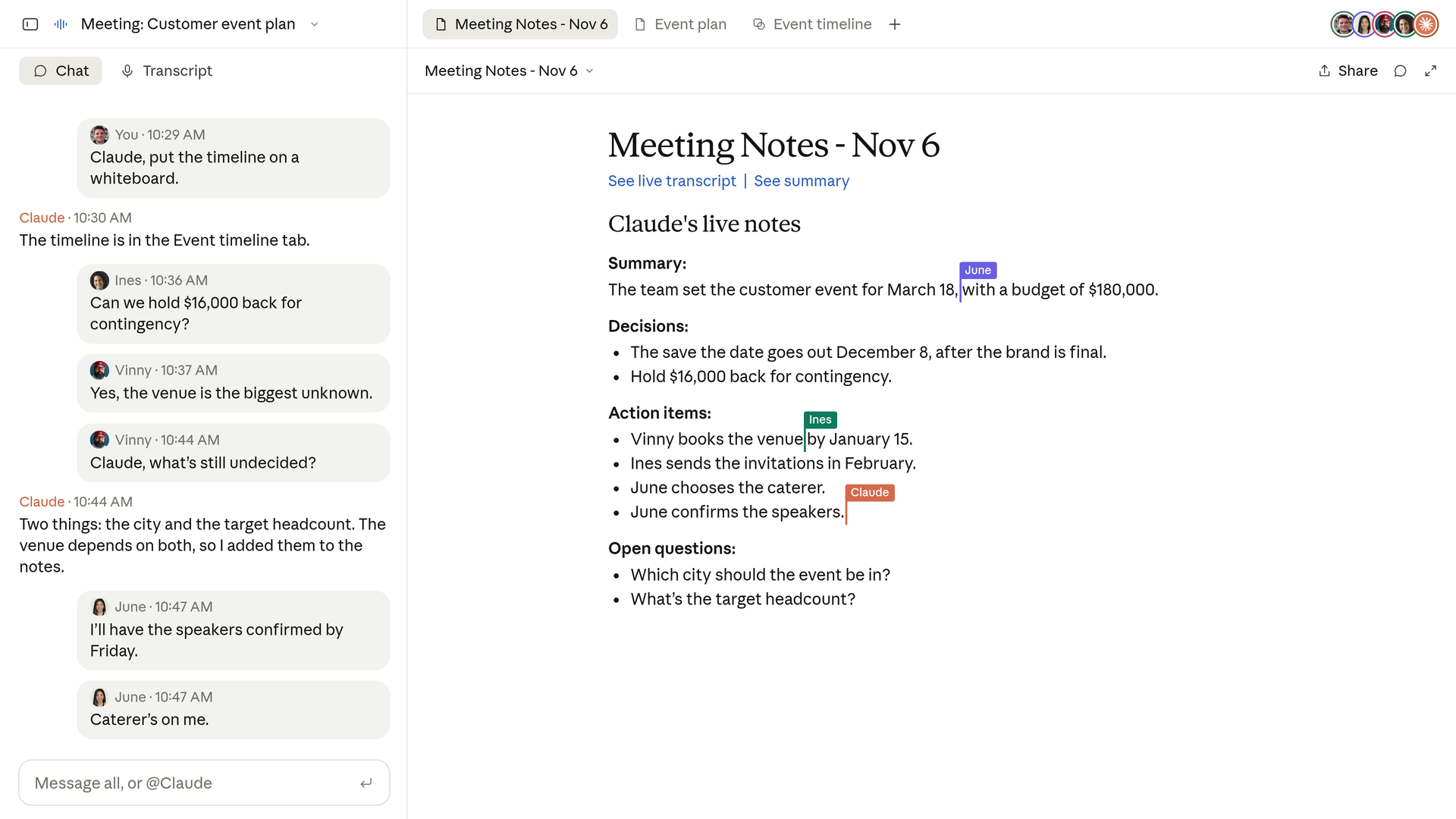
The difference from a standard meeting notetaker is what happens while people are still talking. Claude builds docs, whiteboards and slides live with the team, and it writes the notes and action items itself. After the call, the notes, transcript and everything it made stay on a dedicated meeting page in claude.ai, where people on the invite can read, edit and share them inside the organization. Support at launch covers Google Meet only. Other video platforms are listed as coming soon, with no dates.
The timing closes a loose end from two days earlier. Anthropic's November 10 launch of Claude Sheets, Whiteboards and Data ended with one line saying Meetings was coming soon. The beta arrived two days later with the conditions the early briefings had reported: Team and Enterprise first, Google Meet only, and a set of organization types excluded from the beta.
What Claude Does in the Call
Anthropic's own example is a customer event planning call. Someone says, "Claude, start a doc for this plan," and Claude writes up what the team has said so far while teammates on the invite edit the plan in parallel. When the discussion moves to budget, a participant asks what last year's event cost. Claude asks that person for approval to look it up, posts the figure in the meeting chat, and compares it with the current plan. When the topic shifts to timelines, someone asks Claude to put the schedule on a whiteboard, and the team works on it alongside the doc.
Before the meeting ends, a participant can ask Claude to share a recap with the team. Colleagues on the invite also receive the meeting page link, and later they can ask Claude about meetings they were part of in a regular chat, or add Claude to the next meeting from their calendar in claude.ai. The release notes add that Claude stays in a call for up to 8 hours and warns before it leaves.
Anthropic is also wiring the transcript into the tools teams already use for meeting records. The named partners are Gong, Attention, Granola, Fireflies.ai, Otter and Plaud. The plan is that a meeting transcript can be sent to those tools, although the launch post describes this as work in progress rather than a finished integration.
How a Meeting Runs, Step by Step
Claude joins a call in one of two ways. Someone adds it to a specific meeting, or a user turns on auto-join. The Help Center material adds two details that matter for administrators. Auto-join can cover all of a user's meetings or all except one on ones, and owners cannot set auto-join for someone else. Each person controls that switch for their own account.
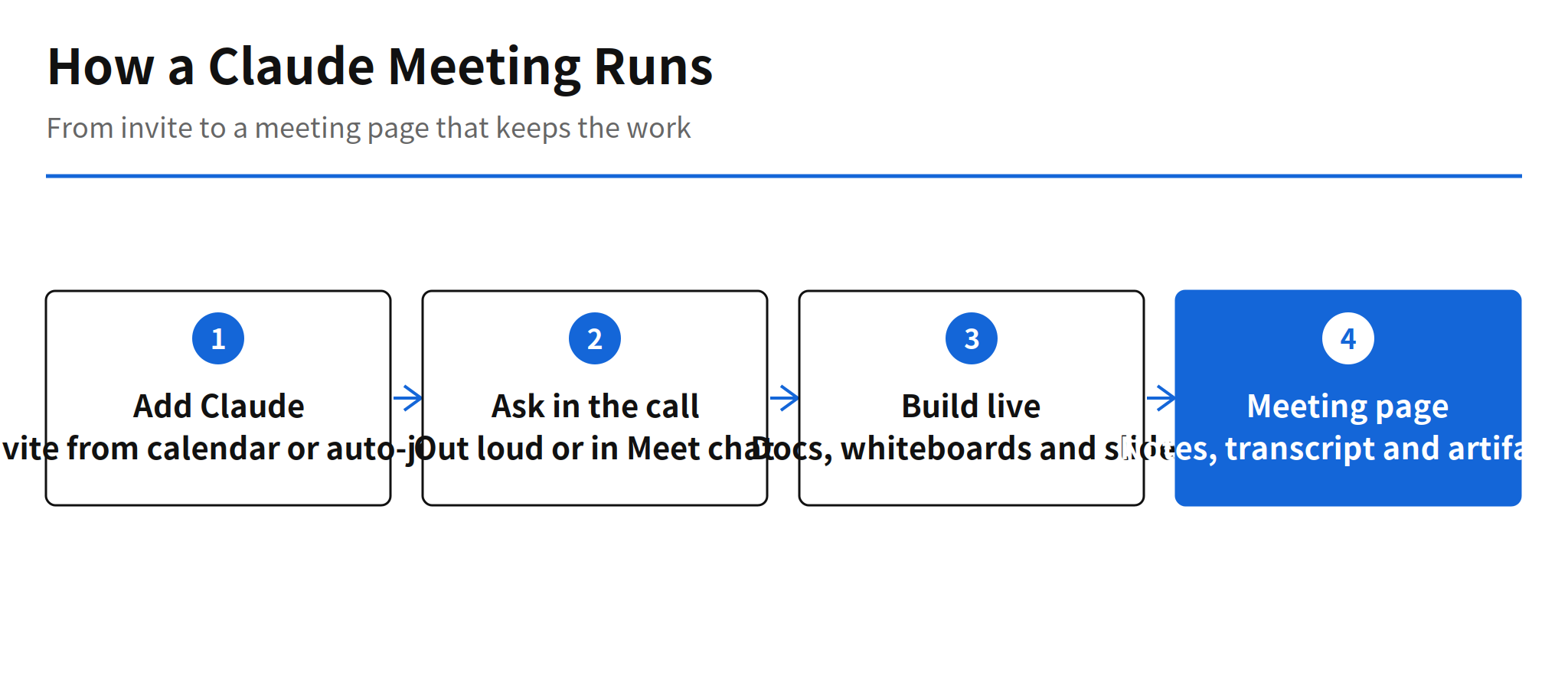
- Check eligibility. The organization needs a Team or Enterprise plan and the call must be on Google Meet. Organizations with zero data retention, a HIPAA-ready configuration or customer-managed encryption keys are excluded from the beta.
- Turn it on. On Team plans, inviting Claude is available by default and an admin can turn it off. On Enterprise plans, an admin turns it on for all or part of the organization.
- Add Claude. In Claude or Claude Desktop, open Meetings, connect Google Calendar, pick the meeting and add Claude, or enable auto-join in settings.
- Ask during the call. Address Claude out loud by name or type in the Meet chat. Answers arrive in writing in the chat, visible to everyone on the call.
- Review the meeting page. After the call, the page in claude.ai holds the notes, action items, transcript and artifacts, and it can be shared inside the organization.
One instruction from the Help Center deserves emphasis because it is easy to skip during setup. Before adding Claude or turning on auto-join, the team should make sure everyone on the call is fine with being transcribed. Claude announces itself in the chat when it joins, but the consent check is still the organizer's job.
Permission Design for a Room of People
The most instructive part of this release is not the notes. It is the permission model, because a meeting breaks the assumption behind most agent products. A chat assistant answers to one person. A meeting has several people, and they do not hold the same access to the same tools. Anthropic's design keeps those permissions separate instead of pooling them.
Claude uses each person's connected tools with that person's permission only. It asks the first time it wants to use someone's tools, and a yes carries forward to later use. Spoken requests get an extra check. When someone asks out loud, Claude confirms who is speaking each time before acting. An answer posted in the call chat is visible to everyone on the call, which is worth remembering before asking Claude to look something up in a mixed audience.
Guest handling follows the same caution. By default, Claude stays out of calls where someone from outside the organization is invited, and it leaves if an outside guest joins partway through. An admin can allow Claude on calls with outside guests. On those calls, Claude posts its notice in the chat but does not reply there, and what guests say is still included in the notes and transcript. What Claude keeps from any call is a transcript, a summary and screen descriptions. It does not save audio.
My read: the permission design is the part other multi-user agent products will copy. Borrowing each participant's access separately, asking once and remembering it, and re-confirming the speaker for voice requests is a workable pattern for any agent that acts in front of a group. The notes and whiteboards are the visible feature. The access rules are the actual product work.
Pricing During the Beta
The beta pricing has three tiers, and only one of them touches plan usage. Claude's notes and transcripts are free on Team and Enterprise plans during the beta. Its answers inside calls are also free, unless an answer uses one of your connected tools. Tool-backed answers count toward the plan's usage, which means the cost of a meeting depends on how much real lookup and action work the team asks for, not on call length alone.
Artifacts have their own clock. Docs, whiteboards, slides and other artifacts Claude makes during a call are free through February 10, 2027. Anthropic has not published what artifact creation costs after that date, and it has not published post-beta pricing for the feature as a whole. A team budgeting for 2027 should treat both numbers as open items rather than assuming the beta terms continue.
Limits and Unconfirmed Points
- Platform limit: Google Meet is the only supported platform at launch. Other platforms are promised as coming soon, with no dates and no named order.
- Excluded organizations: zero data retention, HIPAA-ready configurations and customer-managed encryption keys are out of the beta. Anthropic has not said when or whether those configurations join.
- Guest default discrepancy: Anthropic's own pages do not agree on the external guest default. The launch post says Claude stays out by default when a guest is invited, while the Help Center describes the Team plan default as allowing it. Team admins should read the actual switch in their settings instead of trusting either page.
- No developer surface: no Meetings API, MCP server or webhook has been confirmed. Teams cannot yet wire the meeting page or transcript into their own systems except through the named transcript partners.
- Retention period unknown: how long meeting pages and transcripts are kept has not been published. That gap matters for organizations with their own records policies.
- Post-beta pricing unknown: pricing after the beta, and artifact pricing after February 10, 2027, are both unpublished.
FAQ
What is Claude Meetings?
Claude Meetings is an Anthropic beta that puts Claude in a video call as a visible participant. It follows the conversation, answers questions asked out loud or in chat, builds docs, whiteboards and slides during the call, and writes the notes and action items. After the call, the notes, transcript and artifacts stay on a meeting page in claude.ai.
Which plans and platforms does Claude Meetings support?
The beta is rolling out on Team and Enterprise plans, in Claude and Claude Desktop. The only supported video platform at launch is Google Meet, with other platforms described as coming soon. Organizations with zero data retention, a HIPAA-ready configuration or customer-managed encryption keys cannot use the beta.
What does Claude Meetings cost during the beta?
Notes, transcripts and answers in the call are free during the beta. An answer that uses a connected tool counts toward the plan usage. Docs, whiteboards and other artifacts Claude makes in a call are free through February 10, 2027. Pricing after the beta has not been published.
What does Claude Meetings record from a call?
Claude saves a transcript, a summary and screen descriptions. It does not save audio. By default it stays out of calls with outside guests and leaves if a guest joins partway through, and it uses each person's connected tools only with that person's permission.
Related Reading
- Claude Sheets, Whiteboards and Data: Release and Pricing, the November 10 launch that first teased Meetings as coming soon